
Electronic reading pens for students can scan printed text, read it aloud, and—in some models—translate it or save it as digital text. My best overall pick is the WorldPenScan AI Reading Pen for its combination of dictionary, text-to-speech, translation, and AI reading support; the Scanmarker Air stands out for students who want a wireless scan-to-text workflow, while the NEWYES AI Reading and Translation Pen adds Bluetooth and 16GB of storage. The main tradeoffs are between reading and study tools, language coverage, and how much setup or connectivity a student needs. Some models emphasize offline translation, while others focus more on scanning and recording. Read on for the full comparison and guidance on choosing the right fit for a student’s classes.

Prime made for students and young adults
- Fast, free delivery for dorm and study essentials
- Prime Video and Amazon Music included
- Member-only deals
Key Takeaways
- The WorldPenScan AI is the most balanced study-focused option in this lineup, combining a dictionary, text-to-speech, translation, and an AI reading companion rather than centering on translation alone.
- Scanmarker models serve a different study workflow from many all-in-one pens: the Air emphasizes wireless scanning, while the Pro and Pal offer alternatives for students prioritizing text capture and reading support.
- Language counts do not tell the whole story. The Scan Translator Pen lists 142 online and 10 offline languages, so students should match offline support to their connectivity needs instead of relying only on the largest headline number.
- Recording and storage are useful only when they fit a student’s routine. Options such as the NEWYES pen’s 16GB storage and recording-focused models make more sense for students who will save or revisit spoken material.
- The lineup splits between feature-rich and simpler needs: touchscreen, Bluetooth, OCR, and voice translation can broaden use, but a student who mainly needs printed passages read aloud may prefer a more focused tool.
| Multifunction Translator and Reading Pen with OCR, Text-to-Speech, and Recorder |  | Best for Broad Language Coverage | Scanner type: Text | Connection: Wi-Fi | Resolution: 300 dpi | VIEW LATEST PRICE | See Our Full Breakdown |
| WorldPenScan AI Reading Pen with AI Reading Companion, Dictionary, Text-to-Speech, and Translation | 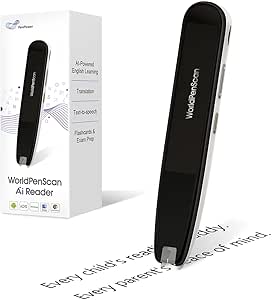 | Best for Reading Comprehension Support | Brand and model: PenPower WorldPenScan AI Reader | Scanner type: Text | Connection: Wi-Fi | VIEW LATEST PRICE | See Our Full Breakdown |
| Scan Translator Pen with Text-to-Speech, 142 Online and 10 Offline Languages |  | Best Compact Translation Pick | Model: S60 | Connectivity: Bluetooth | Online translation: 142 languages | VIEW LATEST PRICE | See Our Full Breakdown |
| SVANTTO S7 Translator and Reading Pen |  | Best for Editable Study Notes | Brand and model: SVANTTO S7 | Scanner type: Text | Connection: Wi-Fi | VIEW LATEST PRICE | See Our Full Breakdown |
| Smart Scan Translation Pen with Text-to-Speech, Recording, and 142-Language Translation |  | Best for Classroom Audio Capture | Scanner type: Text | Connectivity: Bluetooth and Wi-Fi | Online translation: 142 languages | VIEW LATEST PRICE | See Our Full Breakdown |
| NEWYES AI Reading and Translation Pen with OCR, Text-to-Speech, Bluetooth, and 16GB Storage |  | Best for Reading Support and Study Exports | Scanner type: Text | Optical resolution: 900 dpi | Optical sensor: CIS | VIEW LATEST PRICE | See Our Full Breakdown |
| Portable Translation and Reading Pen with OCR, Text-to-Speech, and Voice Translation |  | Best for On-the-Go Language Practice | Text translation: 60 languages online; 10 languages offline | Voice translation: 142 languages online | Reading functions: OCR scanning, text-to-speech, on-screen highlighting | VIEW LATEST PRICE | See Our Full Breakdown |
| Funnywhale Translation Scanning Pen with Voice Recording |  | Best for Offline Translation and Recorded Notes | Scanner type: Text | Connection type: Wi-Fi | Resolution: 300 dpi | VIEW LATEST PRICE | See Our Full Breakdown |
| Smart Translator and Reading Pen with 3.69-Inch Touchscreen, OCR Scanning, and Voice Translation |  | Best for Touchscreen Navigation | Model: MD22 | Screen: 3.69-inch touchscreen | Online scanning translation: 60 languages | VIEW LATEST PRICE | See Our Full Breakdown |
| Scanmarker Pro Reading and Translation Pen |  | Best for Standalone Reading and Note Capture | Scanner type: Text | Connection type: Bluetooth | Resolution: 600 | VIEW LATEST PRICE | See Our Full Breakdown |
| S65 Pro Scan Translator and Reading Pen with Text-to-Speech |  | Best All-in-One Standalone Pick | Model: S65 Pro | Dimensions: 5.5 x 1.5 x 0.4 inches | Weight: 2.47 ounces | VIEW LATEST PRICE | See Our Full Breakdown |
| Scanmarker Air Wireless Reading and Translation Pen |  | Best for Connected Study Workflows | Model: Scanmarker Air | Scanner type: Text | Connection: Bluetooth 4.0 or higher | VIEW LATEST PRICE | See Our Full Breakdown |
| S65PRO Translation Pen and Text Scanner |  | Best for Mixed Print and Screen Reading | Model: S65PRO | Online translation: 142 languages | Offline translation: 10 languages | VIEW LATEST PRICE | See Our Full Breakdown |
| Scanmarker Pal Translation and Reading Pen |  | Best for Highlighted Read-Aloud | Model: Pal | Scanner type: Text | Resolution: 600 dpi | VIEW LATEST PRICE | See Our Full Breakdown |
| S65pro Translation and Reading Pen with Text-to-Speech and Scan-to-Text |  | Best for Photo-Based Language Practice | Model: S65pro | Dimensions: 5.13 x 2.48 x 0.47 inches | Weight: 2.56 ounces | VIEW LATEST PRICE | See Our Full Breakdown |
| electronic reading pens for student | Weight | Scanner type | Dimensions |
|---|---|---|---|
| Multifunction Translator and R | 75 g | Text | — |
| WorldPenScan AI Reading Pen wi | 170 g | Text | 2.4 x 1.33 x 6.92 inches |
| Scan Translator Pen with Text- | 2.56 ounces | — | 6.2 x 1.23 x 0.46 inches |
| SVANTTO S7 Translator and Read | 0.21 kg | Text | — |
| Smart Scan Translation Pen wit | Approximately 70 g | Text | 1.29 x 6.25 x 0.54 inches |
| NEWYES AI Reading and Translat | 10 ounces | Text | — |
| Portable Translation and Readi | — | — | — |
| Funnywhale Translation Scannin | — | Text | — |
| Smart Translator and Reading P | 8.3 ounces | — | 5.78 x 1.37 x 0.59 inches |
| Scanmarker Pro Reading and Tra | 0.23 kg | Text | — |
| S65 Pro Scan Translator and Re | 2.47 ounces | — | 5.5 x 1.5 x 0.4 inches |
| Scanmarker Air Wireless Readin | 27.22 g | Text | 5 x 0.9 x 0.7 inches |
| S65PRO Translation Pen and Tex | 2.38 ounces | — | 5.9 x 1.26 x 0.57 inches |
| Scanmarker Pal Translation and | 5.67 g | Text | — |
| S65pro Translation and Reading | 2.56 ounces | — | 5.13 x 2.48 x 0.47 inches |
More Details on Our Top Picks
Multifunction Translator and Reading Pen with OCR, Text-to-Speech, and Recorder
For students who move between printed reading, language study, and note capture, this pen combines more classroom uses than a translation-only scanner. It reads scanned text aloud, extracts OCR text in 52 languages, and can sync that text to a phone for editing or study notes. Its 142-language online translation range is broader than the SVANTTO S7’s 102-language support, while both offer offline translation in a smaller set. The 4.3-inch touchscreen gives students room to work through settings and results, and left- or right-handed scanning suits more users. The tradeoff is reliance on Wi-Fi for its widest translation coverage: offline translation covers just 10 languages. Choose it for a versatile study tool, not for fully offline use.
Pros:- Reads scanned printed text aloud for pronunciation and reading support.
- Extracts OCR text in 52 languages and syncs it to a phone for editing.
- Online translation covers 142 languages, more than the SVANTTO S7.
- Large 4.3-inch touchscreen and left- or right-handed scanning support.
Cons:- Online translation features require a network connection.
- Offline translation is limited to 10 languages.
- Combines several functions, which may be more than a student needs for basic read-aloud support.
Best for: Students studying multiple languages who want spoken reading, OCR text for notes, and broad online translation in one device.
Not ideal for: Students who regularly work without Wi-Fi or need offline translation in more than 10 languages.
- Scanner type:Text
- Connection:Wi-Fi
- Resolution:300 dpi
- Touchscreen:4.3 inches
- Camera:5 MP
- Online translation:142 languages
- Offline translation:10 languages
- OCR:52 languages
- Weight:75 g
Our verdict“Choose this pen if broad online language coverage and phone-ready OCR notes matter more than extensive offline translation.”
WorldPenScan AI Reading Pen with AI Reading Companion, Dictionary, Text-to-Speech, and Translation
This is the most learning-support-focused option in this group. Rather than centering its pitch on wide translation coverage like the Multifunction Translator and Reading Pen, the WorldPenScan AI Reader offers age-appropriate explanations, simplified text, and comprehension help for children and ESL learners. Offline text-to-speech, translation, and dictionary tools can help with basic study away from a connection; connected features add quizzes and learning insights. That split makes it a better fit for students who need help understanding passages than for those mainly collecting translated text. Its listed languages are English, Spanish, and Chinese, a much narrower set than several other pens here, and AI learning features need internet access. The 170 g weight also makes it less light in a school bag than the roughly 70–75 g alternatives.
Pros:- Provides age-appropriate explanations and simplified text to support comprehension.
- Includes offline text-to-speech, translation, and dictionary tools.
- Connected AI features can add quizzes and learning insights.
- Designed around the needs of children and ESL learners rather than translation alone.
Cons:- Supported languages are limited to English, Spanish, and Chinese.
- AI companion features and enhanced learning support require an internet connection.
- At 170 g, it is heavier than the other listed pens weighing about 70–75 g.
Best for: Children and ESL learners who benefit from simplified explanations, vocabulary support, and comprehension practice while reading.
Not ideal for: Multilingual students who need broad translation coverage, or students seeking a particularly light pen for daily carry.
- Brand and model:PenPower WorldPenScan AI Reader
- Scanner type:Text
- Connection:Wi-Fi
- Resolution:300 dpi
- Supported languages:English, Spanish, and Chinese
- Weight:170 g
- Dimensions:2.4 x 1.33 x 6.92 inches
- Storage media:Micro SD
- Warranty:1 year
Our verdict“Pick the WorldPenScan AI Reader for guided reading support, but choose a broader-language model if translation range is the priority.”
Scan Translator Pen with Text-to-Speech, 142 Online and 10 Offline Languages
Students who want a portable scanner for translation and spoken reading get a straightforward set of core tools here: it translates scanned text and photos, reads text aloud, and extracts text for editing or notes. At 2.56 ounces and about 6.2 inches long, it is easier to carry than the 170 g WorldPenScan AI Reader, though that heavier model offers more explicit comprehension support. This pen’s 142 online and 10 offline languages make it a stronger fit for language-reference tasks than the WorldPenScan’s three listed languages. The limits matter for class use: supported features require Bluetooth, Japanese recognition works only with horizontal text, and the product is stated not to be suitable for blind users. It is a compact utility choice, not a dedicated accessibility reader.
Pros:- Combines scanned text and photo translation with text-to-speech.
- Supports 142 online and 10 offline translation languages.
- Extracts text in 52 languages for syncing, editing, and note-taking.
- Compact, lightweight body with Bluetooth audio support.
Cons:- Bluetooth is required for supported features.
- Japanese text recognition is limited to horizontal text.
- The product is explicitly not suitable for blind users.
Best for: Students who want a pocketable tool for translating printed passages, hearing text aloud, and capturing text for notes.
Not ideal for: Blind students, users who need Japanese vertical-text recognition, or students who need the listed features to work without Bluetooth.
- Model:S60
- Connectivity:Bluetooth
- Online translation:142 languages
- Offline translation:10 languages
- Text extraction:52 languages
- Dimensions:6.2 x 1.23 x 0.46 inches
- Weight:2.56 ounces
- Japanese recognition:Horizontal text only
- Battery:1 lithium polymer battery, included
Our verdict“Choose this compact model for translation and text capture on the go, provided its Bluetooth and Japanese-text limits fit your study needs.”
SVANTTO S7 Translator and Reading Pen
The SVANTTO S7 puts more emphasis on turning scanned material into usable study files than on offering the widest language list. Its OCR translation, text-to-speech, voice recording, and editable digital notes let students gather printed passages and spoken class material in one device, then transfer files to a phone or computer. That workflow makes it distinct from the Scan Translator Pen, which lists broader online coverage at 142 languages but does not specify the same note-taking and transfer functions. The S7 translates in 102 languages online and offers offline translation in five, including Japanese—a useful option for students studying those languages without Wi-Fi. The tradeoff is narrower language coverage and a listed Windows 7 minimum system requirement that may not match every student’s setup.
Pros:- Combines OCR translation, text-to-speech, voice recording, and digital note-taking.
- Transfers scanned text to phones and computers for continued study.
- Offers offline translation in English, Spanish, Japanese, Chinese, and French.
- Adjustable speech speed and Bluetooth earbud support suit different listening preferences.
Cons:- Offline translation covers only five languages.
- Online translation supports 102 languages, fewer than the 142-language options in this roundup.
- The listed minimum system requirement is Windows 7, which may not suit every student’s device setup.
Best for: Students who want to scan readings, record class material, and transfer editable notes to a phone or computer.
Not ideal for: Students who need the broadest online translation range or offline translation across more than five languages.
- Brand and model:SVANTTO S7
- Scanner type:Text
- Connection:Wi-Fi
- Resolution:3600 dpi
- Online translation:102 languages
- Offline translation:English, Spanish, Japanese, Chinese, and French
- Functions:OCR translation, text-to-speech, voice recording, and digital note-taking
- Bluetooth:Compatible with Bluetooth earbuds
- Weight:0.21 kg
Our verdict“Choose the S7 if editable notes and recording matter more than maximum translation coverage.”
Smart Scan Translation Pen with Text-to-Speech, Recording, and 142-Language Translation
This pen suits students who want spoken reading and language help alongside a way to keep classroom audio. It pairs voice recording with text scanning, photo translation, text-to-speech, and Bluetooth headphone support. Its language figures match the Scan Translator Pen—142 online, 10 offline, and 52 for text capture and sync—so those models are close alternatives for translation. The differentiator here is the listed left- and right-hand operation plus the explicit classroom-recording use, which may matter to students capturing lectures or study discussions. It is compact at about 70 g, close to the 75 g Multifunction Translator and Reading Pen. However, it is not suitable for blind users, and Japanese recognition is limited to horizontal text; students who need either form of support should skip it.
Pros:- Combines scanning, text-to-speech, translation, and audio recording.
- Supports 142 online and 10 offline translation languages.
- Captures and syncs text in 52 languages.
- Lightweight design supports left- and right-handed operation and Bluetooth headphones.
Cons:- The product is explicitly not suitable for blind users.
- Japanese text recognition is limited to horizontal orientation.
- The available details do not specify recording storage capacity or recording duration.
Best for: Students who want a lightweight scanner for readings and translations, plus audio recording and Bluetooth headphone playback.
Not ideal for: Blind students or Japanese learners who frequently work with vertical text.
- Scanner type:Text
- Connectivity:Bluetooth and Wi-Fi
- Online translation:142 languages
- Offline translation:10 languages
- Text capture and sync:52 languages
- Dimensions:1.29 x 6.25 x 0.54 inches
- Weight:Approximately 70 g
- Hand modes:Left- and right-handed
- Japanese recognition:Horizontal text only
Our verdict“Pick this model if classroom audio recording and a light, ambidextrous design matter alongside translation.”
NEWYES AI Reading and Translation Pen with OCR, Text-to-Speech, Bluetooth, and 16GB Storage
The NEWYES is the strongest fit here for students who need adjustable read-aloud support alongside tools for saving class material. Its reading-speed and pause controls, British and American voices, and six reading levels offer more ways to tailor listening than the simpler scan-and-translate setup of the Funnywhale pen. It also handles photo and voice translation across 112 languages, while 16GB storage and TXT, DOC, and PDF export give students options for keeping scanned notes. That flexibility comes with setup limits: syncing depends on another connected device, and the stated minimum system requirement is Windows 7. Compared with the Scanmarker Pro, NEWYES offers more reading-level and export options, but its stated weight of 10 ounces makes it less appealing for students prioritizing a lighter carry.
Pros:- Adjustable reading speed and pause time, with British and American accents.
- Supports text, photo, and voice translation across 112 languages.
- 16GB storage and export to TXT, DOC, and PDF.
- Six reading levels and AI learning tools support varied study needs.
Cons:- Syncing some content requires connection to another device.
- The stated minimum system requirement is Windows 7, which may not clarify compatibility with newer setups.
- At 10 ounces, it is heavier than the 8.3-ounce MD22.
Best for: Students who benefit from adjustable text-to-speech and want to save scanned material in editable or shareable file formats.
Not ideal for: Students who want a lightweight, fully self-contained pen or do not have a compatible device for syncing and file export.
- Scanner type:Text
- Optical resolution:900 dpi
- Optical sensor:CIS
- Translation languages:112
- Storage:16GB
- Connectivity:Bluetooth
- Supported export formats:TXT, DOC, PDF
- Weight:10 ounces
Our verdict“Choose NEWYES if adjustable read-aloud support and document export matter more than having the lightest pen in a student bag.”
Portable Translation and Reading Pen with OCR, Text-to-Speech, and Voice Translation
This portable pen suits students who want scanned text read aloud and highlighted while they work through language material. Its on-screen highlighting, dictionary, and word library make it more study-oriented than the Funnywhale pen, whose listed strengths center on translation, definitions, and recording. The language coverage is split by connection: text translation works in 60 languages online and 10 offline, while voice translation supports 142 languages online. That offline text option can help when campus Wi-Fi is unreliable, but voice translation still needs an internet connection. It also includes a recorder and media players, though those extras may matter less to students focused on reading. Compared with the NEWYES AI pen, it offers highlighting but lacks specified reading-level controls, storage capacity, and document export formats.
Pros:- Reads scanned text aloud and highlights it on screen.
- Text translation is available in 10 languages offline.
- Online voice translation covers 142 languages.
- Includes a dictionary, word library, and recorder.
Cons:- Voice translation requires an online connection.
- Offline text translation is limited to 10 languages.
- No storage capacity or file-export formats are specified.
Best for: Language learners who want spoken and highlighted scan results, a dictionary, and some offline text translation for study away from reliable Wi-Fi.
Not ideal for: Students who need broad offline translation, offline voice translation, or clearly specified file-export and storage options.
- Text translation:60 languages online; 10 languages offline
- Voice translation:142 languages online
- Reading functions:OCR scanning, text-to-speech, on-screen highlighting
- Study tools:Dictionary, word library, recorder
- Media features:Music player and video player
- Headphone support:Bluetooth headphone support
- Text synchronization:QR code scanning supported when synchronization is selected
Our verdict“Pick this model for portable language practice with on-screen highlighting, but not if you need dependable offline voice translation.”
Funnywhale Translation Scanning Pen with Voice Recording
Funnywhale is a practical match for students who want translation and spoken-word support without relying on an online connection for every task. Its offline text translation in 13 languages exceeds the 10-language offline text option listed for the portable pen, and it adds pronunciation and definitions to scanned words or sentences. Voice recording and text extraction also suit lecture review or language practice, although the product details do not specify recording storage or how extracted text can be exported. Online translation reaches 112 languages, but the listed Wi-Fi connection means the broadest coverage depends on connectivity. Compared with NEWYES, Funnywhale is less detailed on reading adjustments and file handling; its appeal is a simpler mix of offline translation, scan-to-read, and recording. The stated 300 dpi resolution is also lower than NEWYES’s 900 dpi.
Pros:- Supports offline text translation in 13 languages.
- Provides pronunciation and definitions for scanned words or sentences.
- Combines scan-to-read and text extraction with voice recording.
- Online translation covers 112 languages.
Cons:- The 300 dpi resolution is lower than the NEWYES pen’s listed 900 dpi.
- Online translation features depend on Wi-Fi connectivity.
- Storage capacity and exported file formats are not specified.
Best for: Students who need offline text translation in a modest set of languages and want to record spoken material alongside scanned text.
Not ideal for: Students who need extensive offline language coverage, detailed text-to-speech adjustments, or specified document export and storage.
- Scanner type:Text
- Connection type:Wi-Fi
- Resolution:300 dpi
- Online translation:112 languages
- Offline translation:13 languages
- Functions:Voice translation, text extraction, scan-to-read, voice recording
- Included components:Translator pen, cable
- Warranty:1 year
Our verdict“Choose Funnywhale if offline text translation and voice recording matter more than higher listed resolution or detailed export options.”
Smart Translator and Reading Pen with 3.69-Inch Touchscreen, OCR Scanning, and Voice Translation
The MD22 stands out for students who prefer a visible interface over a more minimal scanner pen. Its 3.69-inch touchscreen gives language and scanning controls room on the device, while text-to-speech reads scanned print aloud and exported scans can be edited on a phone or computer. That export path is a useful study advantage over the Scanmarker Pro, which is described as a standalone device that does not scan to other devices. The tradeoff is its reliance on connectivity for online scanning translation in 60 languages and voice translation in 134; offline translation works only in supported languages, which are not enumerated in the supplied details. At 8.3 ounces, it is lighter than NEWYES, but the screen and battery requirement may not appeal to students seeking a very simple reader.
Pros:- A 3.69-inch touchscreen provides an on-device interface for settings and languages.
- Reads scanned printed text aloud.
- Scanned text can be exported to a phone or computer for editing.
- Online voice translation supports 134 languages.
Cons:- Online scanning translation and voice translation require Wi-Fi or a mobile hotspot.
- Offline translation languages are described only as supported languages, without a specific list.
- Requires a lithium-ion battery, with no battery life specified.
Best for: Students who want a touchscreen interface, read-aloud scanning, and the option to move text to a phone or computer for editing.
Not ideal for: Students who need clearly listed offline language coverage or want online translation to work without Wi-Fi or a mobile hotspot.
- Model:MD22
- Screen:3.69-inch touchscreen
- Online scanning translation:60 languages
- Online voice translation:134 languages
- Text-to-speech:Supported
- Text export:Phone or computer for copying, pasting, and editing
- Dimensions:5.78 x 1.37 x 0.59 inches
- Weight:8.3 ounces
Our verdict“Choose the MD22 if touchscreen controls and editable text export are priorities, and its online connection needs fit your study setting.”
Scanmarker Pro Reading and Translation Pen
The Scanmarker Pro is a good fit for students who want a standalone device for reading scanned text, checking words, and capturing notes without depending on a phone or computer for scanning. It reads aloud and highlights words on its screen, then adds an English dictionary, word translation, note-taking, and recording. That self-contained approach contrasts with the MD22, which supports sending scans to another device for editing. Translation coverage is broad online, at over 100 languages, but offline use is limited to English, Spanish, French, German, and Italian. Its listed 0.23 kg weight is lighter than NEWYES at 10 ounces, though the Scanmarker Pro does not offer NEWYES’s stated 16GB storage or TXT, DOC, and PDF export. Students who need to edit scanned passages elsewhere should favor the MD22 instead.
Pros:- Reads scanned text aloud and highlights words on the screen.
- Includes an English dictionary and word translation.
- Adds note-taking and recording features for study capture.
- Supports online translation into over 100 languages.
Cons:- Offline translation is limited to English, Spanish, French, German, and Italian.
- The standalone device does not scan text to other devices.
- No storage capacity or export formats are specified.
Best for: Students who want a standalone reading aid with word highlighting, dictionary support, and note-taking or recording tools.
Not ideal for: Students who need scans sent to a phone or computer for editing, or who need offline translation beyond the five listed languages.
- Scanner type:Text
- Connection type:Bluetooth
- Resolution:600
- Online translation:Over 100 languages
- Offline languages:English, Spanish, French, German, Italian
- Weight:0.23 kg
- Warranty:1 year
Our verdict“Choose Scanmarker Pro for self-contained reading and note capture, but select the MD22 if editing scans on another device is part of your workflow.”
S65 Pro Scan Translator and Reading Pen with Text-to-Speech
The S65 Pro suits students who want scanning, translation, and read-aloud support in one handheld device, with note-taking and voice recording as useful extras. Its 142 online languages and 10 offline languages give it broader language coverage than the Scanmarker Pal’s five offline languages, though online functions depend on an internet connection. At 2.47 ounces, it is light enough to carry between classes, and Bluetooth adds options for listening. The tradeoff is that its Japanese text recognition handles horizontal text only, and the device is explicitly not suitable for blind users. I’d choose it for flexible study support across multiple languages, but not if offline access to a wide range of languages or full accessibility for blind readers is a requirement.
Pros:- Combines text scanning, extraction, translation, and text-to-speech.
- Supports online translation in 142 languages and offline translation in 10.
- Adds photo translation, note-taking, and voice recording.
- Compact 2.47-ounce design is easy to carry.
Cons:- Japanese text recognition is limited to horizontal text.
- Not suitable for blind users.
- Online features may be unavailable without an internet connection.
Best for: Students studying several languages who want scanning, read-aloud, translation, and recording in one compact device.
Not ideal for: Blind students, or Japanese learners who need to scan vertical text; online translation also depends on internet access.
- Model:S65 Pro
- Dimensions:5.5 x 1.5 x 0.4 inches
- Weight:2.47 ounces
- Online languages:142
- Offline languages:10
- Connectivity:Bluetooth
- Battery:1 included lithium polymer battery
- Japanese text recognition:Horizontal text only
Our verdict“Choose the S65 Pro if you want a compact, feature-rich study pen and can accept its Japanese text and accessibility limitations.”
Scanmarker Air Wireless Reading and Translation Pen
The Scanmarker Air is a better fit for students who want scanned passages sent straight to a computer or phone for editing, translation, or playback. Its key distinction from the S65 Pro is that it relies on a connected device rather than offering the same all-in-one handheld feature set. That connection can suit students already working in a notes app or document editor, while OCR in over 140 languages supports multilingual coursework. At 27.22 grams, it is the lightest option in this group by the stated specs. The main compromise is dependency: it cannot serve as a self-contained reading and translation tool, and Bluetooth 4.0 or higher is required. I’d favor it for connected classroom workflows, not for students who need translation away from a phone or computer.
Pros:- Transfers scanned text to a connected device for editing and study.
- OCR supports over 140 languages.
- App provides real-time text-to-speech playback.
- Lightweight wireless design supports multiple operating systems.
Cons:- Requires a connected computer or mobile device to operate.
- Requires Bluetooth 4.0 or higher.
- Its reading and playback workflow depends on the companion device and app.
Best for: Students who scan passages into a Mac, Windows, iOS, or Android device for editing, translation, and app-based text-to-speech.
Not ideal for: Students who need a standalone pen for reading or translating without a connected computer or mobile device.
- Model:Scanmarker Air
- Scanner type:Text
- Connection:Bluetooth 4.0 or higher
- Resolution:300 dpi
- Optical sensor:CCD
- Supported languages:Over 140
- Dimensions:5 x 0.9 x 0.7 inches
- Weight:27.22 g
- Warranty:1 year
Our verdict“Pick the Scanmarker Air if your study routine already centers on a connected device and you want scanned text ready to edit.”
S65PRO Translation Pen and Text Scanner
The S65PRO stands out for the range of text sources it can scan: paper, printed material, digital screens, labels, and photos. That makes it more adaptable than the Scanmarker Air, which is described around transferring printed text to a connected device. For students switching between textbooks and on-screen study materials, screen scanning and document syncing may reduce the need to retype excerpts. It also combines text-to-speech, photo translation, recording, and reference features, with 142 online and 10 offline translation languages. The tradeoff is a crowded feature set: music and video playback may matter less than dependable reading functions, and battery life is not specified. I’d choose this model for varied source material, while students seeking a simpler device may prefer the Scanmarker Pal’s more focused scan-and-read feature list.
Pros:- Scans text from paper, screens, labels, and photos.
- Supports online translation in 142 languages and offline translation in 10.
- Can convert scanned text to speech and sync extracted documents.
- Includes recording and reference tools alongside scanning.
Cons:- Offline translation covers fewer languages than online translation.
- Battery runtime is not specified.
- Its extra media functions may add complexity without helping every student.
Best for: Students who regularly move between printed books, digital screens, labels, and photos and want to sync extracted text with a phone.
Not ideal for: Students who want a focused, simple reading pen or need confirmed battery runtime before choosing.
- Model:S65PRO
- Online translation:142 languages
- Offline translation:10 languages
- Document extraction:142 languages
- Supported text sources:Paper, printed text, digital screens, labels, and photos
- Functions:Text-to-speech, voice and photo translation, document syncing, recorder, thesaurus, music player, and video player
- Dimensions:5.9 x 1.26 x 0.57 inches
- Weight:2.38 ounces
- Battery:1 included lithium polymer battery
Our verdict“Choose the S65PRO if your study materials span paper and screens and document syncing matters more than a pared-back feature set.”
Scanmarker Pal Translation and Reading Pen
The Scanmarker Pal earns its place for students who benefit from following spoken text on screen: it reads scanned material aloud with on-screen word highlighting and can export scans as digital files. That visual-and-audio pairing gives it a more focused reading-support role than the S65PRO, whose broader mix includes recording and media functions. The Pal translates in more than 100 languages, but its offline translation is limited to five languages—English, Spanish, French, German, and Italian—versus 10 on the S65 models. It includes wireless earbuds, which support listening away from a desk, though use still requires a compatible device with Bluetooth and USB support. I’d pick it for guided read-along practice, not for students who need broader offline language coverage.
Pros:- Reads text aloud with on-screen word highlighting.
- Translates in more than 100 languages.
- Exports scanned text as a digital file.
- Includes wireless earbuds for listening on the go.
Cons:- Offline translation is limited to five languages.
- Requires a compatible device with Bluetooth and USB support.
- Offers less offline language coverage than the S65 Pro and S65PRO.
Best for: Students who want spoken text paired with on-screen highlighting and a way to save scanned passages as digital files.
Not ideal for: Students who need offline translation beyond English, Spanish, French, German, and Italian or cannot use a compatible Bluetooth- and USB-equipped device.
- Model:Pal
- Scanner type:Text
- Resolution:600 dpi
- Connection:Bluetooth
- Translation languages:100+
- Offline languages:English, Spanish, French, German, and Italian
- Weight:5.67 g
- System requirements:Windows 10, macOS 10.15, or Linux; Bluetooth and USB support required
- Included items and warranty:Scanner pen, wireless earbuds, USB cable, user guide; 1-year warranty
Our verdict“Choose the Scanmarker Pal for a highlighted read-along experience, provided its five offline languages cover your study needs.”
S65pro Translation and Reading Pen with Text-to-Speech and Scan-to-Text
This S65pro is a strong match for students who encounter unfamiliar words both in books and in the world around them: its camera can translate text in photos, while scanned text can be extracted or read aloud. Compared with the Scanmarker Pal, it offers 10 offline languages instead of five and adds photo translation, though the Pal’s on-screen highlighting is a clearer fit for students who want to follow each spoken word visually. The S65pro supports 142 online languages, but online functions need internet access. Japanese recognition is restricted to horizontal text, and the product is not suitable for blind users. I’d choose it for language learners who want a portable camera-and-scanner combination, rather than for students prioritizing accessibility or vertical Japanese text.
Pros:- Combines scanning, translation, text extraction, and text-to-speech.
- Camera supports translation of text in photos.
- Offers 142 online and 10 offline languages.
- Highlights scanned words on screen to support reading and pronunciation.
Cons:- Not suitable for blind users.
- Japanese text recognition is limited to horizontal text.
- Online functions require an internet connection.
Best for: Language learners who want to scan textbook passages and translate photographed signs, documents, or other text.
Not ideal for: Blind students and learners who need Japanese vertical-text recognition; online translation also requires internet access.
- Model:S65pro
- Dimensions:5.13 x 2.48 x 0.47 inches
- Weight:2.56 ounces
- Online languages:142
- Offline languages:10
- Connectivity:Bluetooth
- Battery:1 included lithium-polymer battery
- Japanese text recognition:Horizontal text only
Our verdict“Pick this S65pro for photo-assisted language study and broad offline coverage, but skip it if accessibility or vertical Japanese scanning is central.”

How We Picked
I ranked these electronic reading pens for student use by how well their stated functions support common school tasks: reading printed passages aloud, checking unfamiliar words, translating text, and moving scanned text into a study workflow. I gave more weight to a balanced set of useful reading features than to a long language list by itself, since language access does not tell a student how well a pen supports everyday reading or note-taking.
I also compared offline availability, OCR and text capture, recording, storage, connectivity, and interface details where they were specified. A student who needs a pen to work without internet has different priorities from one who wants Bluetooth or wireless transfer. Because the product names and feature summaries provide uneven detail, I treat unlisted capabilities as unknown rather than assuming they are included. The order reflects the clearest match to student study needs, breadth of stated functions, and likely ease of fitting the device into schoolwork—not a claim that every pen will work equally well with every text or classroom rule.
Factors to Consider When Choosing Electronic Reading Pens For Students
Before choosing a pen, I would start with the task that causes the most friction: decoding printed text, understanding a second language, or collecting passages for later study. These devices can overlap, but a long feature list does not guarantee a better fit. The following checks help separate practical student tools from models whose extra functions may go unused.
Match the Main Job to the Student’s Reading Need
Decide whether the student needs text-to-speech, translation, or scan-to-text most often; these functions solve different problems. A learner who struggles to read printed instructions may value spoken output more than document capture, while a language student may need dictionary and translation tools. Scan-to-text can help move passages into notes, but it will not replace audio support for a student who needs to hear the words. A common mistake is buying the model with the most advertised functions without checking which one the student will use daily. If two tools matter equally, look for a clearly stated combination rather than assuming a feature from the product name. Ask the student to describe a real assignment where the pen would help before choosing.
Check Whether Key Features Work Offline
Online language support and offline language support are not interchangeable. A pen may advertise a broad translation library but reserve some languages or functions for an internet connection. This difference matters during exams, field trips, or school periods when phones and Wi-Fi are restricted. Check which specific tasks work offline: scanning, speech playback, dictionary lookup, and translation may have separate requirements. Do not treat a listed offline language count as proof that every study feature works without a connection. If a student mostly uses the pen at home with reliable internet, online coverage may be enough; for a school bag, offline operation can carry more weight. Confirm the exact language pair the student needs before buying.
Think Through the Route From Scan to Study Notes
OCR and text capture are valuable only if the result can be used in the student’s workflow. Consider whether the student needs to save a passage, transfer it to another device, or simply hear it read aloud. Wireless or Bluetooth features may reduce friction, but they can add pairing steps and depend on compatibility with the student’s devices. Storage capacity matters more for someone who saves recordings and scans than for a student who uses the pen for brief lookups. Before selecting a model, check how captured text is accessed and whether it can be exported in a format the student can use. A scan feature alone does not tell you how easy it is to organize or retrieve school material.
Balance Extra Functions Against Classroom Simplicity
More functions can mean more setup and more ways to distract from reading. A touchscreen, voice translation, recorder, and companion tools may suit a student who wants one device for several tasks. A younger learner or someone who needs a quick spoken definition may do better with a simpler routine and fewer menus. Ask who will configure language settings, pair devices, and manage recordings; the answer can change which design is practical. Also check classroom and exam rules, since recording or connected functions may not be allowed in every setting. Paying for capabilities that cannot be used at school may not improve the student’s everyday experience. Choose the interface the student can operate independently, not just the one with the longest feature list.
Prioritize Comfort and Compatibility Before Feature Counts
A reading pen has to work with the materials a student actually encounters. Text size, print quality, page layout, and the student’s scanning technique can affect how smoothly a passage is captured. Before relying on a pen for a full course, check its compatibility claims and test it on representative books or handouts if a return window allows. Consider whether the student can hold and guide the device comfortably across a line of text, especially during longer reading sessions. A model with a large screen or wireless features is not automatically easier for every student to use. Look for clear setup information and support for the student’s required languages and devices. Those checks can prevent a feature-rich purchase from becoming an unused classroom gadget.
Frequently Asked Questions
Can an electronic reading pen replace a student’s phone translation app?
Not in every situation. A pen can be more convenient for scanning printed material directly, and some models add text-to-speech or offline features that a phone workflow may not provide in the same way. A phone app may offer a larger screen, easier editing, or a familiar interface. Compare the exact language pairs and offline functions rather than assuming either device covers every need. School rules also matter: a pen may be permitted where phones are not, but that depends on the classroom or exam policy. For students who mainly translate digital text, a pen may add little; its strongest case is printed reading.
Will these pens work without Wi-Fi during class?
Some functions may work offline, but that depends on the model and task. The Scan Translator Pen listing specifies 142 online languages and 10 offline languages, illustrating why online and offline support should be checked separately. Translation may require a connection even when scanning or stored audio works without one. Confirm that the student’s language pair is included in offline mode, and ask whether text-to-speech and dictionary tools also work offline. If dependable classroom use without Wi-Fi is a priority, treat the exact offline feature list as a deciding factor rather than a minor spec.
Should I choose a pen with recording for a student?
Recording is useful when the student has a clear plan to revisit spoken material. It may help with language practice or capturing permitted study notes, but it is not a substitute for scanning printed text or reading it aloud. Students should check school rules and privacy expectations before recording anyone. Storage capacity also matters: a model with 16GB, such as the NEWYES option in this roundup, may suit someone who saves files, while a student who only needs quick lookups may not benefit much. Choose recording as a real study tool, not as an attractive extra that will rarely be used.
Are scan-to-text pens a good choice for students who need reading support?
They can help, but scan-to-text and text-to-speech address different needs. Scan-to-text is useful for capturing printed passages for later review or digital study, while text-to-speech reads material aloud. A student who needs audio support should verify that spoken output is included and works with the required language. A student who wants to collect quotes or passages may place more value on OCR and transfer options. If both needs matter, look for both functions and confirm how the student can access the captured text. The product label alone is not enough to tell which workflow is supported.
What should I check before buying a reading pen for a younger student?
Prioritize independent use, a manageable interface, and fit with the student’s reading materials. A pen that requires frequent phone pairing or complex setup may be frustrating if an adult cannot help during class. Check whether the student can select the right language, start speech playback, and repeat a scan without assistance. Try representative books or handouts when possible, since page layout and print quality can affect scanning. Also ask the school whether connected or recording features are allowed. A simpler device that the student can use consistently may serve better than a more feature-packed model that stays in a backpack.
Conclusion
For the best overall balance, I would start with the WorldPenScan AI Reading Pen, whose stated dictionary, text-to-speech, translation, and AI reading tools cover several student study needs. For value-focused shoppers, compare the Scan Translator Pen’s specified online and offline language support against the student’s actual language needs rather than paying for unused extras. For a premium, feature-rich setup, the NEWYES AI pen is a fit for students who will use Bluetooth, OCR, recording, and its 16GB storage. For beginners, choose the simplest interface that covers the student’s main task, then verify setup and classroom compatibility before committing. For scan-to-text and wireless study workflows, look closely at the Scanmarker Air; for students focused on reading assistance, compare the WorldPenScan AI and the other models that explicitly list text-to-speech. The right choice is the one that fits the student’s printed materials, connectivity, and daily routine—not the one with the longest feature list.