🔍 Read the full analysis: High Refresh Gaming Monitors: 8 Options For 2027 on ThorstenMeyerAI.com

Prime made for students and young adults
- Fast, free delivery for dorm and study essentials
- Prime Video and Amazon Music included
- Member-only deals
TL;DR
ThorstenMeyerAI.com compares eight gaming monitors by refresh rate, resolution, panel type and screen format, rather than ranking them on refresh rate alone. The list spans a 4K 320Hz MSI, QHD and OLED choices, and several 1080p models; the source does not provide prices, a publication date for the product details, or independent test results.
ThorstenMeyerAI.com has published a guide to eight high-refresh gaming monitors for 2027, ranging from a 4K, 320Hz MSI to compact 1080p displays and an ultrawide option. The report argues that refresh rate is only one part of the choice: a monitor’s resolution, panel, size and shape affect both the gaming experience and the graphics hardware needed to reach high frame rates.
The guide names the MSI MAG 272URDFA E16 its overall pick, citing its combination of 4K resolution and 320Hz refresh. That pairing offers high resolution and a high refresh ceiling, but the source cautions that demanding games at 4K require a capable graphics card to produce very high frame rates. It provides no benchmark results showing how particular PCs perform on the monitor.
For a more conventional resolution-to-speed balance, the report points to the AOC Q27G41ZE, a 27-inch QHD display with a stated 240Hz native refresh rate and a 260Hz overclocked mode, much like other gaming monitors for fast reactions. The Samsung Odyssey OLED G6 is identified as the QD-OLED option, while the ASUS VG259QM5A and Dell SE2426HG are presented as 24-inch-class 1080p choices for players prioritizing speed and lower graphics demands.
The remaining recommendations cover larger formats: the Sceptre 34-inch ultrawide, the 32-inch SANSUI and the curved 27-inch AOC C27G4ZH, alongside other ultrawide monitors for gaming. The source says the larger screens can offer a more immersive presentation, but warns that 1080p may look less sharp on bigger displays at close viewing distances. It does not list full model specifications for every option in the material provided.
The 8 picks
- 1
 Samsung 27" Odyssey OLED G6 (G61SH) QD-OLED Gaming MonitorView on Amazon →
- 2
 msi MAG 272URDFA E16 27-inch 3840 x 2160 (UHD) Gaming Office Monitor, 320Hz,…View on Amazon →
- 3
 Sceptre C345B-QU240T 34-inch Curved Ultrawide Gaming MonitorView on Amazon →
- 4
 SANSUI 32 Inch Curved 240Hz Gaming Monitor High Refresh Rate, FHD 1080PView on Amazon →
- 5
 AOC 27" Gaming Monitor QHD 240Hz Overclocked IPS NVIDIA G‑Sync Q27G41ZEView on Amazon →
- 6
 AOC C27G4ZH 27-Inch Curved FHD Gaming MonitorView on Amazon →
- 7
 ASUS TUF Gaming VG259QM5A 24.5-Inch 1080p 240Hz Gaming MonitorView on Amazon →
- 8
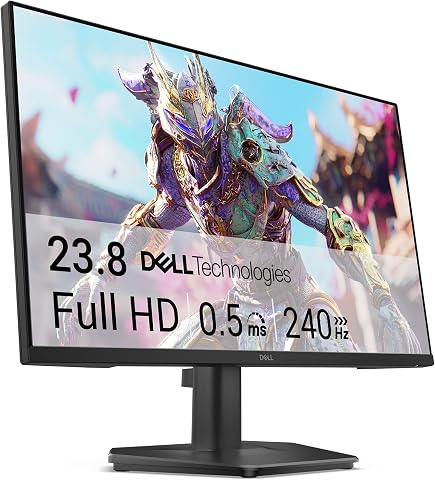 Dell 24 240Hz Gaming Monitor – SE2426HG – 23.8-inch FHD (1920×1080) 240Hz Dis…View on Amazon →
Match Screen Speed to Your PC
The guide’s main practical point is that a monitor’s maximum refresh rate does not guarantee a PC will deliver matching frame rates. Resolution affects the rendering workload: the source says 4K places more demand on a graphics card than 1080p, while QHD offers a middle ground. Buyers who mainly play competitive games may prefer a lower resolution if it lets their system sustain higher frame rates.
That distinction can affect both cost and day-to-day use. A buyer paying for a 320Hz display may not benefit from its full refresh capability in demanding games if their PC cannot produce enough frames. Conversely, a high-refresh 1080p model may make more sense for a system focused on fast play than a larger, sharper display. The report’s recommendations are use-case comparisons, not evidence that one model is best for every buyer.
Screen size also changes how resolution appears. The source notes that 1080p pixels are more apparent on larger screens at typical desk distances, while ultrawide formats may not be supported well by every game. These tradeoffs make desk space, viewing distance and game compatibility relevant alongside headline specifications.
Products Worth Considering

Anker SOLIX C1000 Gen 2 Portable Power Station

LG UltraGear 32-inch QHD Curved Gaming Monitor, 180Hz, 1ms, FreeSync

Sonos Roam Portable Bluetooth and Wi-Fi Speaker, Black
As an affiliate, we earn on qualifying purchases.
Eight Models, Different Tradeoffs
The source says it ranked monitors by how well their refresh rate, resolution and format work together, rather than treating the highest refresh number as an automatic win. It also considered panel type, adaptive-sync support where specified, connectivity and adjustment details. Its stated method avoids assuming a feature is present when product details do not specify it.
The eight options cover several common gaming setups: 4K, QHD and 1080p; conventional and curved screens; an ultrawide; and an OLED panel. The report describes 240Hz as a baseline for high-refresh play, while characterizing the difference between 240Hz and higher rates such as 260Hz or 320Hz as more specialized and dependent on very high, stable frame rates.
For the ultrawide and curved models, the source frames shape as a preference and compatibility decision rather than a performance improvement. It advises checking whether a player’s main games support ultrawide layouts and considering whether a curve suits their seating and viewing needs.
“I ranked these monitors by how well their refresh rate, resolution, and screen format work together, rather than treating the largest refresh number as an automatic win.”
— ThorstenMeyerAI.com
Specifications and Testing Gaps
The supplied source material does not give a publication date, prices, retailer availability or full specifications for all eight monitors. It also provides no side-by-side measurements, independent lab tests, response-time results or game benchmarks. The recommendations should therefore be read as the source’s buying guidance, not as independently verified performance rankings.
Some details are conditional: the AOC Q27G41ZE’s 260Hz mode is described as overclocked, and adaptive-sync support is discussed as a feature buyers should check where specified. The material does not establish that every listed model offers a particular sync standard or that every game will benefit from the maximum refresh rate. The guide also does not identify specific graphics cards that can sustain high frame rates at 4K.
Check Fit Before Buying
Readers should verify each monitor’s current price, full specifications and availability before purchase, then compare those details with independent testing where available. A practical next step is to check expected performance in the games they play, confirm whether the display’s resolution and refresh target suit their graphics card, and measure desk depth and viewing distance.
For the ultrawide option, buyers should also check game support and interface behavior. The source does not announce product launches or future testing milestones, so no further development is confirmed. Its guidance is a starting point for choosing among formats, not a substitute for checking current product listings.
Key Questions
Which monitor does the guide recommend overall?
ThorstenMeyerAI.com names the MSI MAG 272URDFA E16 its overall pick, based on its stated combination of 4K resolution and 320Hz refresh. The guide cautions that reaching high frame rates at 4K requires a capable graphics card.
Which model is the guide’s QHD option?
The AOC Q27G41ZE is the guide’s QHD speed choice. The source lists a 240Hz native refresh rate and an overclocked 260Hz mode.
Does a higher refresh rate mean my PC will run games at that frame rate?
No. A monitor’s refresh rate describes how often its screen can update; it does not determine how many frames the PC can render. Game, resolution and graphics hardware all affect the frame rate.
What should buyers check before choosing an ultrawide monitor?
Check whether the games you play support ultrawide displays and how they handle the interface and wider image. The source also advises considering desk space and viewing distance.
Does the source provide independent performance tests or current prices?
No. The material provided does not include independent benchmark results, prices, availability or complete specifications for every model. Those details should be verified before buying.
Source: ThorstenMeyerAI.com