
The best home audio system overall in this roundup is the ULTIMEA Skywave X50, which pairs a 5.1.4-channel layout with wireless surround speakers for a cinema-focused setup without a traditional receiver. The Klipsch Reference 5.2 with Onkyo receiver is a stronger fit for buyers who want separate components and room to build a system, while the JBL Bar 800 stands out for detachable surrounds and convenient streaming. The choice comes down to how much installation work you’ll accept, how immersive you want movies to sound, and whether you need music and gaming features too. Soundbars simplify setup, while receiver-based bundles offer more flexibility but take more space and configuration. Continue reading for the full breakdown of all 15 systems and guidance on choosing the right one for your room.

Prime made for students and young adults
- Fast, free delivery for dorm and study essentials
- Prime Video and Amazon Music included
- Member-only deals
Key Takeaways
- The ULTIMEA Skywave X50 leads for surround immersion: its 5.1.4-channel design offers a more ambitious height-and-surround layout than basic 5.1 systems.
- Receiver bundles suit buyers who value system flexibility: the Klipsch and Onkyo packages provide a component-based route, but need more room, setup, and speaker placement than soundbars.
- Wireless and detachable surrounds reduce installation friction: the JBL Bar 800 and several ULTIMEA soundbar systems can bring surround effects to homes where running speaker wire is inconvenient.
- Not every 5.1 label means the same experience: speaker arrangement, height-channel support, and how rear speakers connect matter as much as the channel count.
- Simple systems remain useful for specific rooms: the Saiyin soundbar with subwoofer favors a compact TV or PC setup, while Logitech’s Z906 is aimed at buyers who want wired multichannel audio.
| ULTIMEA Skywave X50 5.1.4ch Wireless Surround Sound System for TV, Soundbar |  | Best for Height-Effect Surround | Channel configuration: 5.1.4 | Peak power: 760W | Subwoofer: 8 inches | VIEW LATEST PRICE | See Our Full Breakdown |
| Logitech Z906 5.1 Surround Sound Speaker System | 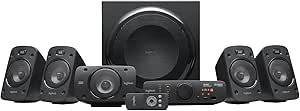 | Best for Multi-Source Wired Setups | Channel configuration: 5.1 | Power output: 1000W peak / 500W RMS | Decoding: Dolby Digital and DTS | VIEW LATEST PRICE | See Our Full Breakdown |
| Yamaha YHT-4950U 4K Ultra HD 5.1-Channel Home Theater System with Bluetooth |  | Best for Straightforward Receiver-Based Setup | Channel configuration: 5.1 | Total output wattage: 150W | HDMI inputs: 4 | VIEW LATEST PRICE | See Our Full Breakdown |
| Yamaha YHT-4970U 5.1-Channel Home Theater System with Dolby Atmos, 4K/120 and 8K/60 HDMI |  | Best for HDMI 2.1 Gaming and Movies | Channel configuration: 5.1 | Receiver: Yamaha RX300A | Audio formats: Dolby Atmos and DTS Virtual:X | VIEW LATEST PRICE | See Our Full Breakdown |
| JBL Bar 800-5.1.2-Channel soundbar with Detachable Surround Speakers and Dolby Atmos®, 10” Wireless subwoofer, Built-in Wi-Fi with AirPlay, Alexa Multi-Room Music and Chromecast (Black) |  | Best for Easy Wireless Surround and Streaming | Channel configuration: 5.1.2 | Total output power: 720W | Surround speakers: Detachable, battery-powered | VIEW LATEST PRICE | See Our Full Breakdown |
| Klipsch Reference 5.2 Home Theater System with Onkyo TX-NR7100 |  | Best for Full-Scale Home Theater | Speaker configuration: 5.2-channel system | Receiver: Onkyo TX-NR7100; 9.2-channel capability | Included speakers: 2 R-625FA floorstanding, 1 R-52C center, 2 R-41M bookshelf | VIEW LATEST PRICE | See Our Full Breakdown |
| ULTIMEA Aura A60 Pro 7.1ch Dolby Atmos Soundbar System with Subwoofer and 4 Surround Speakers |  | Best for App-Based Sound Customization | Channel configuration: 7.1-channel | Audio technology: Dolby Atmos, SurroundX, BassMX, VoiceMX | Peak power: 420W | VIEW LATEST PRICE | See Our Full Breakdown |
| Saiyin Soundbar with Subwoofer for TV and PC |  | Best Compact Pick for Basic TV and PC Audio | Audio output: Stereo | Soundbar size: 16.9 inches | Subwoofer diameter: 5 inches | VIEW LATEST PRICE | See Our Full Breakdown |
| Sony BRAVIA Theater System 6 5.1ch Soundbar with Subwoofer & Rear Speakers |  | Best for Easy, Dialogue-Focused Surround Sound | Channel configuration: 5.1-channel | Audio formats: Dolby Atmos and DTS:X | Speaker arrangement: 3 front-firing speakers, 2 rear speakers, and subwoofer | VIEW LATEST PRICE | See Our Full Breakdown |
| Ultimea Skywave F40 5.1.2ch Sound Bar with Dolby Atmos and Subwoofer |  | Best for Height-Effect Atmos on a Soundbar Setup | Channel configuration: 5.1.2-channel | Audio technology: Dolby Atmos, SurroundX, BassMX, VoiceMX | Connectivity: HDMI eARC, Bluetooth 5.4 | VIEW LATEST PRICE | See Our Full Breakdown |
| Sony HT-S40R 5.1-Channel Home Theater Soundbar System |  | Best for Straightforward 5.1 Setup | Channels: 5.1 | Maximum output power: 600 watts | Connections: HDMI, optical, analog, Bluetooth | VIEW LATEST PRICE | See Our Full Breakdown |
| Amazon Fire TV Soundbar Plus with Wireless Subwoofer and Surround Speakers (5.1 Channel) |  | Best for Wireless 5.1 Convenience | Channels: 5.1 | Audio formats: Dolby Atmos, DTS:X | Soundbar dimensions: 37 × 5.2 × 2.5 in | VIEW LATEST PRICE | See Our Full Breakdown |
| ULTIMEA 7.1ch Surround Sound Bar for TV, Home Theater Systems w/Subwoofer |  | Best for App-Based Sound Customization | Channel layout: 7.1, with 3 main channels and 4 surround speakers | Peak power: 330 watts | EQ control: 10-band graphic EQ and 121 presets | VIEW LATEST PRICE | See Our Full Breakdown |
| TCL S65K S Series 5.1 Channel Soundbar System with Dolby Atmos, DTS:X, Wireless Subwoofer, and Surround Speakers |  | Best for TCL TV Integration | Channels: 5.1 | Audio formats: Dolby Atmos, DTS:X, DTS Virtual:X | Total power: 630 watts | VIEW LATEST PRICE | See Our Full Breakdown |
| Klipsch Reference Dolby Atmos Home Theater Bundle with Onkyo TX-NR7100 Receiver |  | Best Premium Receiver-Based System | Receiver: Onkyo TX-NR7100 | Receiver channels: 9.2 | Receiver power: 220 W per channel at 6 ohms | VIEW LATEST PRICE | See Our Full Breakdown |
More Details on Our Top Picks
ULTIMEA Skywave X50 5.1.4ch Wireless Surround Sound System for TV, Soundbar
The Skywave X50 is the most height-focused soundbar in this group: its 5.1.4-channel layout is designed to place sound above and around the listening area, while dual 5GHz wireless transmission avoids running speaker cables across the room. Its 8-inch subwoofer and stated 28Hz bass extension suit action films and games that benefit from weighty low frequencies. Compared with the JBL Bar 800, the X50 provides four height channels rather than two up-firing drivers, but JBL adds built-in Wi-Fi streaming and detachable, battery-powered rear speakers. The X50 instead emphasizes its wireless link between system components and 4K HDR pass-through. The tradeoff is a less flexible music-streaming setup: the supplied details list app and remote control but no Wi-Fi music services. Choose it for immersive TV audio, not as a smart multiroom hub.
Pros:- Four height channels target overhead effects for compatible surround content.
- Dual 5GHz wireless transmission reduces the need to run cables to surround speakers.
- An 8-inch subwoofer with stated bass extension to 28Hz is suited to weighty movie effects.
- 4K HDR pass-through supports a compatible TV and source-device setup.
Cons:- The supplied product details do not list Wi-Fi streaming services such as AirPlay or Chromecast.
- Its 43.31-inch-wide soundbar and 8-inch subwoofer need room for placement.
- Wireless surround links still require system components to be positioned and powered.
Best for: Movie and gaming fans who want a 5.1.4 soundbar system with height effects and fewer speaker cables across the room.
Not ideal for: Listeners who want built-in AirPlay, Chromecast, or multiroom streaming, or buyers seeking a compact system with minimal bass output.
- Channel configuration:5.1.4
- Peak power:760W
- Subwoofer:8 inches
- Wireless transmission:Dual 5GHz
- Bass extension:Down to 28Hz (stated)
- Video pass-through:4K HDR
- Controls:App and remote
- Soundbar dimensions:43.31 x 2.76 x 3.94 inches (listed D x W x H)
Our verdict“Choose the Skywave X50 if height-focused movie sound and reduced surround-speaker wiring matter more than built-in music streaming.”
Logitech Z906 5.1 Surround Sound Speaker System
The Logitech Z906 is a practical pick for buyers who want discrete 5.1 speakers and several ways to connect sources, rather than a soundbar-led system. Its inputs include optical, coaxial, RCA, 3.5mm, and six-channel direct, with Dolby Digital and DTS decoding for compatible surround signals. The control console and wireless remote make it easier to switch among as many as six connected devices. Compared with the Yamaha YHT-4950U, the Z906 is more flexible for direct connections and avoids a separate AV receiver, but Yamaha adds HDMI video switching, room optimization, and a more upgrade-friendly receiver-based setup. The Logitech’s 1000W peak figure should not be confused with its 500W RMS rating, and the five-speaker layout still takes space and cabling. It suits a media room or PC setup better than buyers seeking a compact, wireless system.
Pros:- Multiple analog and digital inputs accommodate a range of source devices.
- Dolby Digital and DTS decoding support compatible 5.1 surround sound.
- A control console and wireless remote provide straightforward input and volume control.
- Satellite and center speakers can be wall-mounted.
Cons:- Five speakers and a subwoofer require more placement space and cabling than a soundbar system.
- It lacks HDMI inputs for switching video sources through the audio system.
- Its 15kg listed weight makes moving the complete system less convenient.
Best for: PC and media-room owners who need several wired source connections and a conventional five-speaker surround layout.
Not ideal for: Buyers who want HDMI video switching, automatic room correction, wireless surround speakers, or a minimal-footprint soundbar.
- Channel configuration:5.1
- Power output:1000W peak / 500W RMS
- Decoding:Dolby Digital and DTS
- Connections:3.5mm, RCA, six-channel direct, digital coaxial, optical
- Maximum connected devices:Up to six
- Subwoofer driver:6.5 inches
- Controls:Wireless remote and control console
- Listed weight:15kg
Our verdict“Pick the Z906 if you need several direct connections and discrete 5.1 speakers, but choose a Yamaha receiver package for HDMI switching and room correction.”
Yamaha YHT-4950U 4K Ultra HD 5.1-Channel Home Theater System with Bluetooth
The Yamaha YHT-4950U makes sense for buyers who want a traditional receiver, five speakers, and a subwoofer in one home theater package. Its YPAO room optimization helps tune the system to the room, while Virtual Cinema Front offers a placement alternative when rear speakers cannot sit behind the listener. Four HDMI inputs, 4K/60 pass-through, and HDR support cover many TV and console setups; Bluetooth handles casual music streaming. Compared with the newer Yamaha YHT-4970U, this model has less advanced video support and lacks the listed Dolby Atmos and DTS Virtual:X formats, but its simpler 5.1 setup may suit buyers who do not need high-refresh-rate gaming features. It also lacks Wi-Fi and app-based smart streaming, so it is a receiver-led system rather than a connected audio hub. Expect to arrange speaker wire and make space for the receiver.
Pros:- Receiver, five speakers, subwoofer, and speaker wire are included as a coordinated 5.1 package.
- YPAO room optimization can help balance sound for the room.
- Four HDMI inputs provide connections for multiple video sources.
- Bluetooth supports wireless music playback from compatible devices.
Cons:- No Wi-Fi connectivity is listed for streaming services or app-based control.
- Its 5.1 format lacks the height-channel support and advanced gaming HDMI features listed for the YHT-4970U.
- Separate speakers, wiring, and a receiver take more setup effort and space than a soundbar.
Best for: First-time home theater buyers who want a complete wired 5.1 package, room optimization, and HDMI connections for everyday 4K sources.
Not ideal for: Gamers seeking 4K/120 or 8K pass-through, or listeners who want Wi-Fi streaming and smart-home music services built in.
- Channel configuration:5.1
- Total output wattage:150W
- HDMI inputs:4
- Video support:4K Ultra HD at 60fps
- HDR support:Dolby Vision and Hybrid Log-Gamma
- Room optimization:Yamaha YPAO
- Wireless audio:Bluetooth
- Included components:AV receiver, five speakers, subwoofer, speaker wire
Our verdict“Choose the YHT-4950U for a conventional, room-tunable 5.1 system with 4K/60 HDMI, but step up to the YHT-4970U for newer gaming video features.”
Yamaha YHT-4970U 5.1-Channel Home Theater System with Dolby Atmos, 4K/120 and 8K/60 HDMI
For a living room that doubles as a gaming setup, the Yamaha YHT-4970U stands out for combining a receiver-based speaker package with HDMI 2.1 features, including 4K/120, 8K/60, ALLM, and VRR. That makes it a more capable video hub than the older YHT-4950U, which tops out at 4K/60 in the supplied specifications. Dolby Atmos and DTS Virtual:X add immersive processing, while automatic room correction and the included setup microphone can make initial balancing less fiddly. The system remains a 5.1 package, though, so its Atmos support is not the same as a dedicated 5.1.4 system such as the ULTIMEA Skywave X50. It also requires a receiver, wired speakers, and substantial placement space. Choose this Yamaha for modern source switching and a conventional speaker layout, not for cable-free installation.
Pros:- HDMI 2.1 supports 4K/120, 8K/60, ALLM, and VRR with compatible equipment.
- The package includes a receiver, five speakers, powered subwoofer, and setup accessories.
- Dolby Atmos and DTS Virtual:X provide immersive audio-format support.
- Automatic room correction and a setup microphone assist with system calibration.
Cons:- The receiver and wired speakers require more space and installation work than a soundbar.
- Its 5.1 speaker package does not provide the four dedicated height channels listed for the Skywave X50.
- Bluetooth Multipoint is limited to pairing two source devices at a time.
Best for: Console gamers and home theater buyers who want a complete wired speaker package with 4K/120, VRR, and receiver-based HDMI switching.
Not ideal for: People who need a compact soundbar, genuinely wireless rear speakers, or a dedicated four-channel height-speaker layout.
- Channel configuration:5.1
- Receiver:Yamaha RX300A
- Audio formats:Dolby Atmos and DTS Virtual:X
- Video support:4K/120 and 8K/60
- HDMI features:HDMI 2.1, eARC/ARC, ALLM, VRR
- HDMI inputs and outputs:4 inputs / 1 output
- HDR formats:Dolby Vision, HDR10+, HLG
- Listed weight:50.4 pounds
Our verdict“Choose the YHT-4970U if HDMI 2.1 gaming features and a full receiver-based speaker package matter more than a compact or wireless setup.”
JBL Bar 800-5.1.2-Channel soundbar with Detachable Surround Speakers and Dolby Atmos®, 10” Wireless subwoofer, Built-in Wi-Fi with AirPlay, Alexa Multi-Room Music and Chromecast (Black)
The JBL Bar 800 is the most convenient match here for buyers who want surround effects without permanent rear-speaker wiring. Its detachable, battery-powered surrounds can be placed behind the seating area for movie night, then returned to the bar when the room needs to stay clear. A 10-inch wireless subwoofer supplies the low-end impact, and PureVoice dialogue enhancement aims to keep speech audible amid effects. Compared with the ULTIMEA Skywave X50, JBL offers built-in Wi-Fi with AirPlay, Chromecast, and Alexa Multi-Room Music, while the X50 specifies a 5.1.4 layout and dual 5GHz wireless transmission. The JBL’s 5.1.2 design has fewer height channels, and its detachable speakers need charging. It is a strong fit for streaming-focused living rooms, but less appealing if you prefer a receiver-based system or want rear speakers permanently installed.
Pros:- Detachable, battery-powered surround speakers avoid permanent rear-speaker wiring.
- Built-in Wi-Fi supports AirPlay, Chromecast, and Alexa Multi-Room Music.
- A 10-inch wireless subwoofer is designed for substantial bass without a cable to the soundbar.
- PureVoice dialogue enhancement targets clearer speech during loud scenes.
Cons:- The 5.1.2 layout has fewer listed height channels than the Skywave X50’s 5.1.4 configuration.
- Detachable surround speakers rely on batteries and need charging.
- A soundbar package offers less receiver-style input and speaker-upgrade flexibility than Yamaha’s systems.
Best for: Streaming-focused households that want Atmos sound and flexible rear speakers without running permanent speaker cables across the room.
Not ideal for: Buyers who want a receiver-based system, a 5.1.4 channel layout, or rear speakers that do not need periodic charging.
- Channel configuration:5.1.2
- Total output power:720W
- Surround speakers:Detachable, battery-powered
- Subwoofer:10-inch wireless
- Audio format:Dolby Atmos
- Wireless streaming:Wi-Fi, AirPlay, Chromecast, Alexa Multi-Room Music
- TV connection:HDMI eARC
- Video pass-through:4K Dolby Vision
Our verdict“Pick the JBL Bar 800 for streaming and flexible, cable-light surround, but choose a Yamaha receiver package for a wired system with HDMI 2.1 gaming connections.”
Klipsch Reference 5.2 Home Theater System with Onkyo TX-NR7100
This bundle is the most traditional speaker-based system in this group: floorstanding front speakers, a dedicated center, rear bookshelves, dual subwoofers, and an AV receiver give you more room to shape a theater setup than a single soundbar package. The two 12-inch subs are its clearest advantage for buyers who want substantial low-frequency output, while the Onkyo receiver’s 9.2-channel capability leaves room to expand beyond the included 5.2 arrangement. Compared with the Sony BRAVIA Theater System 6, this Klipsch set demands more space and setup work but offers a more modular speaker layout. Its tradeoffs are the many wired components, outlet needs, and large floorstanding cabinets; it is a poor match for a compact or cable-sensitive living room.
Pros:- Complete 5.2 speaker package includes floorstanding, center, bookshelf, and dual subwoofer speakers.
- Two 12-inch powered subwoofers provide a substantial bass foundation.
- Onkyo receiver supports 9.2-channel audio and 8K/4K video.
- Separate components offer more placement and future expansion options than an all-in-one soundbar.
Cons:- Multiple wired speakers and powered components make setup and cable management demanding.
- Large floorstanding speakers and two subwoofers need considerable room.
- The listed receiver power specification is at 6 ohms, so buyers should check speaker and receiver compatibility.
Best for: Home theater owners with a dedicated or spacious living room who want separate speakers, dual subwoofers, and a receiver they can expand.
Not ideal for: Apartment dwellers or buyers seeking a quick, low-clutter setup; the floorstanding speakers, receiver, subs, and wiring require substantial space and planning.
- Speaker configuration:5.2-channel system
- Receiver:Onkyo TX-NR7100; 9.2-channel capability
- Included speakers:2 R-625FA floorstanding, 1 R-52C center, 2 R-41M bookshelf
- Subwoofers:2 R-12SW powered subwoofers
- Subwoofer drivers:12 inches each
- Subwoofer configuration:400W all-digital powered, each
- Receiver power:220W per channel at 6 ohms
- Video support:8K/4K
- Finish:Black wood grain vinyl
Our verdict“Choose this Klipsch bundle if you have the space and want a substantial, expandable speaker-based theater rather than a streamlined soundbar.”
ULTIMEA Aura A60 Pro 7.1ch Dolby Atmos Soundbar System with Subwoofer and 4 Surround Speakers
The Aura A60 Pro is a fit for listeners who want a surround-oriented soundbar system with plenty of room to tune the sound. Its 7.1-channel layout and four surround speakers give it a more speaker-rich arrangement than the Saiyin Soundbar with Subwoofer, while the Ultimea app adds 121 presets and 10-band EQ control for tailoring dialogue, effects, or music. Two rear speakers connect wirelessly, which can reduce long cable runs across the room. The compromise is that the system is not fully wireless: the subwoofer and two front surround speakers still need wired connections. Its recommended room range is also specific, so buyers with a very small or open-plan space may not get the intended surround presentation. I’d choose it for tuning flexibility, not the simplest installation.
Pros:- 7.1-channel arrangement includes four surround speakers.
- Wireless rear speakers can reduce cable runs to the back of the room.
- App offers 121 EQ presets, 10-band control, and six tailored modes.
- HDMI eARC and Bluetooth provide useful TV and music connections.
Cons:- The wired subwoofer and wired front surround speakers limit placement freedom.
- The recommended room-size range may not suit very small or open-plan spaces.
- The multiple speakers and app controls make setup less straightforward than a basic soundbar.
Best for: TV owners in a 108–270-square-foot room who want multiple surround speakers and detailed app-based EQ adjustments.
Not ideal for: Buyers who want a nearly cable-free installation or who need a system for a room outside the stated 108–270-square-foot range.
- Channel configuration:7.1-channel
- Audio technology:Dolby Atmos, SurroundX, BassMX, VoiceMX
- Peak power:420W
- Surround speakers:4; 2 front wired and 2 rear wireless
- Subwoofer:5.25-inch wired
- Connectivity:HDMI eARC and Bluetooth
- EQ controls:121 presets, 10-band control, 6 tailored modes
- Recommended room size:108–270 ft²
Our verdict“Pick the Aura A60 Pro if you want a surround-speaker setup with extensive app tuning and can accommodate its mix of wired and wireless connections.”
Saiyin Soundbar with Subwoofer for TV and PC
This Saiyin system keeps the job simple: a compact stereo soundbar, dedicated 5-inch subwoofer, and three connection options suit a TV or desktop setup that needs fuller sound without a collection of rear speakers. Bluetooth is handy for phone playback, while optical and auxiliary inputs cover common wired sources. Compared with the ULTIMEA Aura A60 Pro, it gives up surround channels, Atmos support, and detailed app tuning in exchange for a smaller, less involved system. The key limitation is format support: it does not decode Dolby or DTS, so a connected source needs to output PCM or stereo. That makes it a better fit for straightforward TV and PC use than for building a cinematic surround system. Its wall-mounting hardware is useful, though the subwoofer still needs the correct SUB OUT connection.
Pros:- Dedicated 5-inch subwoofer adds bass beyond the soundbar’s stereo output.
- Bluetooth, optical, and auxiliary inputs cover common TV and PC sources.
- Three EQ modes and a remote make basic adjustment easy.
- Wall-mounting hardware and included cables support flexible placement.
Cons:- Does not support Dolby or DTS; connected devices must output PCM or stereo.
- Stereo configuration lacks the rear speakers and immersive formats offered by the Sony BRAVIA Theater System 6.
- Subwoofer must connect to the SUB OUT port, not AUX IN.
Best for: Desktop listeners and TV owners who want a compact stereo upgrade with a separate subwoofer and simple Bluetooth, optical, or auxiliary connections.
Not ideal for: Movie fans seeking Dolby or DTS decoding, discrete surround speakers, or a system that can grow into a full home theater.
- Audio output:Stereo
- Soundbar size:16.9 inches
- Subwoofer diameter:5 inches
- Connections:Bluetooth, optical, auxiliary
- Bluetooth range:10 meters
- Equalizer modes:3
- Audio format compatibility:Dolby and DTS not supported; PCM/stereo output required
- Mounting:Wall mount
Our verdict“Choose Saiyin for a straightforward TV or PC audio upgrade, but skip it if you want surround sound or Dolby and DTS support.”
Sony BRAVIA Theater System 6 5.1ch Soundbar with Subwoofer & Rear Speakers
Sony’s BRAVIA Theater System 6 makes a strong case for buyers who want 5.1-channel surround without assembling separate receiver-and-speaker components. Its center channel is aimed at clearer dialogue, and support for Dolby Atmos and DTS:X covers popular movie sound formats. Rear speakers and a wired subwoofer add a more enveloping presentation than the Saiyin Soundbar with Subwoofer, which is a stereo system without Dolby or DTS decoding. BRAVIA TV owners also get compatible TV-menu control and Voice Zoom 3, while Bluetooth supports music from a phone. This is still a soundbar-based package, not the modular setup offered by the Klipsch Reference 5.2; the wired subwoofer also limits placement and adds a cable to manage. The Sony is the more approachable pick for straightforward surround and dialogue clarity.
Pros:- 5.1-channel package includes rear speakers and a dedicated subwoofer.
- Dolby Atmos and DTS:X support suits compatible movie and streaming content.
- Dedicated center channel targets clearer dialogue.
- BRAVIA TV integration and Voice Zoom 3 add useful controls for compatible televisions.
Cons:- The wired subwoofer restricts placement and adds cable management.
- Less modular and expandable than the Klipsch receiver-and-speaker bundle.
- The supplied product data does not detail the surround speaker connections or a full channel-by-channel power breakdown.
Best for: Movie and TV viewers who want rear-speaker surround, clearer dialogue, and Dolby Atmos and DTS:X support, especially owners of compatible BRAVIA TVs.
Not ideal for: Buyers who want an expandable receiver-based system, wireless subwoofer placement, or detailed specifications for each included speaker before choosing.
- Channel configuration:5.1-channel
- Audio formats:Dolby Atmos and DTS:X
- Speaker arrangement:3 front-firing speakers, 2 rear speakers, and subwoofer
- Maximum output power:1000W
- Soundbar width:35.7 inches
- Connectivity:Bluetooth
- Additional features:DSEE, Multi Stereo, Voice Zoom 3 with compatible BRAVIA TV
- Mounting:Tabletop or wall mount
Our verdict“Pick the Sony for an approachable 5.1 soundbar package with dialogue-focused features and broad movie-format support, particularly with a compatible BRAVIA TV.”
Ultimea Skywave F40 5.1.2ch Sound Bar with Dolby Atmos and Subwoofer
The Skywave F40 targets buyers who want a more vertical sense of movie sound from a soundbar package. Its 5.1.2-channel layout and up-firing Atmos drivers add height effects to the front-and-rear surround arrangement, while HDMI eARC supports high-bandwidth audio from a compatible TV. That gives it a different emphasis from the Sony BRAVIA Theater System 6: Sony offers a 5.1 setup with a dialogue-focused center channel and DTS:X support, while the F40 highlights two height channels and app-based sound customization. Its 5.25-inch subwoofer is wired, however, and DTS audio is not supported. The app’s EQ options offer room to tailor sound, but setup may feel involved for buyers unfamiliar with surround systems. I’d favor it when Atmos height effects matter more than broad format support or a low-effort setup.
Pros:- 5.1.2-channel layout includes dedicated up-firing Dolby Atmos drivers and rear surrounds.
- HDMI eARC supports high-bandwidth audio from compatible TVs.
- App provides 10-band EQ and 121 preset sound modes.
- Metal enclosure and a dedicated 5.25-inch subwoofer complete the soundbar package.
Cons:- DTS audio formats are not supported.
- Wired subwoofer limits placement flexibility.
- Surround setup and sound adjustment may be challenging for buyers new to home theater.
Best for: Movie viewers who want a soundbar-based 5.1.2 Atmos arrangement, rear speakers, HDMI eARC, and app control in one system.
Not ideal for: Listeners with DTS-heavy sources, buyers who need a wireless subwoofer, or anyone who wants a simple plug-in-and-play setup.
- Channel configuration:5.1.2-channel
- Audio technology:Dolby Atmos, SurroundX, BassMX, VoiceMX
- Connectivity:HDMI eARC, Bluetooth 5.4
- Subwoofer:5.25-inch wired
- Soundbar dimensions:31.5 × 1.81 × 3.54 inches
- Controls:App and remote
- Bluetooth range:15 meters
- Mounting:Tabletop or wall mount
Our verdict“Choose the Skywave F40 if up-firing Atmos effects and app-based tuning matter more to you than DTS support or the easiest possible installation.”
Sony HT-S40R 5.1-Channel Home Theater Soundbar System
The Sony HT-S40R makes sense for buyers who want real rear speakers and simple TV connections without moving to a separate receiver and speaker package. Its 5.1 layout and stated 600-watt maximum output give movies and shows a more enveloping presentation than a basic soundbar, while HDMI, optical, and analog inputs accommodate a range of TVs. Bluetooth also lets it handle casual music playback. Compared with the Amazon Fire TV Soundbar Plus, Sony offers familiar wired TV connections and a less feature-heavy approach, but it lacks that model’s listed Dolby Atmos and DTS:X support and wireless surround-speaker connections. The tradeoff is a more involved speaker setup than a single bar: rear speakers need placement and cabling, so this is best for a room where they can stay put.
Pros:- Includes rear speakers for a dedicated 5.1-channel layout
- HDMI, optical, and analog inputs suit different TV connection needs
- Bluetooth supports music streaming from compatible devices
- Remote-accessible sound modes and dialogue enhancement offer basic listening adjustments
Cons:- Rear speakers add placement and cable-management work
- No Dolby Atmos or DTS:X support is listed
- Bluetooth streaming is less suitable than a wired connection for latency-sensitive use
Best for: TV owners who want physical rear speakers, straightforward inputs, and Bluetooth without assembling a receiver-based system
Not ideal for: Buyers seeking Dolby Atmos or a cable-light surround setup, or anyone who wants one compact bar with no rear-speaker placement
- Channels:5.1
- Maximum output power:600 watts
- Connections:HDMI, optical, analog, Bluetooth
- USB:1 USB 2.0 port
- Enclosure materials:Metal and plastic
- Dimensions:13.66 × 33.22 × 9.76 in (D × W × H)
- Warranty:1 year
Our verdict“Choose the Sony HT-S40R if you want a conventional 5.1 soundbar system with rear speakers and broad TV inputs, rather than newer spatial-audio features.”
Amazon Fire TV Soundbar Plus with Wireless Subwoofer and Surround Speakers (5.1 Channel)
The Fire TV Soundbar Plus is the more convenient fit for buyers who want a 5.1 layout with fewer speaker cables running between components. Its wireless subwoofer and surround speakers simplify connections to the bar, while a dedicated center channel is aimed at keeping dialogue distinct from effects. Dolby Atmos and DTS:X support add spatial-audio format compatibility that the Sony HT-S40R does not list. The system also provides Movie, Music, Sports, and Night modes, plus Bluetooth for phone streaming. Wireless does not mean outlet-free: the soundbar, subwoofer, and two surround speakers each need power. Fire TV audio customization is also limited to select Fire TV models, and the included wall-mount kit covers only the bar. Pick it over Sony for a tidier cable route and newer formats; skip it if outlet placement is awkward.
Pros:- Dolby Atmos and DTS:X support add compatibility with spatial-audio formats
- Dedicated center channel is designed to keep dialogue clear
- Wireless subwoofer and surround-speaker connections reduce inter-speaker cabling
- Four listening modes and Bluetooth streaming support varied use
Cons:- The soundbar, subwoofer, and both surround speakers still need separate power outlets
- Some Fire TV audio customization features work only with select Fire TV models
- Mounting hardware is provided for the soundbar, not the subwoofer or surround speakers
Best for: People building a 5.1 TV setup who want wireless links to the subwoofer and surround speakers, plus clear dialogue and selectable listening modes
Not ideal for: Renters or room layouts with few accessible power outlets, and buyers who need Fire TV audio customization with a non-supported television
- Channels:5.1
- Audio formats:Dolby Atmos, DTS:X
- Soundbar dimensions:37 × 5.2 × 2.5 in
- Soundbar weight:8.8 lb
- Connections:HDMI, optical, USB-A, Bluetooth
- Subwoofer connection:Wireless
- Surround-speaker connection:Wireless
- EQ modes:Movie, Music, Sports, Night
- Warranty:1-year limited
Our verdict“Choose the Fire TV Soundbar Plus if wireless connections between speakers and spatial-audio support matter more than minimizing power-cord needs.”
ULTIMEA 7.1ch Surround Sound Bar for TV, Home Theater Systems w/Subwoofer
The ULTIMEA Aura A40 Pro is aimed at listeners who want more control over how a soundbar system is tuned. Its 7.1-channel layout uses three main channels and four surround speakers, while the app offers a 10-band EQ, 121 presets, and adjustable surround levels. VoiceMX and VocalMatrix are designed to improve vocal intelligibility and place dialogue within the surround presentation; BassMX is paired with a subwoofer specified to extend to 45 Hz. Compared with the Amazon Fire TV Soundbar Plus, ULTIMEA gives buyers much more listed EQ adjustment, but its rear-speaker arrangement is only partly wireless: one rear speaker connects to the bar wirelessly, while the other connects by wire to it. The detailed tuning is a plus for hands-on listeners, not for anyone seeking a minimal setup or Dolby Atmos support, which is not listed here.
Pros:- Seven-channel arrangement includes four surround speakers
- App provides a 10-band graphic EQ, 121 presets, and adjustable surround levels
- Voice-focused processing is designed to improve dialogue audibility
- Subwoofer is specified for bass response down to 45 Hz
Cons:- Rear-speaker wiring is hybrid rather than fully wireless
- App controls and many presets may be unnecessary complexity for plug-and-play buyers
- Dolby Atmos support is not listed in the supplied product information
Best for: Listeners who want app-controlled EQ, multiple surround speakers, and dialogue and bass adjustments they can tailor to their room
Not ideal for: Buyers who want a simple cable-free installation, Dolby Atmos format support, or a sound system that needs little adjustment
- Channel layout:7.1, with 3 main channels and 4 surround speakers
- Peak power:330 watts
- EQ control:10-band graphic EQ and 121 presets
- Surround adjustment:13 adjustable surround levels
- Subwoofer bass response:Specified down to 45 Hz
- Bluetooth:Bluetooth 6.0
- Connections:HDMI ARC, Bluetooth, optical, AUX
- Rear-speaker setup:Right rear connects wirelessly to the soundbar; left rear connects by wire to the right rear speaker
- Control:ULTIMEA app
Our verdict“Choose the ULTIMEA Aura A40 Pro if you want detailed app tuning and a 7.1 speaker layout, and can accommodate its hybrid rear-speaker wiring.”
TCL S65K S Series 5.1 Channel Soundbar System with Dolby Atmos, DTS:X, Wireless Subwoofer, and Surround Speakers
The TCL S65K stands out for combining Dolby Atmos and DTS:X support with wireless surround speakers, a wireless subwoofer, and automatic room calibration. AI Sonic Auto Room Calibration is intended to adapt playback to the listening space, reducing the need to tune everything by ear. With HDMI eARC, an additional HDMI input, Wi-Fi, and Bluetooth, it also offers more connection options than the Sony HT-S40R, which lacks listed Wi-Fi and spatial-audio formats. TCL’s ChoruSound feature can combine the soundbar with compatible TCL TV speakers for a wider presentation, but that benefit depends on owning a supported TCL television. The system is a stronger match for buyers already in that TV ecosystem than for people with another brand. Wireless speaker connections reduce signal cables, though each component still needs a suitable power location.
Pros:- Supports Dolby Atmos, DTS:X, and DTS Virtual:X
- Wireless subwoofer and surrounds reduce cables between audio components
- AI Sonic Auto Room Calibration is designed to tune sound for the room
- HDMI eARC, HDMI input, Wi-Fi, and Bluetooth provide varied connection options
Cons:- ChoruSound requires a compatible TCL television
- Separate subwoofer and surround speakers need suitable placement and power access
- Wall mounting may require hardware beyond what is included
Best for: TCL TV owners who want a wireless 5.1 system with room calibration, HDMI eARC, and spatial-audio format support
Not ideal for: People without a compatible TCL TV who are counting on ChoruSound, or buyers with limited space for separate surround speakers and a subwoofer
- Channels:5.1
- Audio formats:Dolby Atmos, DTS:X, DTS Virtual:X
- Total power:630 watts
- Subwoofer driver:6.5 in
- Connections:HDMI eARC, HDMI input, Bluetooth, USB, Wi-Fi
- Speaker configuration:Soundbar with wireless subwoofer and surround speakers
- Room calibration:AI Sonic Auto Room Calibration
- Control:Remote
Our verdict“Choose the TCL S65K if you have a compatible TCL TV and want room calibration and wireless 5.1 components in one system.”
Klipsch Reference Dolby Atmos Home Theater Bundle with Onkyo TX-NR7100 Receiver
This Klipsch and Onkyo bundle is the most substantial option here for buyers building a dedicated home theater rather than adding a soundbar to a TV. It pairs floorstanding speakers with up-firing Atmos drivers, bookshelf surrounds, a center speaker, and a 12-inch powered subwoofer with a 9.2-channel receiver. That component-based design offers a more expandable, placement-focused system than the all-in-one-bar approach of the TCL S65K, and the Onkyo receiver also lists 8K/4K video support and HEOS streaming. The tradeoff is real: floorstanding speakers need significant room, and the bundle calls for careful connection and calibration. Up-firing Atmos effects rely on ceiling reflections, so vaulted or angled ceilings may weaken the intended height impression. This is a strong fit for a planned theater room, not a quick, compact upgrade.
Pros:- Includes floorstanding speakers with integrated up-firing Dolby Atmos drivers
- Onkyo TX-NR7100 receiver provides a 9.2-channel platform and HEOS streaming
- 12-inch powered subwoofer and separate center and bookshelf speakers create a full component system
- Receiver lists 8K/4K video support
Cons:- Floorstanding speakers and multiple components require substantial space
- Setup, wiring, and calibration are more involved than with a soundbar system
- Up-firing height effects depend on suitable ceiling reflections
Best for: Home theater builders with room for floorstanding speakers who want a receiver-based Dolby Atmos system, dedicated surrounds, and future video-format support
Not ideal for: Small living rooms, buyers who want quick soundbar setup, or rooms with ceilings poorly suited to reflected up-firing Atmos effects
- Receiver:Onkyo TX-NR7100
- Receiver channels:9.2
- Receiver power:220 W per channel at 6 ohms
- Video support:8K/4K
- Speaker components:2 R-625FA floorstanding, 1 R-52C center, 2 R-41M bookshelf, 1 R-12SW subwoofer
- Subwoofer driver:12 in Spun Copper IMG
- Audio technologies:Dolby Atmos, Tractrix Horn, Linear Travel Suspension tweeter
- Streaming:HEOS built-in
- Cabinet material:MDF with scratch-resistant wood-grain vinyl
Our verdict“Choose this Klipsch bundle if you have space and want a receiver-based Atmos theater; choose a soundbar system for simpler installation and a smaller footprint.”
How We Picked
I ranked these systems by how well they serve different home-audio needs, not by channel count alone. I weighed surround and height-channel capability, subwoofer and rear-speaker arrangements, connection options, setup demands, and how easily each system fits a living room, media room, or desktop. I also looked at the practical distinction between all-in-one soundbars and receiver-based speaker bundles: the former tend to simplify installation, while the latter can offer more control and flexibility.
The ranking favors systems that balance immersive sound with manageable setup and useful features for everyday TV and movie watching. That puts the Skywave X50 first as a strong all-around surround option, while the Klipsch bundles rank as premium component choices for buyers prepared to handle a more involved setup. Other picks rise for a specific strength—such as detachable surrounds, straightforward TV integration, or compact size—and fall when their format, connectivity, or installation needs make them less suitable as a broad recommendation.
Factors to Consider When Choosing Best Home Audio Systems
Before choosing a system, match its layout and connection style to your room and listening habits. A bigger channel number does not automatically mean better sound for your space, and a feature-rich package can be a poor fit if it makes everyday setup awkward.
Match the speaker layout to your room
Start with the space you can actually use, not the largest layout in a product listing. Rear speakers need suitable positions behind or beside the seating area, and height effects work best when the room and speaker arrangement support them. In an open-plan room, a simulated surround effect may be more practical than trying to place several speakers across distant areas. Measure the distance from the TV to seating and check where the subwoofer can sit before choosing a package. A compact soundbar may create a more coherent result in a small room than a system whose speakers have to be squeezed into poor positions. Choose more channels when you can place them sensibly, rather than treating the channel count as a stand-alone measure of quality.
Choose between a soundbar and a receiver system
Soundbars bundle much of the system into a bar and subwoofer, which can reduce cable runs and simplify daily use. Receiver-based systems separate the electronics from the speakers, giving you more control over inputs and a clearer path for changing or expanding components. That flexibility asks more of the owner: you need space for a receiver, more speaker placement options, and time to connect and configure the equipment. A common mistake is choosing a receiver bundle for future expansion without checking whether the room can accommodate the speakers now. If a quick TV upgrade is the main goal, a soundbar is often the more sensible format. If you enjoy adjusting a system and can dedicate space to it, a receiver setup may be worth the added work.
Check how surround speakers connect
“Wireless surround” can mean that audio reaches the rear speakers without a long cable back to the TV, but some systems still need power at each speaker or a link to another module. Detachable surrounds can be convenient when you want a cleaner look between movie sessions, though you’ll need to store and reposition them. Wired rear speakers can provide a straightforward signal path, but their cables may dictate where the speakers can go. Before buying, map the route from the system to each speaker and note where wall outlets are available. This simple check can prevent a system with the right sound format from becoming a frustrating fit. Prioritize the connection arrangement that works in your room over the label alone.
Match features to your sources and habits
Make a short list of what you’ll connect: TV, game console, streaming device, computer, or phone. HDMI features matter most when the TV and source equipment can use them, while Bluetooth and Wi-Fi are more relevant if the system will also play music. Check which device handles switching and volume control, since a system can have useful formats yet add extra steps to everyday viewing. Gamers should verify that the connection path supports the video features they use, rather than assuming a home-theater label guarantees compatibility. Music listeners may care more about reliable streaming and easy input changes than extra surround channels. Paying for functions you cannot use with your existing equipment rarely improves the experience.
Decide where paying more makes sense
Spending more is most defensible when the upgrade solves a real limitation: a larger room needs broader coverage, movie fans want dedicated surround and height effects, or a component system gives you needed control over sources. It is less useful to pay for extra speakers that have nowhere to go or advanced formats that your TV and media do not pass through. The subwoofer’s placement and the room’s acoustics can affect bass as much as the system’s specifications. A smaller system in a well-arranged room can be more satisfying than a larger package installed hastily. Also leave room in your plan for stands, cables, and the time needed to position speakers. Buy for the setup you can maintain, not only the feature list you can imagine using.
Frequently Asked Questions
Should I choose a soundbar system or a receiver-based home theater bundle?
Choose a soundbar if you want fewer components, a simpler TV connection, and an easier fit in a typical living room. A receiver-based bundle makes more sense when you want separate speakers, more input control, or the option to adjust and expand the system. It also takes more space and usually demands more planning for wiring and speaker placement. Before deciding, check whether your room can accommodate rear speakers and a receiver cabinet. The better format is the one you can set up properly and use without hassle.
Do I need Dolby Atmos or height channels for a good home audio system?
No. Height-channel support can add a sense of sound above the listening position, but it is only one part of a system’s performance. Speaker placement, room shape, and the content you watch all affect how much difference you hear. If your room cannot support the recommended placement, a well-positioned conventional surround setup may be a better fit. Check that your TV and playback sources can pass the relevant audio formats before paying for features you may not use. Treat Atmos as a useful option, not a requirement for better TV sound.
Will wireless rear speakers work if there is no outlet behind my sofa?
Wireless describes the audio connection, not necessarily the power supply. Many rear speakers still need a nearby outlet, and some designs connect to a separate wireless module that also needs power. Read the connection and power requirements for the specific system, then check the room before ordering. If there is no practical outlet, a soundbar without separate rear speakers or a system with flexible speaker placement may be easier to live with. Avoid assuming that wireless means completely cable-free.
Can I connect a home audio system to a TV and a computer?
Often, but the available connections vary widely between soundbars, PC-oriented speakers, and receiver bundles. Check how many source inputs the system has and whether you can switch between them without repeatedly unplugging cables. A TV may use HDMI or optical audio, while a computer might connect through another input or Bluetooth, depending on the model. Also check whether the TV can pass the audio format you want from connected devices. If both TV and PC use matter, connection flexibility should rank ahead of channel count.
How can I tell whether a 5.1 system will fit my living room?
Look at the placement requirements rather than relying on the 5.1 label. You need a suitable position for the center and front speakers, space for the subwoofer, and workable locations beside or behind the seating for the surround speakers. Measure the room and note where power outlets and cable paths sit before choosing. If furniture or open doorways prevent proper rear placement, a soundbar with virtual surround or detachable speakers may be a more realistic match. A system that fits your layout is more useful than one whose speakers remain boxed or poorly positioned.
Conclusion
For the best overall home audio system, I’d start with the ULTIMEA Skywave X50: its 5.1.4-channel approach makes it a strong choice for buyers seeking immersive movie sound without a separate receiver. For best value in a straightforward TV setup, compare the Sony HT-S40R and ULTIMEA’s more accessible surround soundbar options against the connections and speaker arrangement you need. The best premium direction is the Klipsch Reference bundle with the Onkyo TX-NR7100 for buyers who want separate components and can accommodate a larger, more involved system. Beginners who want an easier path should look at a soundbar package such as the JBL Bar 800, particularly if detachable surrounds suit their room. For a compact TV or PC space, the Saiyin soundbar with subwoofer is the more targeted choice; for wired multichannel desktop or media use, consider the Logitech Z906. Pick the system whose speaker layout, connections, and setup demands match your actual room—that matters more than choosing the longest feature list.