🔍 Read the full analysis: The Best 6 Thunderbolt Docking Stations For A Flexible Desk on ThorstenMeyerAI.com

Prime made for students and young adults
- Fast, free delivery for dorm and study essentials
- Prime Video and Amazon Music included
- Member-only deals
TL;DR
A source-based buying guide ranks six Thunderbolt docks, led by Anker’s Prime 14-in-1 Thunderbolt 5 model, with five Thunderbolt 4 alternatives from Plugable and Dell. The recommendations depend on a buyer’s computer, monitor setup and charging needs; listed ports and power figures do not guarantee the same results across systems.
ThorstenMeyerAI.com’s buying guide ranks six Thunderbolt docking stations for desk setups, naming the Anker Prime 14-in-1 Thunderbolt 5 Dock its top overall pick. The list also includes five Thunderbolt 4 models from Plugable and Dell. The guide advises buyers to check charging and monitor support against their specific computer.
The guide’s top pick is Anker’s Prime 14-in-1 Thunderbolt 5 Dock, positioned for buyers seeking newer-generation bandwidth and a broad selection of connections. The other five recommendations are Thunderbolt 4 docks: Plugable’s TBT-UDM and 100W model, plus Dell’s Pro SD25TB4, WD19TB and WD19TBS. The source does not provide a publication date, price comparison or independent test results, so its rankings should be read as buying guidance rather than a dated lab review.
The models serve different priorities. The guide describes the Plugable TBT-UDM as a cross-platform option and the second Plugable dock as a choice centered on 100W charging and dual-monitor use. Dell’s Pro SD25TB4 is presented as the newer Dell-oriented option, while the WD19TB and WD19TBS may suit buyers fitting an existing Dell setup. Their power configurations are not interchangeable: the source identifies a 180W adapter for the WD19TB and 130W Power Delivery for the WD19TBS.
The ranking weighs Thunderbolt generation, host compatibility, charging, display support, connection variety and how clearly each dock fits a particular setup. The guide does not claim every dock will deliver every listed capability with every laptop. Operating system, computer specifications, monitor inputs and the exact connection mode can affect what works.
The 6 picks
- 1
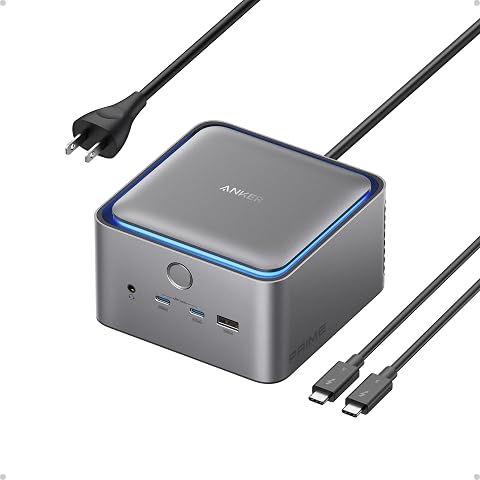 Anker Prime 14-in-1 Thunderbolt 5 Docking StationView on Amazon →
- 2
 Dell Pro Thunderbolt 4 Smart Dock SD25TB4 – USB-C Station 130W, 4 Displays 4K…View on Amazon →
- 3
 Plugable Thunderbolt 4 Dock with 100W Charging, Dual MonitorView on Amazon →
- 4
 Plugable Thunderbolt 4 Dock (TBT-UDM) for Mac and WindowsView on Amazon →
- 5
 Dell WD19TB Thunderbolt Docking Station with 180W AC AdapterView on Amazon →
- 6
 Dell Thunderbolt Dock WD19TBS with 130W Power DeliveryView on Amazon →
Match the Dock to Your Desk
A dock can reduce cable swapping and connect displays, storage, networking and other peripherals through a single desk setup. Choosing based on headline features alone may lead to extra cost or a setup that does not meet expectations. A Thunderbolt 5 model may offer more bandwidth headroom, but a laptop without the matching capability may not make use of it.
Power and display limits also affect practical value. A dock’s adapter rating is not necessarily the same as the power delivered to a laptop, and a dock with multiple display outputs cannot override the computer’s own limits. Checking the full system before purchase matters more than counting connectors on the dock.
Products Worth Considering

Samsung Odyssey OLED G8 34-Inch Curved Ultra WQHD Gaming Monitor

Sonos One (Gen 2) Voice-Controlled Smart Speaker, White

Samsung Odyssey G55C 32-Inch QHD 1000R Curved Gaming Monitor
As an affiliate, we earn on qualifying purchases.
Six Models, Two Thunderbolt Generations
The recommendations divide into one Thunderbolt 5 dock and five Thunderbolt 4 docks. That makes the Anker model the guide’s choice for buyers looking at a newer connection generation, while the Plugable and Dell options address Thunderbolt 4 setups and more specific power or brand preferences.
The guide advises buyers to work backward from their laptop and desk: verify the computer’s port specification and operating-system support; list monitor resolution, refresh rate and inputs; compare laptop power requirements with dock output; and identify which peripherals need to remain connected. It also warns that similarly named Dell WD19 models have distinct power details, so buyers should check the exact configuration.
“A dock’s port count alone does not guarantee that every screen or peripheral will work as expected.”
— ThorstenMeyerAI.com buying guide
Compatibility Depends on the Host
The source does not give exact supported monitor resolutions, refresh rates or display combinations for each dock, nor does it name every compatible laptop and operating-system configuration. It also supplies no pricing, availability information, dated testing or measured performance comparisons. As a result, the rankings cannot establish which dock is the best value at a particular price or guarantee a specific result on an individual computer.
Buyers should verify the computer maker’s Thunderbolt and external-display specifications, the dock’s supported operating systems, and the required charging level before ordering. The guide’s figures describe listed configurations; they do not confirm that every laptop will receive that power or drive every display configuration.
Check Specs Before Buying
Buyers can compare the exact laptop model, operating system, monitor requirements and charger rating with the dock’s official specifications. They should confirm the intended display arrangement—including resolution and refresh rate—and whether the dock can replace the laptop’s power adapter for the intended workload. The source provides no announced follow-up testing or product update, so current pricing, stock and compatibility should be checked with manufacturers or retailers before purchase.
Key Questions
Which dock does the guide rank first?
The guide names the Anker Prime 14-in-1 Thunderbolt 5 Dock its best overall pick, citing its newer-generation bandwidth positioning and broad connection focus.
Are all six recommendations Thunderbolt 5 docks?
No. The Anker is the sole Thunderbolt 5 model in the list. The other five—the two Plugable docks and three Dell docks—are Thunderbolt 4 models.
Can any of these docks guarantee dual-monitor support?
No general guarantee is established by the guide. Monitor support depends on the dock’s supported configuration as well as the laptop, operating system, display specifications and connection type. Check the exact combination before buying.
What is the difference between the Dell WD19TB and WD19TBS?
The guide distinguishes their listed power configurations: the WD19TB is paired with a 180W adapter, while the WD19TBS is listed with 130W Power Delivery. Buyers should check their laptop’s requirements and the exact product configuration.
Source: ThorstenMeyerAI.com