🔍 Read the full analysis: Compare 8 Drawing Tablets For Digital Art In 2027 on ThorstenMeyerAI.com

Prime made for students and young adults
- Fast, free delivery for dorm and study essentials
- Prime Video and Amazon Music included
- Member-only deals
TL;DR
This comparison ranks eight drawing tablets for different setups: computer-connected screen tablets, screenless pen tablets and standalone devices. The source favors the HUION Kamvas 13 (Gen 3) overall, but provides no independent testing, prices or confirmed 2027 product updates; buyers should check exact specifications and compatibility.
ThorstenMeyerAI.com’s comparison of eight drawing tablets identifies the HUION Kamvas 13 (Gen 3) as its overall pick for artists who want a computer-connected display, while recommending different models for larger screenless work areas or standalone drawing. The guide’s central point is that setup, compatibility and workspace can matter as much as advertised pen features. The material supplied does not establish independent test results, prices or 2027 product changes.
The comparison covers three types of device: screen tablets, which connect to a computer and show the artwork under the pen; screenless pen tablets, which control a separate computer display; and standalone tablets, which can run supported drawing apps without a computer, as discussed in this drawing tablet guide. The guide ranks the Kamvas 13 (Gen 3) first for its display and dual dials, and the HUION Inspiroy H1060P as a value-oriented choice for buyers who already have a computer and want a larger active area.
The other named products are the HUION H640P, Wacom Intuos Small, XP-Pen Artist 13.3 Pro V2 listings, Frunsi RubensTab T11 Pro and PicassoTab A10. The guide says the H640P and Intuos Small prioritize portability, while the Frunsi and PicassoTab support standalone use. It cautions that two XP-Pen listings appear closely related and advises checking the exact version, package and included accessories before choosing.
The source describes its approach as a practical comparison of drawing setup, workspace, controls, portability, stated pen features and learning curve, topics also covered in this guide to AI drawing tablets. It does not provide test measurements, a full specification table, prices or a detailed account of how each product performed. Its rankings should therefore be read as editorial recommendations, not as results from documented laboratory testing.
The 8 picks
- 1
 HUION Kamvas 13 (Gen 3) 13.3-Inch Drawing Pen Display with Dual Dial and StandView on Amazon →
- 2
 PicassoTab 10" Standalone Drawing Tablet (A10)View on Amazon →
- 3
 XP-Pen Artist 13.3 Pro V2 Drawing Tablet with Screen, 16K Pressure Levels, Re…View on Amazon →
- 4
 XPPen Artist 13.3 Pro V2 Drawing Tablet with ScreenView on Amazon →
- 5
 Frunsi RubensTab T11 Pro Standalone Drawing TabletView on Amazon →
- 6
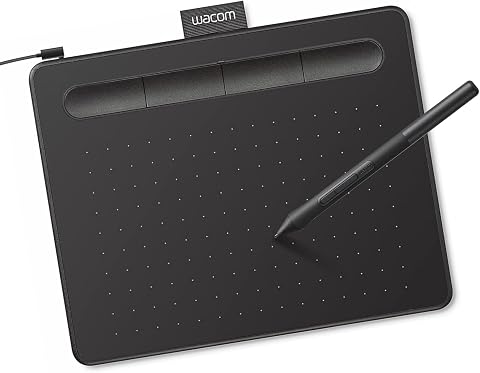 Wacom Intuos Small Wired Drawing Tablet with PenView on Amazon →
- 7
 HUION Inspiroy H1060P Graphics Drawing Tablet, 10 x 6.25 inView on Amazon →
- 8
 HUION Inspiroy H640P 6 × 4-Inch Drawing Tablet with Battery-Free StylusView on Amazon →
How Setup Shapes the Choice
The recommendations matter because these eight products do not offer the same kind of drawing experience. A screen tablet may feel more direct because the artist draws on the displayed image, but it needs a compatible computer and a suitable display connection. A pen tablet can cost less and work well with an existing computer setup, though drawing on one surface while looking at another can take practice. A standalone model reduces dependence on a computer for supported tasks, but app availability and workflow can differ.
For buyers, the guide’s most useful takeaway is to start with the way they plan to work, rather than selecting a tablet solely by pen pressure claims or shortcut count. Drawing area, desk space, portability, operating-system support and the desired art software all affect whether a device fits. These practical checks can help prevent a mismatch even when a product’s advertised features appear attractive.
Products Worth Considering

Apple Watch Series 12 GPS 42mm Smartwatch

EcoFlow Solar Generator DELTA 3 Classic with 2x100W Solar Panels, 1024Wh

Apple AirPods Pro 3 Wireless Earbuds with Active Noise Cancellation
As an affiliate, we earn on qualifying purchases.
Three Drawing Setups Compared
The guide groups the choices by the relationship between tablet and computer. A display tablet is a drawing surface and screen in one device, but it remains computer-connected in the models discussed. A screenless tablet sends pen input to a computer while the artwork appears on a separate monitor. A standalone tablet runs supported apps on the device itself, which can reduce the equipment needed for drawing away from a desk.
Workspace is a separate consideration from screen size. The H1060P is described as providing more room than the compact H640P and Intuos Small, a difference that may suit broad arm movements. Smaller tablets take less room and are easier to carry, but can feel restrictive for detailed work or larger gestures. Before buying, the guide advises checking the active area, connection requirements and compatibility with the intended computer, operating system and software.
“The main tradeoff is between drawing directly on a display, using a more affordable pen tablet with a separate computer screen, or paying for a self-contained tablet.”
— ThorstenMeyerAI.com buying guide
Details Buyers Must Verify
The supplied source does not state when the comparison was published, whether the products have been checked against 2027 versions, or whether all eight are currently available. It also omits pricing, detailed specifications and documented testing procedures. The recommendations are presented as the guide’s judgments, not as independently verified conclusions.
Several practical details remain product-specific. Buyers should confirm compatible operating systems and drawing apps, required cables or adapters, and whether a standalone tablet supports their preferred software. The source also does not resolve whether the two XP-Pen listings differ in specifications or package contents. No claim about comparative performance, value at current prices or long-term reliability can be confirmed from the supplied material alone.
Checks Before You Buy
The guide gives no announced follow-up tests or publication schedule. For shoppers, the next step is to compare the exact product listing with the intended setup: check the active drawing area, supported software, computer or mobile-device compatibility, connection requirements and included accessories. For a standalone device, confirm that the desired art apps are available and suitable for the workflow.
Buyers comparing the XP-Pen listings should verify the precise model and package rather than relying on the shared product name. Those considering a screen tablet should confirm that their computer can support its display connection. Current prices, stock and any revised product versions should be checked with the seller or manufacturer, since the source material does not establish those details.
Key Questions
Which tablet does the comparison rank first?
The guide names the HUION Kamvas 13 (Gen 3) as its overall pick, citing its computer-connected display and dual dials. The recommendation is the source’s editorial assessment, not a documented independent test result.
Which option is described as a value choice?
The source recommends the HUION Inspiroy H1060P for buyers who already have a computer and want a larger screenless drawing area. Check compatibility and the current listing before purchase.
What is the difference between a pen tablet and a screen tablet?
A pen tablet has no built-in display; the artist draws on its surface while viewing the image on a computer monitor. A screen tablet displays the artwork under the pen, but the models discussed require a compatible computer connection.
Can the Frunsi RubensTab T11 Pro and PicassoTab A10 work without a computer?
The guide describes both as supporting standalone use for supported tasks. It does not list app compatibility or confirm that every drawing workflow works without a computer, so buyers should check the specific software they plan to use.
Are the two XP-Pen Artist 13.3 Pro V2 listings different?
The source says the listings appear to describe closely related tablets but does not establish whether their specifications differ. Compare the exact model details and included accessories in each listing.
Source: ThorstenMeyerAI.com