
🔍 Read the full analysis: Looking For A 3D Printer? 10 Best Picks For Multicolor Projects In 2027 on ThorstenMeyerAI.com

Prime made for students and young adults
- Fast, free delivery for dorm and study essentials
- Prime Video and Amazon Music included
- Member-only deals
TL;DR
A 2027 buyer’s guide ranks 10 3D printers for multicolor projects, putting the Bambu Lab P2S Combo first for its enclosed printer and included multicolor system. The guide also compares open-frame models, standalone printers and a four-toolhead design, while noting that speed and color capability come with tradeoffs in setup, print time and material waste.
ThorstenMeyerAI.com’s 2027 buyer’s guide compares 10 3D printers for multicolor projects and ranks the Bambu Lab P2S Combo first as a well-rounded package with an enclosed printer and included multicolor material system. The guide also highlights alternatives for hobbyists, buyers who want an enclosed printer without bundled color hardware, and makers considering a four-toolhead workflow.
The guide’s recommendations turn on more than the number of colors a printer can produce. It compares enclosure design, material handling, setup, maintenance and versatility, and gives added weight to whether a multicolor system is included in the package. The ranking puts general-purpose usefulness ahead of narrower advantages such as an open frame or speed-focused design.
The P1S and P1S Combo are treated as different options: the standalone P1S is for buyers seeking an enclosed printer without bundled multicolor hardware, while the Combo adds an AMS system. The guide describes the A1 and A1 Combo as more accessible open-frame choices for hobbyists whose materials and workspace suit that design.
Other models named include the Snapmaker U1, Adventurer 5M, Kobra X, AD5X and K2 Combo. The source presents the U1’s four-toolhead setup as a different approach to multicolor printing, while the Adventurer 5M is associated with fast CoreXY printing. It does not provide a complete model-by-model specification table or testing data in the supplied material.
The 10 picks
- 1
 Snapmaker U1 3D Printer with 4-Toolhead and 5-Second Tool ChangerView on Amazon →
- 2
 Bambu Lab P2S Combo – P2S 3D Printer with AMS 2 Pro (Multi‑Color)View on Amazon →
- 3
 Bambu Lab P1S Combo 3D Printer with AMS – Multi‑Color PrintingView on Amazon →
- 4
 Creality K2 Combo 3D Printer, Multicolor Printing, Max 600mm/s Speed, Auto Le…View on Amazon →
- 5
 Bambu Lab A1 Combo + LED Lamp Kit (with AMS Lite)View on Amazon →
- 6
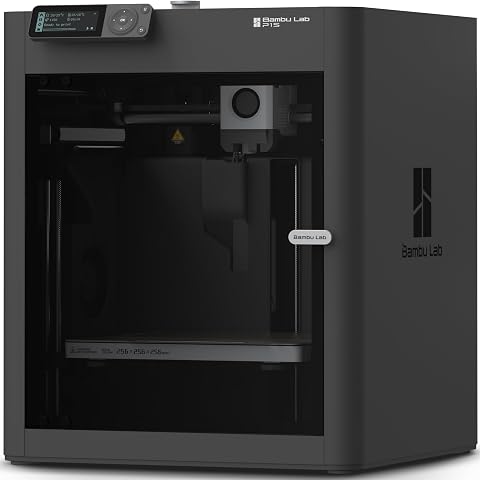 Bambu Lab P1S 3D PrinterView on Amazon →
- 7
 Anycubic Kobra X Multicolor 3D PrinterView on Amazon →
- 8
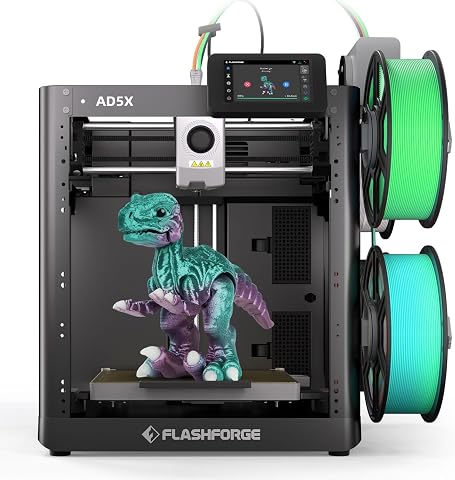 Flashforge AD5X Multi-Material 3D PrinterView on Amazon →
- 9
 Bambu Lab A1 FDM 3D PrinterView on Amazon →
- 10
 FLASHFORGE Adventurer 5M 3D Printer, All-Metal CoreXY, 600mm/s Max TravelView on Amazon →
Choosing a Workflow, Not Just Colors
The guide’s comparison matters to buyers because multicolor printing is not a single, uniform feature. Filament-switching systems and multiple toolheads change how a print is produced, and each approach can affect setup, upkeep, print time and material use. A higher color count alone does not show which system will suit a particular project.
For small decorative objects or occasional color accents, an automated system may not justify its added cost and complexity. The guide notes that frequent filament changes can extend print times and produce purge waste, especially when several colors are used in one layer. Makers producing mostly functional, single-color parts may find a simpler machine a better fit.
Enclosure and speed also need to match actual use. An enclosed printer may help manage drafts and temperature for some materials, but takes more space and may require ventilation planning. Maximum movement speed does not guarantee a faster finished print at a desired quality; model geometry, material, cooling and layer settings all affect results.
Products Worth Considering

Apple AirPods Pro 3 Wireless Earbuds with Active Noise Cancellation

Amazon Kindle Scribe Colorsoft 64GB with Premium Pen

Logitech MX Mechanical Wireless Illuminated Keyboard, Tactile Quiet, Graphite
As an affiliate, we earn on qualifying purchases.
How the Guide Ranks Its Picks
ThorstenMeyerAI.com says it compared the 10 printers by print-system design, material handling, enclosure, setup, expected maintenance and versatility. It also separated enclosed CoreXY machines from open-frame printers rather than using headline speed as the sole measure. Its ordering favors broad usefulness, with lower-ranked machines still potentially better for buyers with specific requirements.
The source advises shoppers to consider their typical models and workspace before buying. Build volume, access for loading filament, room around the printer and material compatibility can matter more day to day than a rarely used maximum capacity. Larger projects may be split and assembled, but that can add design work and visible seams.
The recommendations are a buyer’s-guide assessment, not a reported independent laboratory test in the material provided. The source describes its selection criteria and preferences but does not state that it ran controlled print comparisons, nor does the supplied text list prices, measured print times or quantified waste for each machine.
“The P2S Combo ranks first as the most complete general-purpose bundle in this group.”
— ThorstenMeyerAI.com buyer’s guide
Specs, Prices and Test Results
The supplied source does not give prices, detailed specifications, availability or a publication date, so it is not possible to verify how the recommendations compare on cost or whether every model is currently sold in each market. It also does not supply controlled test results, such as print-time measurements, reliability rates or waste quantities.
The guide names 10 printers, but the supplied text does not identify all 10 models: it lists the P2S Combo, P1S, P1S Combo, A1, A1 Combo, Snapmaker U1, Adventurer 5M, Kobra X, AD5X and K2 Combo, which totals 10 only when the P1S and Combo and the A1 and Combo are counted separately. Specific claims about performance, materials and bundled accessories should be checked against current manufacturer listings before purchase.
Check Current Models Before Buying
Shoppers can use the guide’s ranking as a starting point, then compare current package contents, material compatibility, footprint and support information with the projects they plan to make. In particular, buyers should confirm whether a multicolor system is included or sold separately and what consumables the workflow requires.
For a more direct comparison, the next useful information would be current prices and model-by-model testing under stated materials and print settings, including finished-part quality, total print time and filament waste. Those details are not present in the supplied source, so the ranking should be treated as a recommendation rather than a definitive performance result.
Key Questions
Which printer does the guide recommend first?
The guide ranks the Bambu Lab P2S Combo first, describing it as a general-purpose package that pairs an enclosed printer with included multicolor hardware.
What is the difference between the P1S and P1S Combo in the guide?
The standalone P1S is presented as an enclosed printer without bundled multicolor hardware. The P1S Combo adds an AMS system for handling multiple filaments.
Does multicolor printing always save time?
No. The guide says filament changes can add print time and purge waste, particularly when a model uses several colors on a layer. Actual results depend on the printer, workflow and project.
Is an enclosed printer the right choice for every buyer?
Not necessarily. The guide says an enclosure can help manage drafts and temperature for some materials, but it uses more space and may call for ventilation planning. Buyers should match the enclosure to their materials and workspace.
Are the rankings based on published controlled tests?
The supplied source describes comparison criteria but does not report controlled testing or measured results for print speed, quality, reliability or material waste. Its ranking is presented as a buyer’s-guide assessment.
Source: ThorstenMeyerAI.com