
The best triple-laser projector for most home theaters is the Hisense C3 Pro, which pairs 4K resolution with Dolby Vision and a high-refresh gaming mode. The Dangbei MP1 Max stands out for buyers who want Google TV, while the AWOL VISION LTV-3000 Pro is a dedicated ultra-short-throw choice for placing a large image close to a wall. The main tradeoffs are placement flexibility, brightness in your room, gaming features, and how much setup work you are willing to do. Triple-laser models differ in more than color: lens design, built-in streaming, and screen distance can matter just as much. Read on for the full breakdown and a guide to choosing the right fit.

Prime made for students and young adults
- Fast, free delivery for dorm and study essentials
- Prime Video and Amazon Music included
- Member-only deals
Key Takeaways
- The Hisense C3 Pro leads for mixed use: Dolby Vision and 240Hz gaming features give it a broader brief than a theater-only model, though buyers should check whether its placement range suits their room.
- Ultra-short-throw is a distinct setup choice, not a universal upgrade: The AWOL VISION LTV-3000 Pro can sit near the screen, while standard-throw models require more distance and a different room layout.
- Portable and fixed-room priorities split the field: The Hisense M2 Pro emphasizes portability, while the XGIMI HORIZON 20 Pro and Valerion VisionMaster Pro2 are more naturally suited to a dedicated viewing setup.
- Bright-room use calls for more than a headline lumen figure: The JMGO N3 Ultimate lists 5800 ISO lumens, but ambient light, screen choice, and image size still shape perceived contrast and color.
- Google TV and built-in apps can simplify a setup, but they are not a reason to skip connectivity checks: Streaming needs, external devices, room placement, and gaming latency should all factor into a purchase.
| Hisense M2 Pro Triple Laser Smart Portable Projector, 4K UHD |  | Best for Compact, Low-Light Viewing | Native resolution: 3840 × 2160 | Brightness: 1,300 ANSI lumens | Image size: 65–200 inches | VIEW LATEST PRICE | See Our Full Breakdown |
| Hisense C3 Pro 4K Triple Laser Projector with Dolby Vision and 240Hz Gaming |  | Best for Gaming and Flexible Placement | Native resolution: 3840 × 2160 | Brightness: 3,000 ANSI lumens | Image size: 65–300 inches | VIEW LATEST PRICE | See Our Full Breakdown |
| Dangbei MP1 Max 4K Triple Laser Projector with Google TV |  | Best for Easy Setup and Built-In Streaming | Native resolution: 3840 × 2160 | Brightness: 3,100 lumens | Color gamut: 110% BT.2020 | VIEW LATEST PRICE | See Our Full Breakdown |
| Nebula X1S 4K RGB Triple-Laser Projector with Google TV |  | Best for Bright Rooms and Integrated Audio | Native resolution: 3840 × 2160 | Maximum brightness: 6,000 ANSI lumens in Peak Output Mode | Color gamut: 106% Rec. 2020 in Vivid Mode | VIEW LATEST PRICE | See Our Full Breakdown |
| XGIMI HORIZON 20 Pro 4K RGB Triple Laser Home Projector |  | Best for Premium Gaming and HDR Formats | Native resolution: 3840 × 2160 | Light source: RGB triple laser | Brightness: 4,100 ISO lumens | VIEW LATEST PRICE | See Our Full Breakdown |
| AWOL VISION LTV-3000 Pro 4K 3D Ultra Short Throw Triple Laser Projector |  | Best Ultra Short Throw for Home Theater | Native resolution: 3840 x 2160 | Light source: Triple laser | Throw ratio: 0.25:1 | VIEW LATEST PRICE | See Our Full Breakdown |
| Valerion VisionMaster Pro2 4K Triple Laser Projector |  | Best All-in-One Flexible Setup | Native resolution: 3840 × 2160 | Display type: DLP RGB triple laser | Brightness: 3,000 ISO lumens | VIEW LATEST PRICE | See Our Full Breakdown |
| JMGO N3 Ultimate 4K Triple Laser Projector, 5800 ISO Lumens |  | Best for Bright Rooms and Gaming | Resolution: 3840 x 2160 | Brightness: 5,800 ISO lumens | Color gamut: 110% BT.2020 | VIEW LATEST PRICE | See Our Full Breakdown |
| JMGO N1S Ultimate Triple-Laser 4K Projector, 3300 ISO Lumens, Google TV |  | Best Portable 4K All-Rounder | Native resolution: 3840 x 2160 | Display type: Triple RGB laser | Brightness: 3,300 ISO lumens | VIEW LATEST PRICE | See Our Full Breakdown |
| JMGO N1S Ultra 4K Triple Laser Projector with Google TV | 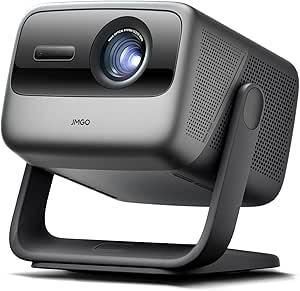 | Best for Color Accuracy and Easy Setup | Native resolution: 3840 × 2160 | Light source: Triple RGB laser | Brightness: 2,800 ISO lumens | VIEW LATEST PRICE | See Our Full Breakdown |
| Ultra Short Throw Triple Laser Projector, 1080p with Built-In Apps |  | Best Compact-Room Pick | Native resolution: 1920 × 1080 | Light source: RGB triple laser | Throw ratio: 0.18:1 | VIEW LATEST PRICE | See Our Full Breakdown |
| triple-laser projector | Native resolution | Brightness | Image size | Color gamut |
|---|---|---|---|---|
| Hisense M2 Pro Triple Laser Sm | 3840 × 2160 | 1,300 ANSI lumens | 65–200 inches | — |
| Hisense C3 Pro 4K Triple Laser | 3840 × 2160 | 3,000 ANSI lumens | 65–300 inches | 118% BT.2020 |
| Dangbei MP1 Max 4K Triple Lase | 3840 × 2160 | 3,100 lumens | 40–300 inches | 110% BT.2020 |
| Nebula X1S 4K RGB Triple-Laser | 3840 × 2160 | — | — | 106% Rec. 2020 in Vivid Mode |
| XGIMI HORIZON 20 Pro 4K RGB Tr | 3840 × 2160 | 4,100 ISO lumens | 40–300 inches | — |
| AWOL VISION LTV-3000 Pro 4K 3D | 3840 x 2160 | 2,000 lm; maximum white brightness 3,000 ANSI lumens | 80–150 inches | 107% BT.2020; 147% DCI-P3 |
| Valerion VisionMaster Pro2 4K | 3840 × 2160 | 3,000 ISO lumens | 40–300 inches | 110% Rec.2020 |
| JMGO N3 Ultimate 4K Triple Las | — | 5,800 ISO lumens | 40–300 inches | 110% BT.2020 |
| JMGO N1S Ultimate Triple-Laser | 3840 x 2160 | 3,300 ISO lumens | 60–300 inches | 110% BT.2020 |
| JMGO N1S Ultra 4K Triple Laser | 3840 × 2160 | 2,800 ISO lumens | 60–300 inches | — |
| Ultra Short Throw Triple Laser | 1920 × 1080 | 1000 ANSI lumens | — | 110% BT.2020 |
More Details on Our Top Picks
Hisense M2 Pro Triple Laser Smart Portable Projector, 4K UHD
The Hisense M2 Pro is the more restrained portable choice in this group: its 4K triple-laser image, Dolby Vision, and optical zoom suit a dedicated room or evening viewing without demanding a fixed installation. The 1.0–1.3:1 zoom lets me adjust screen size while keeping the projector in place, a practical advantage over options that rely more heavily on moving the unit. Its 1,300 ANSI lumens are the main limit: compared with the much brighter Hisense C3 Pro or Dangbei MP1 Max, it is less suited to rooms with ambient light. VIDAA includes Netflix, and the portable mounting options add flexibility, but the 65-inch minimum image is less accommodating for very small setups. Active 3D also requires separately purchased DLP-Link glasses.
Pros:- 4K triple-laser light source with Dolby Vision support
- Optical zoom changes image size without relocating the projector
- VIDAA supports streaming apps including Netflix
- Portable design allows tabletop, ceiling, and rear mounting
Cons:- 1,300 ANSI lumens make low-light viewing the better fit
- Active 3D requires separate DLP-Link shutter glasses
- Minimum image size is 65 inches, limiting very small-room flexibility
Best for: Viewers who want a portable 4K triple-laser projector for a darkened bedroom, den, or occasional movie setup, with optical zoom and built-in streaming.
Not ideal for: Buyers who watch with lights on or want a very large image in a bright room; its 1,300 ANSI lumens trail the C3 Pro and MP1 Max.
- Native resolution:3840 × 2160
- Brightness:1,300 ANSI lumens
- Image size:65–200 inches
- Light source:Triple laser
- Optical zoom:1.0–1.3:1
- Contrast ratio:5,000:1
- Operating system:VIDAA
- Connectivity:Wi-Fi, Bluetooth 5, HDMI, USB 3.0
Our verdict“Choose the M2 Pro for portable, low-light 4K viewing with optical zoom, but pick the brighter C3 Pro or MP1 Max for rooms with more ambient light.”
Hisense C3 Pro 4K Triple Laser Projector with Dolby Vision and 240Hz Gaming
The Hisense C3 Pro pairs a bright 3,000-ANSI-lumen triple-laser image with a feature set that makes it the gaming-focused pick here. Its HDMI 2.1, VRR, and up-to-240Hz support can suit fast play, though that 240Hz ceiling applies at 1080p rather than native 4K. Compared with the M2 Pro, it offers more brightness, a wider 65–300-inch image range, and 1.6x optical zoom; lens shift and automatic image adjustment also reduce setup fuss. The Dangbei MP1 Max reaches a similar stated brightness and adds an adjustable stand plus Google TV, while the C3 Pro counters with Wi-Fi 7, Bluetooth 5.4, and gaming features. It needs mains power during use, so its portability is about placement rather than cordless operation.
Pros:- 3,000 ANSI lumens and Dolby Vision support for a bright, HDR-capable image
- 1.6x optical zoom and lens shift offer flexible placement
- HDMI 2.1, VRR, and gaming support up to 240Hz at 1080p
- Wi-Fi 7 and Bluetooth 5.4 provide current wireless connectivity
Cons:- 240Hz gaming support is limited to 1080p
- Requires a power connection during use
- The 65-inch minimum image may not suit very small projection spaces
Best for: Console and PC gamers who want a portable 4K triple-laser projector, broad placement flexibility, and fast-refresh 1080p play.
Not ideal for: Buyers seeking 240Hz at native 4K or a projector that can operate without a power connection.
- Native resolution:3840 × 2160
- Brightness:3,000 ANSI lumens
- Image size:65–300 inches
- Color gamut:118% BT.2020
- Optical zoom:1.6×
- Gaming refresh rate:Up to 240Hz at 1080p
- Input lag:1ms
- Connectivity:HDMI 2.1, Ethernet, USB 3.0, Wi-Fi 7, Bluetooth 5.4
Our verdict“Pick the C3 Pro if gaming features, brightness, and setup flexibility matter more than cordless use or 240Hz at 4K.”
Dangbei MP1 Max 4K Triple Laser Projector with Google TV
The Dangbei MP1 Max is the most self-contained setup choice in this batch: its Google TV with Netflix, voice control, adjustable stand, and AI-assisted focus and screen fitting reduce the number of separate steps between placement and viewing. At 3,100 lumens, it is brighter on paper than the Hisense M2 Pro and comparable to the C3 Pro, while its 40-inch minimum image gives it an advantage in tighter rooms. The C3 Pro offers more explicit gaming credentials and a larger maximum image; the MP1 Max instead leans on convenience, including obstacle avoidance and built-in Dolby Audio and DTS:X speakers. Its 2–4.5-meter throw range still sets real placement boundaries, so it is not a short-throw solution for a projector placed close to the screen.
Pros:- 3,100-lumen output and 110% BT.2020 color coverage
- AI autofocus, keystone correction, screen fitting, and obstacle avoidance simplify setup
- Built-in adjustable stand offers 360° horizontal rotation and 135° vertical tilt
- Google TV with Netflix plus dual 12W Dolby Audio and DTS:X speakers
Cons:- Requires at least 2 meters of throw distance
- Maximum throw distance is 4.5 meters
- The listed specifications do not detail the high-refresh gaming features found on the C3 Pro
Best for: Households that want a straightforward Google TV projector with automatic image adjustments, built-in audio, and flexible placement in a medium-sized room.
Not ideal for: Buyers who need a short-throw projector for a shallow room, or who prioritize specified high-refresh gaming features like those on the C3 Pro.
- Native resolution:3840 × 2160
- Brightness:3,100 lumens
- Color gamut:110% BT.2020
- Image size:40–300 inches
- Throw distance:2–4.5 meters
- Smart platform:Google TV with Netflix
- Audio:Dual 12W speakers, Dolby Audio, DTS:X
- Connectivity:HDMI 2.1 with eARC, USB, Bluetooth 5.2, Wi-Fi 6
Our verdict“Choose the MP1 Max if you want built-in streaming, automatic setup aids, and integrated speakers in a brighter, more flexible package than the M2 Pro.”
Nebula X1S 4K RGB Triple-Laser Projector with Google TV
The Nebula X1S stands apart on peak output: its listed 6,000 ANSI lumens give it the strongest brightness claim in this group, which may help in rooms where the M2 Pro’s 1,300 lumens would be restrictive. That figure is specified for Conference Mode, though, so I would not treat it as a direct guarantee of color-accurate movie brightness; Vivid Mode is the stated color-focused setting. A 14-element all-glass lens, 1.67× optical zoom, and AI spatial adaptation give it more placement tools than a fixed-lens setup, while Google TV and 40W Dolby Audio make it a more self-contained entertainment unit than the C3 Pro. Its larger body and stated throw range still need room planning, and the mode-dependent brightness claim calls for care when comparing it with the MP1 Max.
Pros:- RGB triple-laser 4K projection with Dolby Vision support
- Up to 6,000 ANSI lumens in Peak Output Mode
- 1.67× optical zoom and AI spatial adaptation support flexible setup
- Built-in 40W Dolby Audio speakers and Google TV
Cons:- The 6,000-lumen figure is specified for Conference Mode, not as a color-accuracy mode
- Its 11.14 × 7.32 × 9.76-inch dimensions may complicate tight placements
- The stated throw distance of 1.69–4.78 meters still requires room planning
Best for: Home-theater buyers with a brighter viewing space who want strong peak output, optical zoom, Google TV, and substantial built-in speakers.
Not ideal for: Shoppers with tight shelves or limited placement space, or buyers who need a clearly stated movie-mode brightness figure for direct comparison.
- Native resolution:3840 × 2160
- Maximum brightness:6,000 ANSI lumens in Peak Output Mode
- Color gamut:106% Rec. 2020 in Vivid Mode
- Native contrast ratio:5,000:1
- Dynamic contrast ratio:56,000:1
- Optical zoom:1.67×
- Audio:Built-in 40W Dolby Audio speakers
- Throw distance:1.69–4.78 meters
Our verdict“Choose the X1S for its high stated peak brightness, optical zoom, and integrated sound, but compare brightness modes carefully against the MP1 Max and C3 Pro.”
XGIMI HORIZON 20 Pro 4K RGB Triple Laser Home Projector
The XGIMI HORIZON 20 Pro is the most gaming-oriented premium pick here, combining 1ms response time, 240Hz, VRR, and ALLM with 4K RGB triple-laser projection. Its 4,100 ISO-lumen rating sits above the Hisense C3 Pro’s 3,000 ANSI lumens on the supplied figures, though the units differ, so they are not a clean head-to-head brightness measurement. Dolby Vision, HDR10+, and IMAX Enhanced broaden its format support beyond the C3 Pro’s listed Dolby Vision and IMAX Enhanced. Optical zoom and lens shift also help with placement, while Google TV and Harman Kardon speakers limit the need for extra equipment. The tradeoff is that the manufacturer warns some viewers may notice laser speckle or a faint rainbow effect and recommends an ALR screen and viewing distance beyond nine feet.
Pros:- RGB triple-laser 4K projection with Dolby Vision, HDR10+, and IMAX Enhanced
- Gaming features include 1ms response time, 240Hz, VRR, and ALLM
- Optical zoom and lens shift help adapt placement
- Google TV and Harman Kardon speakers are built in
Cons:- Some viewers may notice laser speckle or a faint rainbow effect
- The manufacturer recommends an ALR screen and viewing distance over 9 feet
- Its 4,100 ISO-lumen figure uses a different stated measurement unit from the C3 Pro’s ANSI-lumen rating
Best for: Gamers and home-theater buyers who want 4K triple-laser projection, multiple HDR formats, and advanced refresh-rate features in one projector.
Not ideal for: Viewers sensitive to laser speckle or rainbow effects, people sitting closer than the recommended viewing distance, or buyers unwilling to plan around an ALR screen.
- Native resolution:3840 × 2160
- Light source:RGB triple laser
- Brightness:4,100 ISO lumens
- Contrast ratio:20,000:1
- Image size:40–300 inches
- Gaming features:1ms response time, 240Hz, VRR, ALLM
- Picture formats:IMAX Enhanced, Dolby Vision, HDR10+
- Smart platform and speakers:Google TV; Harman Kardon speakers
Our verdict“Choose the HORIZON 20 Pro for its broad HDR support and gaming features, provided its viewing-distance and screen recommendations suit your room.”
AWOL VISION LTV-3000 Pro 4K 3D Ultra Short Throw Triple Laser Projector
The AWOL VISION LTV-3000 Pro is the specialist pick for buyers who want a large image from a cabinet close to the wall. Its 0.25:1 throw ratio can produce an 80-to-150-inch picture from very short distances, avoiding the long-room placement needed by the JMGO N1S Ultimate. Dolby Vision, HDR10+, and 3D support broaden its movie options, while the built-in center channel speaker maps dialogue toward the image rather than leaving voices anchored below it. Its tradeoff is flexibility: the fixed lens ratio calls for careful placement, and 2,000 lm brightness makes an ALR screen useful when room light is hard to control. Choose it for a planned theater setup, not frequent moves or casual repositioning.
Pros:- 0.25:1 ultra-short-throw ratio supports large images from close to the wall.
- 4K resolution with Dolby Vision, HDR10+, and 3D support.
- Built-in center-channel speaker maps dialogue to the screen.
- PJ Link and Control4 compatibility suit home-automation setups.
Cons:- Fixed throw ratio leaves little room to adjust placement once installed.
- Best contrast in brighter rooms may require an ALR screen.
- 3D viewing requires active shutter glasses and a compatible source.
Best for: Home-theater buyers who need a large 4K image from a low cabinet close to the screen and want mapped center-channel dialogue.
Not ideal for: People who want to move a projector between rooms, need flexible lens placement, or watch mainly in a bright room without an ALR screen.
- Native resolution:3840 x 2160
- Light source:Triple laser
- Throw ratio:0.25:1
- Image size:80–150 inches
- Brightness:2,000 lm; maximum white brightness 3,000 ANSI lumens
- Color gamut:107% BT.2020; 147% DCI-P3
- Supported formats:4K UHD, Dolby Vision, HDR10+, 3D
- Light source life:25,000 hours
Our verdict“Choose the LTV-3000 Pro for a dedicated, close-placement theater setup; pick a flexible standard-throw model if you need easier repositioning.”
Valerion VisionMaster Pro2 4K Triple Laser Projector
The Valerion VisionMaster Pro2 makes the most sense for buyers who want a standard-throw projector that can handle movies, streaming, and gaming without a separate streamer. Its 0.9–1.5 throw ratio and automatic focus, keystone correction, obstacle avoidance, and screen alignment make placement less fussy than the fixed-ratio AWOL LTV-3000 Pro. Google TV and broad wireless casting options also simplify everyday use. The stated 3,000 ISO lumens and 110% Rec.2020 gamut support a bright, colorful picture, while the 300-inch maximum image size gives it room to scale up. Compared with the brighter JMGO N3 Ultimate, it offers less headline brightness; its 240 Hz and 4 ms gaming figures are also specified for ultra-wide screens, not every setup.
Pros:- Flexible 0.9–1.5 throw ratio suits a range of room layouts.
- Automatic focus, keystone correction, obstacle avoidance, and screen alignment reduce setup work.
- Google TV, AirPlay 2, Chromecast, and other casting options are built in.
- 4K resolution, 3,000 ISO lumens, and 110% Rec.2020 color coverage.
Cons:- Standard throw requires more distance from the screen than the AWOL LTV-3000 Pro.
- The maximum 240 Hz refresh rate and 4 ms input lag are specified for ultra-wide screens.
- The portable form still needs a suitable surface and a clear projection path.
Best for: Buyers who want one adaptable projector for streaming, wireless casting, gaming, and different room layouts.
Not ideal for: Viewers who need an ultra-short-throw installation or expect the listed 240 Hz and 4 ms gaming figures on standard-width screens.
- Native resolution:3840 × 2160
- Display type:DLP RGB triple laser
- Brightness:3,000 ISO lumens
- Throw ratio:0.9–1.5
- Image size:40–300 inches
- Color gamut:110% Rec.2020
- Refresh rate and input lag:Up to 240 Hz; 4 ms (specified for ultra-wide screens)
- Smart features:Google TV, AirPlay 2, Miracast, Chromecast, Alexa, Google Home, Apple HomeKit
Our verdict“Pick the VisionMaster Pro2 if you want flexible placement and built-in streaming, but not if your setup depends on ultra-short throw or standard-screen 240 Hz gaming.”
JMGO N3 Ultimate 4K Triple Laser Projector, 5800 ISO Lumens
For buyers prioritizing brightness and placement options, the JMGO N3 Ultimate is the most ambitious pick in this group. Its 5,800 ISO lumens exceed the Valerion VisionMaster Pro2’s stated 3,000 ISO lumens, giving it more headroom for a large image or a room that is not fully dark. A motorized gimbal, four-way lens shift, and optical zoom make it easier to aim and size the picture than the JMGO N1S Ultimate, which relies on its rotating gimbal rather than listed optical zoom and lens shift. Gaming features include VRR, up to 240 Hz, and 1 ms input lag. This versatility comes with a substantial installation footprint and a power connection; the 300-inch maximum also depends on suitable room and projection conditions.
Pros:- 5,800 ISO lumens provide the highest stated brightness in this five-projector group.
- Motorized gimbal, four-way lens shift, and optical zoom offer broad placement control.
- VRR, up to 240 Hz, and 1 ms input lag target gaming setups.
- Google TV, native Netflix, Chromecast, and dual 12.5W speakers are built in.
Cons:- Large-image projection can require considerable room and placement space.
- It needs a power connection and is less suited to quick, untethered use than portable-focused models.
- The stated 300-inch maximum depends on the room and projection conditions.
Best for: Buyers planning a large-screen setup who want high stated brightness, adjustable placement, built-in streaming, and gaming features.
Not ideal for: People who need a compact, battery-powered projector or lack the room and mounting options for a large standard-throw unit.
- Resolution:3840 x 2160
- Brightness:5,800 ISO lumens
- Color gamut:110% BT.2020
- Optical zoom:0.88–1.7:1
- Lens shift:Horizontal ±53%; vertical ±130%
- Gimbal movement:360° pan; 150° tilt
- Image size:40–300 inches
- Gaming:VRR; up to 240 Hz; 1 ms input lag
Our verdict“Choose the N3 Ultimate for a bright, adjustable large-screen setup with gaming features; skip it if portability and minimal installation matter more.”
JMGO N1S Ultimate Triple-Laser 4K Projector, 3300 ISO Lumens, Google TV
The JMGO N1S Ultimate is a strong middle ground for buyers who want portable-style setup flexibility without giving up 4K resolution or a wide color gamut. Its 3300 ISO lumens are higher than the JMGO N1S Ultra’s 2,800 ISO lumens, while Google TV, automatic focus, keystone correction, and a rotating gimbal cover the basics of a quick setup. It can project up to 300 inches, matching the maximum listed for the Valerion VisionMaster Pro2, though its 60-inch minimum is less useful when a smaller picture is needed. The N3 Ultimate offers much higher stated brightness and added optical zoom and lens shift; the N1S Ultimate is the simpler fit for buyers who value built-in audio and flexible aiming over advanced gaming specifications.
Pros:- 4K resolution with 3,300 ISO lumens and 110% BT.2020 color coverage.
- Automatic focus and keystone correction help simplify setup.
- Rotating gimbal supports a range of projection angles and mounting arrangements.
- Google TV and 20W audio with Dolby Digital Plus and DTS-HD are built in.
Cons:- The 60-inch minimum image size limits use in small rooms or for compact pictures.
- Maximum throw distance is 25.1 feet.
- Compared with the N3 Ultimate, it lacks listed optical zoom and lens-shift specifications.
Best for: Buyers seeking a movable 4K projector with built-in Google TV, automatic image adjustment, and a rotating gimbal.
Not ideal for: People who need an image smaller than 60 inches, a very long throw distance, or the N3 Ultimate’s higher stated brightness and lens-shift options.
- Native resolution:3840 x 2160
- Display type:Triple RGB laser
- Brightness:3,300 ISO lumens
- Contrast ratio:1600:1
- Color gamut:110% BT.2020
- Image size:60–300 inches
- Projection adjustment:360° horizontal and 135° vertical gimbal; automatic focus and keystone correction
- Audio:20W; Dolby Digital Plus and DTS-HD
Our verdict“Choose the N1S Ultimate for a flexible 4K projector with built-in streaming and audio, provided a 60-inch minimum picture suits your room.”
JMGO N1S Ultra 4K Triple Laser Projector with Google TV
The JMGO N1S Ultra suits viewers who value stated color accuracy and automatic setup over the extra brightness of its sibling, the N1S Ultimate. Its ΔE<1 color accuracy rating gives color-sensitive movie watchers a clear point of distinction, while 2,800 ISO lumens and 4K resolution make it a capable choice for a controlled-light room. The gimbal and sensors handle autofocus, keystone correction, screen fitting, and object avoidance, cutting down on manual alignment compared with the AWOL LTV-3000 Pro’s fixed ultra-short-throw placement. Google TV, Chromecast, and 20W Dolby Digital Plus speakers round out a self-contained setup. The tradeoffs are its 60-inch minimum image size and 25.1-foot maximum throw distance; the N1S Ultimate is brighter and lists a wider color gamut.
Pros:- ΔE<1 stated color accuracy suits viewers who prioritize faithful color.
- Gimbal and smart sensors support autofocus, keystone correction, screen fitting, and object avoidance.
- Google TV, Chromecast, and Google Assistant are integrated.
- 20W dual speakers support Dolby Digital Plus and bass down to 45 Hz.
Cons:- The minimum image size is 60 inches, limiting smaller-room flexibility.
- The maximum throw distance is 25.1 feet.
- The N1S Ultimate offers higher stated brightness and 110% BT.2020 color coverage.
Best for: Movie viewers who want a portable 4K triple-laser projector with a stated color-accuracy rating and sensor-assisted setup.
Not ideal for: Buyers who need an image under 60 inches, a throw beyond 25.1 feet, or more brightness than the N1S Ultimate offers.
- Native resolution:3840 × 2160
- Light source:Triple RGB laser
- Brightness:2,800 ISO lumens
- Color accuracy:ΔE<1
- Contrast ratio:1600:1
- Image size:60–300 inches
- Projection adjustment:Gimbal; autofocus, auto keystone correction, screen fitting, and object avoidance
- Connectivity:Bluetooth, HDMI 2.1 (eARC), USB 2.0, Wi-Fi, 3.5mm audio
Our verdict“Pick the N1S Ultra for color-focused viewing and automated setup in a controlled-light room, but choose the N1S Ultimate if higher brightness matters more.”
Ultra Short Throw Triple Laser Projector, 1080p with Built-In Apps
The 0.18:1 ultra-short-throw design is the main reason to choose this model: it can make a 100-inch picture from just 8.7 inches away, a practical fit for rooms where a conventional projector would need too much space. Its RGB triple-laser light source and stated 110% BT.2020 gamut offer wide color coverage, while built-in Android apps, autofocus, and dual 20 W speakers reduce the extra gear needed for casual viewing. Compared with 4K options such as the Hisense C3 Pro, this projector gives up native resolution and advanced gaming headroom in exchange for short placement distance and an integrated setup. The 1000 ANSI-lumen rating also makes a darkened room a better match than a bright living space. A smooth, flat wall or screen matters, and 3D glasses must be purchased separately.
Pros:- Projects a 100-inch image from 8.7 inches away, making it suitable for compact rooms.
- RGB triple-laser source with a stated 110% BT.2020 color gamut.
- Android apps, dual-band Wi-Fi, and Bluetooth support streaming and device connections.
- TOF autofocus, 6-way keystone correction, and dual 20 W speakers simplify setup and everyday viewing.
Cons:- Native 1920 × 1080 resolution offers less fine detail than the roundup’s 4K models.
- 1000 ANSI lumens is a better fit for controlled lighting than bright-room viewing.
- Image quality depends on a flat, smooth wall or screen, and DLP-Link 3D glasses are not included.
Best for: Apartment dwellers or families who want a large image close to the wall, built-in streaming, and simple tabletop setup.
Not ideal for: Viewers seeking native 4K detail, a bright-room picture, or a flexible image on an uneven wall; 3D buyers also need to source compatible DLP-Link glasses separately.
- Native resolution:1920 × 1080
- Light source:RGB triple laser
- Throw ratio:0.18:1
- Brightness:1000 ANSI lumens
- Color gamut:110% BT.2020
- 100-inch image distance:8.7 inches
- Audio:Dual 20 W speakers
- Operating system and memory:Android; 2 GB RAM and 32 GB storage
- 3D support:DLP-Link active shutter 3D; glasses sold separately
Our verdict“Choose this model for a space-saving, app-ready triple-laser setup in a compact, dimmable room, but pick a 4K or brighter alternative if detail or ambient-light performance matters more.”
How We Picked
I ranked these projectors around the questions that most affect a real purchase: how well each fits a room, what kind of viewing it supports, and how much setup friction it may bring. Image format and resolution, stated brightness, gaming features, built-in streaming, portability, and ultra-short-throw design all informed the comparison. I treated specs as evidence of intended use, not as a guarantee that one model will look better in every room.
The order favors balanced capability first, then models with a clear advantage for a particular buyer. The Hisense C3 Pro leads because its stated feature mix covers movies and gaming; specialized picks such as the AWOL ultra-short-throw model rank for their placement advantage rather than universal flexibility. I also weighed tradeoffs: an unusually bright specification does not settle contrast in a lit room, and a projector with built-in apps may still be a poor match if its throw distance or installation demands conflict with the space.
Factors to Consider When Choosing Best Triple-laser Projectors
Triple-laser projectors can share a light-source approach while serving very different rooms. Before choosing by resolution or a brightness figure, match the projector to your viewing distance, screen, lighting, and habits. These checks can help prevent paying for features your room cannot use—or overlooking a limitation that affects every viewing session.
Match Throw Distance to Your Room Before Comparing Features
Start by measuring the distance from the planned projector position to the screen, then compare it with the manufacturer’s throw and image-size guidance. A standard-throw projector may need a ceiling mount or a rear shelf, while an ultra-short-throw design is intended to sit close to the wall. Those approaches are not interchangeable: furniture depth, screen placement, and foot traffic can make one far easier to live with. Avoid assuming digital keystone correction makes any location equally good; heavy image correction can reduce usable resolution or complicate alignment. Check whether lens shift, zoom, and mounting options suit the room before paying for extra picture features.
Plan for Light, Screen Size, and Viewing Conditions Together
Brightness figures are useful for comparison, but they do not tell the whole story about a finished image. A larger image spreads available light over more area, and daylight or room lamps can wash out dark scenes even on a powerful projector. A darker room and a suitable screen can improve perceived contrast more than a small jump in a listed brightness number. For ultra-short-throw models, screen flatness and the right screen surface matter because the steep projection angle can reveal bumps or texture. Decide when and how large you plan to watch before treating a high lumen specification as a guarantee of bright-room performance.
Choose Gaming Features for the Games You Actually Play
A high refresh-rate mode can appeal to competitive players, but refresh rate alone does not establish how responsive a projector feels. Check supported resolution and refresh combinations, input lag information, and whether the gaming mode changes image processing or picture quality. Console and PC users should confirm that their preferred devices can output the formats the projector accepts. Movie-focused buyers may gain little from paying extra for gaming capabilities they rarely use. If gaming is central, verify the connection options and mode details rather than relying on a single headline number.
Treat Built-In Streaming as Convenience, Not a Complete Setup
Built-in Google TV or other apps can reduce the need for a separate streaming box and make casual viewing easier. App availability, updates, and service support can change, so check that the services you use are available on the specific model. Also compare the projector’s audio options with your plans for external speakers or a receiver; convenient streaming does not automatically mean a complete theater setup. If you already use a console, streaming device, or media server, prioritize the ports and control features those devices need. This can prevent paying extra for an interface you will rarely use.
Weigh Portability Against Installation and Repeatability
A portable projector makes sense if you expect to move it between rooms or take it along, but repeated setup can mean realigning the image and reconnecting accessories. A model intended to stay in one place may offer a more consistent arrangement for a main viewing space, even if it is less convenient to carry. Think about whether your screen is fixed, whether the projector has a secure resting or mounting location, and how often the room layout changes. For a shared room, portability can be useful only if the setup remains quick enough that you will actually use it. Buyers seeking a permanent theater should favor placement compatibility over a compact design they do not need.
Pay More for a Benefit Your Room Can Use
Premium features are easiest to justify when they solve a specific problem: an ultra-short-throw design for a shallow room, gaming modes for frequent play, or flexible placement for a space that cannot accept a fixed mount. More expensive specifications may have little impact if you watch on a small image in a dark room or already own the devices that handle streaming and sound. Compare the full installation cost too, including a screen, mount, cabling, and audio equipment. A lower-feature model can be the better choice when it fits your room without compromises. Spend on the bottleneck in your setup rather than adding capabilities that will sit unused.
Frequently Asked Questions
Is an ultra-short-throw triple-laser projector the right choice for a small room?
It can be a strong fit when the projector cannot sit far from the screen, since ultra-short-throw designs place the image from close to the wall. The projector still needs a suitable surface and careful alignment, and a screen designed for ultra-short-throw projection may improve results in a brighter room. Measure the available width and depth, including the projector’s footprint and any cabinet overhang. If you have ample distance and want flexible mounting, a standard-throw model may offer a simpler fit. Choose based on the room geometry, not just the promise of a large image.
Does a triple-laser projector work well with the lights on?
It may produce a watchable image with some ambient light, but no projector can fully avoid the effect of light washing out contrast. Room brightness, image size, wall or screen surface, and the content all influence the result. A brighter model can help, but a bright specification by itself does not promise a theater-like picture in daylight. For regular daytime viewing, consider light control and a screen suited to the projector’s placement. If you mainly watch films at night, contrast and screen setup may matter more than maximizing brightness.
Should I choose a projector with built-in Google TV or use a separate streaming device?
Built-in Google TV can make everyday streaming more direct and reduce the number of boxes and remotes in the setup. A separate device may still be preferable if you depend on particular apps, want a familiar interface, or already have a media system. Check app support and the projector’s available connections before deciding. Also consider where the device will sit and how you will route power and audio. For many buyers, the built-in platform is a convenience rather than a deciding picture-quality feature.
Are high refresh rates worth prioritizing for gaming?
They are most relevant if you play games that can take advantage of higher frame rates and your console or PC supports the projector’s accepted signal. Verify which resolution and refresh combinations are available, along with input lag details for the gaming mode. A headline refresh-rate figure may not describe every input or image setting. If you mostly play slower-paced games or watch films, color, room fit, and ease of use may matter more. Competitive players should confirm the full signal path before choosing.
What should I buy along with a triple-laser projector?
That depends on whether the projector will sit on furniture, mount from a ceiling, or project from close to the wall. A compatible screen can help with image consistency, especially for an ultra-short-throw setup or a room with ambient light. Many buyers will also want external audio, since built-in speakers may not meet home-theater expectations. Plan for the right cables, power access, and a way to manage streaming or game devices. Budget for the complete setup before choosing a projector, because accessories can shape both convenience and picture quality.
Conclusion
For a balanced mix of film and gaming features, I recommend the Hisense C3 Pro as the best overall. The best value depends on your setup: the Hisense M2 Pro is the more fitting pick if portability matters most, while the JMGO N1S models offer a different route for buyers prioritizing a 4K triple-laser setup with Google TV. For a premium, close-to-wall installation, choose the AWOL VISION LTV-3000 Pro; its ultra-short-throw design is for a specific room need, not every buyer. The Hisense M2 Pro is also the easiest fit for beginners who want a portable option, while the JMGO N3 Ultimate suits shoppers focused on its stated high brightness. If gaming leads your decision, compare the C3 Pro’s stated 240Hz feature with your device’s supported signals; if compact placement is the priority, start with the AWOL. Match the model to your room and viewing habits before choosing by specifications alone.
Black Friday Picks

DJI Osmo Mobile 7P 3-Axis Smartphone Gimbal with Mic Mini Transmitter, Infinity Black
As an affiliate, we earn on qualifying purchases.