The best coding kits for kids turn programming ideas into hands-on play, but they differ in how much screen time, building, and adult setup they require. I’d choose the Makeblock mBot Bluetooth Robot Coding Kit as the best overall for its blend of robot building and programmable control. For younger beginners, Learning Resources Botley Coding Robot Activity Set offers a screen-free way to practice sequences, while the CodaKid Roblox Coding Box suits kids ready to create games with Lua. The main tradeoff is between immediate, low-screen activities and kits with deeper coding or construction that take more setup. Read on for how the 12 options compare and which one best fits your child.

Prime made for students and young adults
- Fast, free delivery for dorm and study essentials
- Prime Video and Amazon Music included
- Member-only deals
Key Takeaways
- Makeblock mBot Bluetooth Robot Coding Kit is my best overall pick because it pairs a buildable robot with coding, while the Botley options favor screen-free command practice.
- Botley Coding Robot Activity Set and Botley the Coding Robot are the clearest choices for younger children who are not ready for an app-led coding experience.
- The robotics kits split into two different experiences: BeAndge, Sillbird, and Teach Tech Mech-5 put more emphasis on assembling mechanisms, while mBot centers on programmable robot control.
- CodaKid Roblox Coding Box is the standout for a child motivated by making games, but it is a narrower choice than a general-purpose robotics or coding kit.
- Osmo Coding Kit and Ozobot Evo make screen-linked activities central to learning, so device access and a child’s comfort with app-based play matter before buying.
| Osmo Coding Kit for iPad, Ages 5–10+ |  | Best Overall for iPad-Based Coding | Recommended age: 5–10+ years | Included games: Coding Awbie, Coding Jam, Coding Duo | Coding blocks: 31 | VIEW LATEST PRICE | See Our Full Breakdown |
| Learning Resources Botley Coding Robot Activity Set | 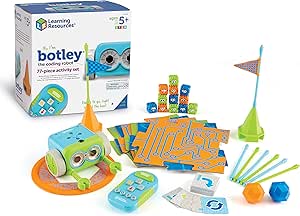 | Best Screen-Free Starter Set | Recommended age: 5 years and up | Pieces: 77 | Included components: Botley robot, remote programmer, detachable robot arms, 40 coding cards, 6 double-sided tiles, 27 obstacle building pieces, starter guide | VIEW LATEST PRICE | See Our Full Breakdown |
| BeAndge 6-in-1 Robotics STEM Kit for Kids Ages 8–12 |  | Best for Building Multiple STEM Projects | Recommended age: 8–14 years | Kit count: 6-in-1 | Projects listed: Reptile robot, balance car, bubble machine, fiber lamp, buzzer wire game | VIEW LATEST PRICE | See Our Full Breakdown |
| Thames & Kosmos My Robotic Pet: Coding Chameleon |  | Best Screen-Free Coding Build | Recommended age: 8–12 years | Length: 15 inches | Play modes: Coding, Wild, Pet | VIEW LATEST PRICE | See Our Full Breakdown |
| Playz Coding and Computer Science Learning Kit for Kids |  | Best for Offline Computer Science Concepts | Age range: 6 years and up | Educational objectives: Coding skills, sorting | Activities: Binary necklaces, encryption devices, sorting races, mystery mazes, pixel art | VIEW LATEST PRICE | See Our Full Breakdown |
| Learning Resources Botley the Coding Robot |  | Best Screen-Free Starter | Brand: Learning Resources | Age range: 5–8 years | Programmable steps: Up to 80 | VIEW LATEST PRICE | See Our Full Breakdown |
| Sillbird 5-in-1 Programmable STEM Robot Building Kit, 488 Pieces |  | Best for Multi-Model Building | Brand: Sillbird | Model: B883 | Pieces: 488 | VIEW LATEST PRICE | See Our Full Breakdown |
| Teach Tech Mech-5 STEM Coding Robot Building Kit |  | Best Mechanical Coding Project | Brand: Teach Tech | Model: TTC-895 | Recommended age: 10 years and up | VIEW LATEST PRICE | See Our Full Breakdown |
| Makeblock mBot Bluetooth Robot Coding Kit for Kids |  | Best Guided Coding Curriculum | Brand: Makeblock | Model: mBot V1.2 Bluetooth Version | Recommended age: 8 years and up | VIEW LATEST PRICE | See Our Full Breakdown |
| Makeblock mBot Coding Robot Kit for Kids Ages 8+ | 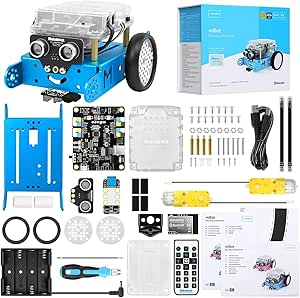 | Best for Expandable Robotics | Brand: Makeblock | Model: 90053 | Recommended age: 8 years and up | VIEW LATEST PRICE | See Our Full Breakdown |
| Ozobot Evo Entry Coding Robot Kit for Ages 5–11 |  | Best for Screen-Free-to-Screen Coding | Brand: Ozobot | Age range: 5 years and up | Educational objective: Coding skills and STEM | VIEW LATEST PRICE | See Our Full Breakdown |
| CodaKid Roblox Coding Box for Kids: Game Design and Lua Programming, Ages 9+ |  | Best for Roblox Game Design | Age range: 9+ | Programming language: Lua | Platform: Roblox Studio | VIEW LATEST PRICE | See Our Full Breakdown |
| coding kits for kid | Recommended age | Included components | Brand |
|---|---|---|---|
| Osmo Coding Kit for iPad | 5–10+ years | iPad base and reflector, 31 coding blocks, stackable storage | — |
| Learning Resources Botley Codi | 5 years and up | Botley robot, remote programmer, detachable robot arms, 40 coding cards, 6 double-sided tiles, 27 obstacle building pieces, starter guide | Learning Resources |
| BeAndge 6-in-1 Robotics STEM K | 8–14 years | Electronic STEM kit, mini screwdriver, instruction manuals | — |
| Thames & Kosmos My Robotic Pet | 8–12 years | Plastic building parts, manual | — |
| Playz Coding and Computer Scie | — | 30+ tools, ingredients, and parts; illustrated instruction guide | — |
| Learning Resources Botley the | — | Botley robot, remote programmer, detachable arms, coding cards, tiles, and obstacles | Learning Resources |
| Sillbird 5-in-1 Programmable S | 8–16 years | — | Sillbird |
| Teach Tech Mech-5 STEM Coding | 10 years and up | — | Teach Tech |
| Makeblock mBot Bluetooth Robot | 8 years and up | mCore mainboard, 2 motors, line-follower sensor, chassis, wheels, cables, screws, screwdriver, USB cable, AA battery holder, infrared remote controller, and coding box | Makeblock |
| Makeblock mBot Coding Robot Ki | 8 years and up | — | Makeblock |
| Ozobot Evo Entry Coding Robot | — | Evo robot, starter activities, charging cable, five dual-tip Color Code Markers, and zip case | Ozobot |
| CodaKid Roblox Coding Box for | — | — | — |
More Details on Our Top Picks
Osmo Coding Kit for iPad, Ages 5–10+
Osmo is my most rounded pick for families who want coding concepts to connect directly with hands-on play. Its 31 physical blocks control three different games: Coding Awbie introduces sequencing, Coding Jam adds music-making, and Coding Duo brings in collaborative puzzles. That range gives it more variety than the single-robot focus of Botley, while keeping the interaction approachable for younger beginners. The adjustable reflector also accommodates supported older and thin-bezel iPads, and gameplay does not require Wi-Fi. The main tradeoff is the device dependency: an iPad is not included, and compatibility is limited to supported models running iOS 15 or later. I would choose Botley instead for a screen-free setup or a classroom kit that does not depend on a family tablet.
Pros:- Three games cover sequencing, music-making, and collaborative puzzle-solving.
- Physical coding blocks make programming actions tangible.
- Adjustable reflector accommodates supported older and thin-bezel iPads.
- Gameplay does not require Wi-Fi.
Cons:- Requires a compatible iPad, sold separately.
- Works only with supported iPads running iOS 15 or later.
- The 90-day manufacturer-defect warranty is limited in duration.
Best for: Families with a supported iPad who want several beginner-friendly coding activities, including creative and cooperative play.
Not ideal for: Households without a compatible iPad or buyers who want a fully screen-free coding kit.
- Recommended age:5–10+ years
- Included games:Coding Awbie, Coding Jam, Coding Duo
- Coding blocks:31
- Compatibility:Supported iPads running iOS 15 or later
- Connectivity:Wi-Fi not required for gameplay
- Included components:iPad base and reflector, 31 coding blocks, stackable storage
- Warranty:90 days against manufacturer defects
- Model number:901-00021
Our verdict“Choose Osmo if you already have a compatible iPad and want more activity variety than a single screen-free robot can offer.”
Learning Resources Botley Coding Robot Activity Set
Botley is my clearest choice for screen-free coding when a child is ready to program a robot without using an app. The remote sends instructions that Botley follows through mazes and obstacle courses, while features such as loops, object detection, and black-line path following give activities room to grow beyond simple forward-and-turn commands. Its 77 pieces, including coding cards, double-sided tiles, and obstacle parts, make it easier to set up challenges than the more focused Coding Chameleon. The tradeoff is that Botley depends on five AAA batteries, which are not included, and its remote-programming format is less suited to children who specifically want tablet-based coding games like Osmo. I’d pick it for shared play at home or in a classroom where avoiding screens matters more than digital variety.
Pros:- Programs without a screen or app.
- Introduces loops, object detection, obstacle avoidance, and line following.
- Includes cards, tiles, and obstacles for creating varied courses.
- Suitable for individual, family, and classroom activities.
Cons:- Requires three AAA batteries for the robot and two for the remote; none are included.
- Remote-based commands offer a different learning experience from on-screen coding games.
- The 77-piece set requires space to lay out and store its course components.
Best for: Parents and educators seeking a screen-free first coding robot with materials for building group challenges.
Not ideal for: Buyers who want app-based coding, a robot that works without separately supplied batteries, or a compact set with few loose parts.
- Recommended age:5 years and up
- Pieces:77
- Included components:Botley robot, remote programmer, detachable robot arms, 40 coding cards, 6 double-sided tiles, 27 obstacle building pieces, starter guide
- Coding features:Loops, object detection, obstacle avoidance, black-line path following
- Screen required:No
- Power:3 AAA batteries for robot and 2 AAA batteries for remote; not included
- Brand:Learning Resources
- Model:LER2935
Our verdict“Choose Botley for a battery-powered, screen-free robot that lets children practice coding by building and solving physical courses.”
BeAndge 6-in-1 Robotics STEM Kit for Kids Ages 8–12
BeAndge suits children who want to build before they program, with a selection of projects including a reptile robot, balance car, bubble machine, fiber lamp, and buzzer wire game. The kit’s mix of circuit work and mechanical builds gives it a broader making focus than Botley, which arrives as a ready-to-program robot with course pieces. That variety can keep project-minded kids engaged, but the listed activities do not describe a dedicated programming interface or explain how much coding each build involves. I’d treat this as a hands-on STEM construction kit with coding-related learning, rather than a direct substitute for Osmo’s structured coding games. Families also need to supply AA batteries and bubble solution, and younger builders may need adult help. Its six-in-one scope is appealing, but buyers seeking clear, progressive coding lessons may prefer a more explicitly programming-centered option.
Pros:- Offers several project types, from a robot and balance car to a bubble machine.
- Includes a mini screwdriver and step-by-step instructions.
- Combines hands-on circuit building with problem-solving activities.
- Manufacturer lists a lifetime warranty against defects.
Cons:- AA batteries and bubble solution are required but not included.
- The project descriptions do not specify a clear coding system or progression.
- Younger children may need adult guidance during some builds.
Best for: Families of school-age makers who enjoy assembling different circuit and robotics projects and can provide adult guidance.
Not ideal for: Buyers looking for a clearly structured programming curriculum, a ready-to-use robot, or a kit with all project supplies included.
- Recommended age:8–14 years
- Kit count:6-in-1
- Projects listed:Reptile robot, balance car, bubble machine, fiber lamp, buzzer wire game
- Included components:Electronic STEM kit, mini screwdriver, instruction manuals
- Batteries:AA batteries required; not included
- Bubble solution:Required; not included
- Warranty:Lifetime warranty against manufacturer defects
- Model number:BA1001
Our verdict“Choose BeAndge for varied construction projects, but favor Osmo or Botley if your main goal is a more clearly defined coding experience.”
Thames & Kosmos My Robotic Pet: Coding Chameleon
Coding Chameleon makes coding part of a build-and-play project: children assemble a 15-inch robotic pet, then use action cards to program movement without a screen. Color sensing, infrared sensing, and RGB lights support its coding, Wild, and Pet modes, so it offers more character-based interaction than Botley’s maze-and-obstacle activities. The 48-page manual also introduces assembly and biomimicry, making this a good fit for children who want a robot to build and animate rather than just direct along a course. That build is the main tradeoff. Children under 12 need adult help with assembly, and batteries are recommended but are not listed among the included components. Compared with the simpler setup of Botley, this kit asks for more patience before play begins, but gives the finished robot a more distinctive personality.
Pros:- Physical action cards enable screen-free programming.
- Three modes combine coding with color matching and touch interaction.
- Color and infrared sensors, RGB LEDs, and articulated parts support expressive play.
- The 48-page manual covers assembly and STEM learning activities.
Cons:- Assembly requires adult help for children under 12.
- Batteries are recommended but are not listed among the included components.
- Building takes more setup than beginning with a ready-to-use robot such as Botley.
Best for: Children ages 8–12 who enjoy assembling a characterful robot and programming it with physical cards rather than a screen.
Not ideal for: Families seeking a ready-to-run robot, an app-based coding path, or a build a child under 12 can complete independently.
- Recommended age:8–12 years
- Length:15 inches
- Play modes:Coding, Wild, Pet
- Sensors:Color sensor, infrared sensor
- Lighting:RGB LEDs
- Included components:Plastic building parts, manual
- Manual length:48 pages
- Assembly guidance:Ages 8+ with adult help; ages 12+ for independent play
- Model number:620507
Our verdict“Choose Coding Chameleon for a screen-free coding experience built around assembling and interacting with a robotic pet.”
Playz Coding and Computer Science Learning Kit for Kids
Playz takes a broader, activity-book approach to coding concepts, using projects such as binary necklaces, encryption devices, sorting races, mystery mazes, and pixel art. That makes it a better match than Botley for a child curious about how computer science ideas show up beyond programming a robot. Its 30-plus tools and parts, paired with an illustrated guide, offer multiple ways to explore without requiring a screen or a robot build. The tradeoff is specificity: the product description does not identify each item in the kit, and age guidance varies between the title and details. It also does not lay out a defined sequence of coding lessons, unlike Osmo’s three named games. I’d choose Playz for varied tabletop activities and concept exposure, but not for families who want a programmable robot or a clearly staged progression.
Pros:- Covers several computer science ideas through hands-on activities.
- Includes more than 30 tools, ingredients, and parts.
- Illustrated guide provides instructions and educational information.
- Compact, lightweight kit can suit home or classroom activities.
Cons:- The individual contents of the kit are not specified in the product description.
- Age guidance differs between the title and product details.
- Activities introduce concepts but are not described as a structured programming progression.
Best for: Families and educators seeking offline activities that introduce binary, encryption, sorting, mazes, and pixel art.
Not ideal for: Buyers who want a programmable robot, a clearly itemized parts list, or a specified step-by-step coding curriculum.
- Age range:6 years and up
- Educational objectives:Coding skills, sorting
- Activities:Binary necklaces, encryption devices, sorting races, mystery mazes, pixel art
- Included components:30+ tools, ingredients, and parts; illustrated instruction guide
- Item dimensions:12.2 x 10.1 x 2.8 inches
- Item weight:1.1 pounds
- Model number:coding
- ASIN:B07C68Y5V1
Our verdict“Choose Playz for offline computer science activities across several topics, not for robot-based coding or a clearly sequenced course.”
Learning Resources Botley the Coding Robot
Botley is the clearest fit for younger children who are ready to learn coding ideas without a screen or a complicated build. Its remote programmer sends sequences of up to 80 steps, while loops and if/then logic give kids ways to make a route more than a fixed set of commands. The 45-piece set adds obstacles and tiles for hands-on challenges, so children can test and adjust their instructions as they play.
Compared with the Makeblock mBot, Botley is less suited to learning software platforms or electronics, but it skips assembly and app setup. Its main limitation is its ages 5–8 focus: older children may outgrow its activities sooner, and it offers less room to progress into Scratch or Arduino.
Pros:- Teaches sequencing, loops, and if/then logic without an app or screen
- Programs sequences of up to 80 steps
- Includes 45 pieces for obstacle-course and line-following activities
- Remote programmer supports immediate, hands-on experimentation
Cons:- Age range of 5–8 may limit its appeal as a child grows
- Does not offer the software and electronics progression found in the Makeblock mBot
Best for: Families with children ages 5–8 who want a screen-free introduction to sequencing, loops, and conditional logic.
Not ideal for: Older beginners looking for app-based programming, electronics, or a longer progression into Scratch or Arduino.
- Brand:Learning Resources
- Age range:5–8 years
- Programmable steps:Up to 80
- Set size:45 pieces
- Programming concepts:Sequencing, loops, and if/then logic
- Included components:Botley robot, remote programmer, detachable arms, coding cards, tiles, and obstacles
- Screen-free:Yes
- Model number:LER2936
Our verdict“Choose Botley for a young learner who needs hands-on coding concepts without screens, rather than a robot designed for software projects.”
Sillbird 5-in-1 Programmable STEM Robot Building Kit, 488 Pieces
The Sillbird kit puts construction at the center of its coding experience. Children assemble one of several models—including a robot, dinosaur, car, or tank—then use Bluetooth app control or the remote for basic programming and path functions. That mix gives builders a reason to revisit the kit, while progressive model difficulty can extend the activity beyond a single build.
Compared with the Teach Tech Mech-5, Sillbird offers several model forms and app-based control; Mech-5 instead focuses on a mechanical coding wheel and physical actions. The tradeoff here is the 488-piece assembly commitment: it suits patient builders better than children who want to start coding right away. Its stated play time is up to 40 minutes per charge, so sessions may need a pause for recharging.
Pros:- Can be assembled into a robot, dinosaur, car, tank, and other models
- Progressive build difficulty offers more than one construction challenge
- Supports Bluetooth app control, remote control, and basic path programming
- Rechargeable battery provides up to 40 minutes of play per charge
Cons:- The 488-piece build can delay the start of programming and requires patience
- Play time is limited to up to 40 minutes per charge
- Basic programming offers less named software-platform progression than the Makeblock mBot
Best for: Builders ages 8–16 who enjoy assembling different robot-style models and want app or remote control after construction.
Not ideal for: Children who prefer a ready-to-use coding robot, dislike multi-step builds, or want longer continuous play between charges.
- Brand:Sillbird
- Model:B883
- Pieces:488
- Buildable models:Robot, dinosaur, car, tank, and more
- Control methods:Bluetooth app and remote control
- Recommended age:8–16 years
- Play time:Up to 40 minutes per charge
- Dimensions:6 x 7 x 8 inches
Our verdict“Pick Sillbird for a child who values rebuilding and customizing models as much as coding, and skip it if assembly is likely to frustrate them.”
Teach Tech Mech-5 STEM Coding Robot Building Kit
Mech-5 makes the mechanics part of the lesson: children build the robot, then use buttons on its coding wheel to plan movement and actions such as lifting, kicking, drawing, and throwing. That physical programming method can make cause and effect easier to follow than entering commands in an app, while construction adds a separate engineering challenge. It also needs no batteries.
Compared with the Sillbird 5-in-1 kit, Mech-5 offers fewer model-building options but gives its actions a distinctive mechanical focus. It is also a more involved starting point than the Learning Resources Botley, which is aimed at younger children and can be played with without a lengthy assembly project. The main tradeoff is time: the several-hour build and age-10-and-up recommendation make this a project for a patient older learner, not a quick introduction.
Pros:- Mechanical coding wheel turns commands into visible, physical actions
- Programs forward, backward, and 360-degree rotation
- Actions include throwing, lifting, kicking, and drawing
- Combines coding basics with mechanical engineering and construction
- Does not require batteries
Cons:- Assembly takes several hours before the coding activities begin
- Recommended for ages 10 and up, limiting its fit for younger beginners
- Provides a single build rather than the multiple models offered by the Sillbird kit
Best for: Children age 10 and up who enjoy extended construction projects and want to explore how coded commands translate into mechanical actions.
Not ideal for: Younger beginners or families seeking a robot that is ready for coding soon after opening the box.
- Brand:Teach Tech
- Model:TTC-895
- Recommended age:10 years and up
- Programming method:Buttons on a mechanical coding wheel
- Movements:Forward, backward, and 360-degree rotation
- Actions:Throwing, lifting, kicking, and drawing
- Power:No batteries required
- Warranty:1 year against manufacturer defects
Our verdict“Choose Mech-5 for an older child who wants a substantial build and physical programming, not a quick-play or screen-based coding kit.”
Makeblock mBot Bluetooth Robot Coding Kit for Kids
This mBot stands out for its guided learning structure: four projects introduce functions such as line following, obstacle avoidance, and remote control, with visual instructions and access to online courses. Scratch provides a visual route into programming, while Arduino offers a further step for learners ready to explore a more technical platform. The listed build takes about 15 minutes, so the focus can shift from assembly to experimenting relatively quickly.
Compared with the Makeblock mBot 90053, this Bluetooth version lists four projects and eight online courses, giving buyers a clearer picture of its included learning path. It still shares the mBot line’s dependence on separate batteries: the AA battery holder is included, but AA batteries are not listed as included. Some resources are online, so it is a weaker match for families seeking a fully self-contained, offline kit.
Pros:- Supports both Scratch and Arduino programming
- Four projects cover line following, obstacle avoidance, and remote control
- Visual instructions and eight online courses provide structured learning
- Build is designed to take about 15 minutes
Cons:- AA batteries are not listed among the included components
- Some learning resources require online access
- Compared with screen-free Botley, programming depends on digital tools
Best for: Families with children ages 8 and up who want a guided first robotics build with a path from Scratch toward Arduino.
Not ideal for: Buyers who need all learning materials offline or want a kit that includes its required AA batteries.
- Brand:Makeblock
- Model:mBot V1.2 Bluetooth Version
- Recommended age:8 years and up
- Included projects:4
- Programming platforms:Scratch and Arduino
- Online courses:8
- Languages:9
- Included components:mCore mainboard, 2 motors, line-follower sensor, chassis, wheels, cables, screws, screwdriver, USB cable, AA battery holder, infrared remote controller, and coding box
Our verdict“Choose this mBot for a child who benefits from guided projects and wants to progress from Scratch toward Arduino, provided online resources and separate batteries are acceptable.”
Makeblock mBot Coding Robot Kit for Kids Ages 8+
The mBot 90053 is the strongest choice here for a learner who may want to expand beyond the starter robot. Its open system is compatible with more than 100 electronic modules and 500 Makeblock platform parts, while Scratch, Arduino, and mBlock provide several ways to approach programming. Line following, obstacle avoidance, and remote control give kids concrete behaviors to explore after the roughly 15-minute assembly.
Compared with the Bluetooth mBot V1.2, this version explicitly lists mBlock compatibility and broad expansion support, while the V1.2 listing specifies four projects and eight online courses. Both offer a faster route into robotics than the Teach Tech Mech-5, whose long build is part of the challenge. The mBot’s drawback is practical: its four AA batteries and one CR2025 battery are not included, and the open-ended ecosystem may be more than a first-time learner needs.
Pros:- Supports Scratch, Arduino, and mBlock programming
- Remote control, line following, and obstacle avoidance give coding immediate applications
- Open system supports more than 100 electronic modules and 500 Makeblock platform parts
- Assembly takes about 15 minutes and coding cards and lessons support early projects
Cons:- Four AA batteries for the robot and one CR2025 battery for the remote are not included
- The wide expansion system can be unnecessary for children who only want a basic starter activity
- Compared with the Bluetooth mBot V1.2, this listing does not specify a project count or online-course count
Best for: Families with children ages 8 and up who want a quick-start robot that can grow through compatible modules and more advanced coding platforms.
Not ideal for: Buyers looking for a screen-free kit, included batteries, or a narrowly guided activity with no add-on ecosystem to manage.
- Brand:Makeblock
- Model:90053
- Recommended age:8 years and up
- Programming platforms:Scratch, Arduino, and mBlock
- Robot functions:Remote control, line following, and obstacle avoidance
- Assembly time:About 15 minutes
- Required batteries:4 AA for the robot and 1 CR2025 for the remote; not included
- Compatibility:More than 100 electronic modules and 500 Makeblock platform parts
Our verdict“Pick the mBot 90053 if expandability and several coding platforms matter more than an included battery supply or a tightly defined project sequence.”
Ozobot Evo Entry Coding Robot Kit for Ages 5–11
Ozobot Evo makes a strong choice for families who want children to begin coding without a screen and later move to a digital environment. Kids can guide the robot with color-code markers, then use Ozobot Blockly for more structured practice across five skill levels. Its library of more than 700 free lessons gives it more guided material than the more hands-on building focus of the Sillbird 5-in-1 Programmable STEM Robot Building Kit. The included zip case also keeps the small markers and accessories together between activities. The tradeoff is that Blockly requires a compatible device, so screen-free play is only one part of the experience. This kit is less focused on assembling a robot than Sillbird, but better suited to children ready to connect simple commands with on-screen coding.
Pros:- Offers screen-free color-code activities alongside Ozobot Blockly
- Five Blockly skill levels support progression as skills grow
- Includes access to more than 700 free lessons
- Zip case stores the robot accessories and markers
Cons:- A compatible device is required for online Blockly coding
- Does not offer the robot assembly experience found in kits such as the Sillbird 5-in-1
Best for: Families with children ages 5–11 who want a gradual path from physical color-code activities to block-based coding and can provide a compatible device.
Not ideal for: Buyers seeking a robot-building kit or a fully screen-free coding experience, since Blockly needs a compatible device and the robot is not presented as a build project.
- Brand:Ozobot
- Age range:5 years and up
- Educational objective:Coding skills and STEM
- Coding options:Screen-free color codes and Ozobot Blockly
- Blockly learning content:Five skill levels and more than 700 free lessons
- Included components:Evo robot, starter activities, charging cable, five dual-tip Color Code Markers, and zip case
- Battery:Lithium-ion
- Dimensions:8.5 x 6.5 x 1.8
Our verdict“Choose Ozobot Evo for a young learner who should start with physical coding commands and progress to Blockly rather than building a robot from parts.”
CodaKid Roblox Coding Box for Kids: Game Design and Lua Programming, Ages 9+
For a child who wants to make Roblox games, the CodaKid Roblox Coding Box connects coding lessons to a familiar creative goal: designing 3D experiences in Roblox Studio with Lua programming. Its step-by-step videos, short 8–10 minute lesson format, and large collection of projects and challenges give learners a structured path that goes beyond the robot-command activities in Ozobot Evo. Online mentor support can help when a student gets stuck, though access is through an email or screenshare help desk rather than an in-person instructor. This is a computer-based course, not a kit for building or driving a physical robot; it requires a PC or Mac, and an adult may need to help with registration and platform access. It makes the most sense for Roblox-motivated learners ages 9 and up, not younger children seeking screen-free play.
Pros:- Teaches Lua through 3D game design in Roblox Studio
- Step-by-step videos support self-paced learning
- Online help desk offers email or screenshare mentor support
- Provides a year of access to projects, modules, quests, and challenges
Cons:- Requires a PC or Mac and Roblox Studio
- Parents may need to help with registration and platform access
- Online lessons do not provide the hands-on robot interaction available with Ozobot Evo
Best for: Roblox fans ages 9 and up who have access to a PC or Mac and want guided practice creating 3D games with Lua.
Not ideal for: Families looking for a physical coding robot, screen-free activities, or lessons that do not require a computer and online account setup.
- Age range:9+
- Programming language:Lua
- Platform:Roblox Studio
- Access duration:12 months
- Learning content:100+ hours of projects, 19 modules, 53 quests, and 161 challenges
- Lesson length:8–10 minutes
- Compatibility:PC and Mac
- Mentor support:Online help desk via email or screenshare
Our verdict“Pick CodaKid for a computer-ready Roblox fan who wants a guided introduction to Lua and game creation rather than a physical coding kit.”
How We Picked
I compared these coding kits for kids by the kind of learning they support, how accessible the first activity is, and whether the core play can grow with a child’s skills. I also weighed the practical demands: device or app reliance, assembly time, need for adult help, and whether a kit’s activities invite repeat experimentation rather than a single build. These factors matter because a sophisticated kit can sit unused if setup or the coding interface is a poor fit.
The ranking favors options that balance clear entry points, hands-on engagement, and room to progress. That puts mBot first for its mix of building and coding, while screen-free Botley options rate well for young beginners but offer a different ceiling. Specialized choices such as the Roblox box or Coding Chameleon rank for their specific appeal rather than broad versatility. I distinguish similar products by their stated format and role, and do not treat age labels alone as a guarantee that a kit will suit every child.
| coding kits for kid | Brand |
|---|---|
| Osmo Coding Kit for iPad | — |
| Learning Resources Botley Codi | Learning Resources |
| BeAndge 6-in-1 Robotics STEM K | — |
| Thames & Kosmos My Robotic Pet | — |
| Playz Coding and Computer Scie | — |
| Learning Resources Botley the | Learning Resources |
| Sillbird 5-in-1 Programmable S | Sillbird |
| Teach Tech Mech-5 STEM Coding | Teach Tech |
| Makeblock mBot Bluetooth Robot | Makeblock |
| Makeblock mBot Coding Robot Ki | Makeblock |
| Ozobot Evo Entry Coding Robot | Ozobot |
| CodaKid Roblox Coding Box for | — |
Factors to Consider When Choosing Coding Kits For Kids
Before choosing among coding kits for kids, I’d match the kit to the way a child likes to learn, not just to an age range or a promise of STEM activities. These decisions can prevent a kit from being too simple, too setup-heavy, or dependent on a device your family does not want to use.
Choose the Learning Format Before the Feature List
Start with the activity your child is most likely to repeat: moving a robot, building a mechanism, solving a tabletop challenge, or making a game. A robot that follows commands makes sequencing visible, while a construction kit can make mechanical cause and effect the main attraction. Game-making kits connect coding to a familiar digital hobby, but may feel less hands-on. A common mistake is choosing the kit with the longest feature list rather than the format the child already enjoys. If you are unsure, pick a format with a short first activity and a clear path to try a new command or design.
Check Screen and Device Requirements Early
Some kits center on physical cards or commands, while others rely on a tablet, computer, app, or online lessons. Screen-free play can suit families seeking unplugged practice, but it may not teach the same kind of on-screen coding interface as an app-based tool. Before ordering, check device compatibility, software access, and whether the child will need an account or adult setup. Do not assume that a kit described as coding-focused works independently of a screen. If the household shares a device, think about whether that could limit how often the kit gets used.
Match the Challenge to the Child, Not Just Their Age
Age guidance is a starting point, not a measure of a child’s patience, reading ability, or experience with instructions. A younger child may enjoy open-ended building with help, while an older beginner may prefer a guided activity that avoids complicated assembly. Look at what the child must do before reaching the first successful result: sort pieces, build a model, connect an app, or follow a sequence of commands. Too much setup can make a kit feel like a parent project; too little challenge can shorten its useful life. Choose a first step the child can manage, with enough room to experiment afterward.
Separate Building Time From Coding Time
Robotics kits often combine two kinds of work: assembling the robot and programming its behavior. That combination can be rewarding for a child who likes both, but it can also mean that a coding lesson waits until construction is finished. If your main goal is learning code, favor a kit that reaches programming quickly. If your child enjoys following plans, testing parts, and rebuilding, a construction-heavy option may hold attention longer. Check whether the model offers more than one design or behavior so the build does not become a one-time activity.
Think About Repeat Play and Skill Progression
A kit’s value depends partly on what happens after the first completed activity. Look for ways to change commands, solve new challenges, build another form, or create an original project. A tightly guided kit can be a reassuring start, but children who already know basic sequencing may want more freedom. On the other hand, an open-ended platform can frustrate a beginner without enough prompts. Ask whether the child can move from copying an example to changing it, then inventing a project of their own.
Set Expectations for Adult Help and Kit Pieces
Some children can start independently; others will need help reading directions, assembling components, or troubleshooting a connection. Consider who will be available during the first few sessions and whether the kit’s setup suits that reality. For piece-based kits, storage and keeping small components together affect how easy it is to return to a project. A larger build is not automatically a better learning experience if pieces are hard to sort or instructions require sustained adult attention. When choosing between a quick-start activity and a more involved robot, weigh the family’s available time as well as the child’s interest.
Frequently Asked Questions
Which coding kit is a good first choice for a child who has never programmed?
I’d start with a kit that makes the link between an instruction and an outcome easy to see. Botley’s screen-free command play is a natural fit for children who benefit from physical, guided activities, while Osmo and Ozobot offer a more device-linked route. The right starting point depends on whether your child prefers tangible commands or an app-based activity. Avoid choosing a complex building kit solely because it has a higher age range; assembly can compete with the first coding lesson. A beginner should be able to complete an early task with manageable help and then try changing it.
Should I choose a screen-free kit or one that uses a tablet or computer?
Choose based on the learning experience you want, not on the assumption that one format is automatically better. Screen-free kits can help children focus on sequences and physical cause and effect without requiring a device. App- or computer-based kits can introduce visual coding tools and, in some cases, more advanced project work. Check compatibility and access requirements before choosing a screen-led option. If your child already spends a lot of time on a particular device, consider whether that will make the kit convenient or harder to manage.
Are building-focused robotics kits a better choice than a ready-to-use coding robot?
They suit different interests. A build-focused kit adds assembly and mechanical problem-solving, which can appeal to children who like constructing models and following instructions. A ready-to-use robot can get a child to coding activities sooner, with less time spent on setup. If your child is most interested in programming behavior, favor a direct path to coding; if they enjoy making things, the building process may be part of the appeal. Check whether the kit’s build and coding demands can be handled together by your child or will need regular adult support.
Is the CodaKid Roblox Coding Box the right pick if my child likes Roblox?
It is a strong match when the child wants to learn game design and is ready to engage with Lua-based programming, rather than simply play Roblox. That focus makes it more specialized than a general robot kit, so it may be less appealing to a child who prefers physical building or movement-based activities. Consider the child’s reading and computer skills, plus whether they enjoy making projects as much as playing games. Check the included learning access and technical requirements before purchase. A Roblox interest is a useful starting clue, but curiosity about creating is the better signal.
How can I tell whether a coding kit will remain interesting after the first project?
Look for ways to alter a finished activity: change a command sequence, tackle additional challenges, build another configuration, or make a project from scratch. A kit that only guides a child through one fixed result may have a shorter play arc, even if the first activity is engaging. Guided lessons can still support repeat use when they introduce new skills in steps. Think about how much freedom your child enjoys; some want clear prompts, while others want room to experiment. The best sign of staying power is a next step that feels achievable without simply repeating the same task.
Conclusion
For the widest mix of construction and programming, I recommend the Makeblock mBot Bluetooth Robot Coding Kit as best overall. The Botley Coding Robot Activity Set is my pick for beginners who need screen-free command practice, while the Playz Coding and Computer Science Learning Kit is the value-minded option for families seeking a broader set of learning activities rather than one robot platform. For a premium-style, more specialized coding experience, choose the CodaKid Roblox Coding Box if game creation and Lua are the goal; for kids who want to assemble and reconfigure a robot, look to the Sillbird 5-in-1 or BeAndge 6-in-1. Pick Osmo or Ozobot Evo when an app-linked format fits your household, and Thames & Kosmos My Robotic Pet: Coding Chameleon when a character-led activity is more likely to hold a child’s attention. The best fit is the kit whose setup, screen demands, and kind of play match the child who will use it.