The best streaming devices combine an easy-to-use interface, dependable streaming, and the picture and sound formats your TV supports. I name the Amazon Fire TV Stick 4K Max my best overall pick for its 4K focus and Wi-Fi 6E, while the Roku Ultra stands out for its remote features and the Google TV Streamer 4K for its 32 GB of storage. The main tradeoffs are platform preference, compact stick versus set-top box design, and whether you need 4K, faster connectivity, or a simpler HD option. A higher-spec device is not automatically a better match if your TV or home network cannot use its features. Read on for the full comparison, buying advice, and answers to common questions.

Prime made for students and young adults
- Fast, free delivery for dorm and study essentials
- Prime Video and Amazon Music included
- Member-only deals
Key Takeaways
- The Fire TV Stick 4K Max is the roundup’s best overall pick: its 4K streaming focus and Wi-Fi 6E make it a stronger fit for buyers who want a compact device with advanced wireless support.
- Roku Ultra models stand apart on remote convenience: the reviewed amazon.com/dp/B0C6W3D4RM?tag=kwatsjpedia-20&ascsubtag=dc-1178165″ target=”_blank” rel=”nofollow sponsored noopener”>amazon.com/dp/B09BZZ3MM7?tag=kwatsjpedia-20&ascsubtag=dc-1178165″ target=”_blank” rel=”nofollow sponsored noopener”>amazon.com/dp/B08G9TJWW9?tag=kwatsjpedia-20&ascsubtag=dc-1178165″ target=”_blank” rel=”nofollow sponsored noopener”>Roku Ultra adds a headphone jack and personal shortcuts, while Roku Ultra LT offers a more pared-back box-style alternative.
- Google TV choices split by hardware ambition: Google TV Streamer 4K offers 32 GB of storage, while the onn Google TV 4K Pro provides another route for shoppers who prefer that interface.
- Streaming sticks make the most sense when space and setup matter: the Fire TV Stick and Roku Streaming Stick models plug close to the TV, while box-style devices offer a different placement and connection setup.
- HD and 2K models suit specific TVs, not every upgrade: Fire TV Stick HD and onn Android TV 2K FHD can fit secondary or lower-resolution screens, but buyers with 4K TVs should compare them against the 4K options.
| Amazon Fire TV Stick 4K Plus with Wi-Fi 6 and Alexa Voice Remote |  | Best Compact Pick | Resolution: Up to 2160p at 60 fps | Video formats: Dolby Vision, HDR10, HDR10+, HLG | Audio: Dolby Atmos, 7.1 surround sound, stereo, HDMI audio passthrough | VIEW LATEST PRICE | See Our Full Breakdown |
| Roku Ultra Streaming Device HD/4K/HDR/Dolby Vision with Dolby Atmos, Bluetooth Streaming, and Roku Voice Remote with Headphone Jack and Personal Shortcuts, includes Premium HDMI Cable |  | Best for Reliable, Feature-Rich Streaming | Resolution: 4K (3840 × 2160) | HDR: HDR and Dolby Vision | Audio: Dolby Atmos | VIEW LATEST PRICE | See Our Full Breakdown |
| Roku Ultra LT 4K Streaming Device with Voice Remote, HDMI Cable, and USB Extension Cord |  | Best Simple Roku Box | Resolution: 4K UHD (3840 × 2160) | HDR: Dolby Vision | Wireless: 802.11ac dual-band Wi-Fi | VIEW LATEST PRICE | See Our Full Breakdown |
| onn 4K Pro Streaming Device with Google TV |  | Best for Expandable Google TV Storage | Resolution: 4K Ultra HD | Video: Dolby Vision | Audio: Dolby Atmos | VIEW LATEST PRICE | See Our Full Breakdown |
| Google TV Streamer 4K with Voice Search Remote, 32 GB, Hazel |  | Best for Google TV Recommendations | Resolution: 4K (3840 × 2160) | HDR: Dolby Vision | RAM: 4 GB | VIEW LATEST PRICE | See Our Full Breakdown |
| Amazon Fire TV Cube (3rd Gen) 4K Streaming Media Player with Alexa and Wi-Fi 6E |  | Best for Hands-Free Control | Maximum resolution: 2160p at up to 60 fps | Video formats: Dolby Vision, HDR10, HDR10+, HLG | Audio: Dolby Atmos; HDMI audio passthrough up to 5.1 | VIEW LATEST PRICE | See Our Full Breakdown |
| Amazon Fire TV Stick 4K Select |  | Best Value 4K Stick | Maximum resolution: 2160p at up to 60 fps | Video formats: HDR10, HDR10+, HLG, H.265, H.264, VP9, AV1 | Audio: HDMI passthrough for Dolby-encoded audio | VIEW LATEST PRICE | See Our Full Breakdown |
| TiVo Stream 4K Streaming Media Player |  | Best for Cross-Service Discovery | Model: RA2400 | Resolution: 4K | HDR: Dolby Vision | VIEW LATEST PRICE | See Our Full Breakdown |
| onn Android TV 2K FHD Streaming Stick with Voice Remote |  | Best for 1080p TVs | Maximum resolution: 1080p | Connectivity: HDMI and Wi-Fi | Casting and mirroring: Chromecast built-in and Miracast | VIEW LATEST PRICE | See Our Full Breakdown |
| Roku Streaming Stick 4K with Voice Remote (Renewed) | 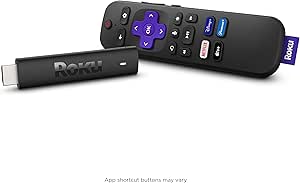 | Best Renewed Roku Pick | Model: 3820R | Video output: 4K | Supported formats: Dolby Vision and HDR10+ | VIEW LATEST PRICE | See Our Full Breakdown |
| Roku Ultra 4K Streaming Player with Voice Remote Pro |  | Best Premium Roku Player | Resolution: 4K (3840 x 2160) | HDR formats: HDR10, HDR10+, Dolby Vision | Audio: Dolby Atmos | VIEW LATEST PRICE | See Our Full Breakdown |
| Amazon Fire TV Stick 4K Max (2nd Gen) with Alexa Voice Remote |  | Best for Wi-Fi 6E and Cloud Gaming | Maximum resolution: 2160p at up to 60 fps | Video formats: Dolby Vision, HDR10, HDR10+, HLG | Wi-Fi: Wi-Fi 6E tri-band (2.4, 5, and 6 GHz) | VIEW LATEST PRICE | See Our Full Breakdown |
| ONN Android TV 4K UHD Streaming Device with Voice Remote and Google Assistant |  | Best for Google Play and Casting | Resolution: 4K Ultra HD (3840 x 2160) | Platform: Android TV | RAM: 2 GB | VIEW LATEST PRICE | See Our Full Breakdown |
| Roku Streaming Stick 4K with Voice Remote, Dolby Vision and HDR10+ |  | Best Compact 4K Pick | Resolution: 4K UHD, up to 2160p at 60 fps | HDR formats: Dolby Vision, HDR10, HDR10+ | Connectivity: Wi-Fi | VIEW LATEST PRICE | See Our Full Breakdown |
| Fire TV Stick HD (Newest Model) |  | Best for Full HD TVs | Resolution: Full HD (1080p) | Wi-Fi: Wi-Fi 6 | Power: TV USB-C port | VIEW LATEST PRICE | See Our Full Breakdown |
| streaming device | Resolution | Connectivity | Storage | Audio |
|---|---|---|---|---|
| Amazon Fire TV Stick 4K Plus w | Up to 2160p at 60 fps | — | 8 GB | Dolby Atmos, 7.1 surround sound, stereo, HDMI audio passthrough |
| Roku Ultra Streaming Device HD | 4K (3840 × 2160) | Bluetooth, USB, Ethernet | 256 GB listed | Dolby Atmos |
| Roku Ultra LT 4K Streaming Dev | 4K UHD (3840 × 2160) | HDMI | 2 GB | — |
| onn 4K Pro Streaming Device wi | 4K Ultra HD | Wi-Fi 6, Ethernet port | 32 GB | Dolby Atmos |
| Google TV Streamer 4K with Voi | 4K (3840 × 2160) | Ethernet, Wi-Fi | 32 GB | — |
| Amazon Fire TV Cube | — | — | — | Dolby Atmos; HDMI audio passthrough up to 5.1 |
| Amazon Fire TV Stick 4K Select | — | — | 8 GB | HDMI passthrough for Dolby-encoded audio |
| TiVo Stream 4K Streaming Media | 4K | Wi-Fi and HDMI | — | Dolby Atmos |
| onn Android TV 2K FHD Streamin | — | HDMI and Wi-Fi | — | Dolby Audio |
| Roku Streaming Stick 4K with V | — | Wi-Fi and HDMI | 4 GB | — |
| Roku Ultra 4K Streaming Player | 4K (3840 x 2160) | Wi-Fi 6, Ethernet, Bluetooth, HDMI, USB | — | Dolby Atmos |
| Amazon Fire TV Stick 4K Max | — | — | 16 GB | — |
| ONN Android TV 4K UHD Streamin | 4K Ultra HD (3840 x 2160) | HDMI, Wi-Fi | 8 GB | — |
| Roku Streaming Stick 4K with V | 4K UHD, up to 2160p at 60 fps | Wi-Fi | — | — |
| Fire TV Stick HD | Full HD (1080p) | — | — | — |
More Details on Our Top Picks
Amazon Fire TV Stick 4K Plus with Wi-Fi 6 and Alexa Voice Remote
I’d choose the Fire TV Stick 4K Plus when a compact HDMI plug-in is a better fit than a set-top box. It streams up to 4K at 60 fps and supports Dolby Vision, HDR10+, and Dolby Atmos, giving it a strong picture-and-sound feature set for a stick. Wi-Fi 6 can help on compatible networks, while Alexa voice search and TV power and volume controls cut down on remote juggling. Compared with the larger Roku Ultra, this model gives up Ethernet and Roku’s headphone-jack remote, but takes up less space behind a TV. Its 8 GB storage is modest, and the 4K and Wi-Fi 6 advantages depend on compatible equipment. Cloud gaming also needs separate service access and a compatible controller.
Pros:- 4K at up to 60 fps with Dolby Vision and HDR10+
- Wi-Fi 6 support for compatible home networks
- Alexa remote controls voice search, TV power, and volume
- Compact stick form factor leaves little equipment visible
Cons:- 8 GB storage is limited compared with the 32 GB Google TV Streamer 4K
- No Ethernet connection is listed
- Some 4K and Wi-Fi 6 benefits require compatible equipment; cloud gaming needs separate gear and service
Best for: Viewers who want a small 4K device with Dolby Vision, Wi-Fi 6, and Alexa controls for a compatible TV.
Not ideal for: Households that need wired Ethernet, private listening from the remote, or ample device storage.
- Resolution:Up to 2160p at 60 fps
- Video formats:Dolby Vision, HDR10, HDR10+, HLG
- Audio:Dolby Atmos, 7.1 surround sound, stereo, HDMI audio passthrough
- Wi-Fi:Dual-band Wi-Fi 6, 2.4 GHz and 5 GHz
- Processor:Quad-core, 1.7 GHz
- Storage:8 GB
- Bluetooth:Bluetooth 5.2 + BLE
- Dimensions:99 × 30 × 14 mm housing; 108 × 30 × 14 mm including connector
Our verdict“Choose this compact stick if you want Dolby Vision 4K and Alexa control without the footprint of a box-style player.”
Roku Ultra Streaming Device HD/4K/HDR/Dolby Vision with Dolby Atmos, Bluetooth Streaming, and Roku Voice Remote with Headphone Jack and Personal Shortcuts, includes Premium HDMI Cable
The Roku Ultra earns its place for viewers who want a capable box with flexible connections and a remote built for more than basic playback. It supports 4K, Dolby Vision, and Dolby Atmos, and offers optional Ethernet for homes where Wi-Fi is unreliable. The remote’s headphone jack enables private listening, while Bluetooth audio and a lost-remote finder add practical conveniences. Compared with the Roku Ultra LT, this model lists Ethernet and Bluetooth connectivity, making it the more adaptable choice for a wired setup or wireless audio. That extra flexibility may be unnecessary if a simple stick is all the TV needs. The listed 256 GB storage is also more than most streaming viewers will use, and the product information doesn’t specify rechargeable-remote battery life.
Pros:- 4K HDR with Dolby Vision and Dolby Atmos support
- Optional Ethernet provides a wired alternative to Wi-Fi
- Remote includes a headphone jack, personal shortcuts, and lost-remote finder
- Bluetooth supports audio streaming
Cons:- Box-style design takes more space than the Fire TV Stick 4K Plus
- The listed 256 GB storage may exceed typical streaming needs
- Rechargeable remote battery life is not specified
Best for: Viewers who want a box-style Roku player with optional Ethernet, private listening, and Dolby Vision support.
Not ideal for: People seeking a low-profile HDMI stick or a straightforward device without extra remote and connection features.
- Resolution:4K (3840 × 2160)
- HDR:HDR and Dolby Vision
- Audio:Dolby Atmos
- Connectivity:Bluetooth, USB, Ethernet
- Storage:256 GB listed
- Video codecs:H.264/AVC, H.265/HEVC
- Remote:Voice Remote with headphone jack and personal shortcuts
- Dimensions:5 × 4.9 × 1 in
Our verdict“Pick the Roku Ultra if you value wired networking and a feature-rich remote more than a compact stick design.”
Roku Ultra LT 4K Streaming Device with Voice Remote, HDMI Cable, and USB Extension Cord
The Roku Ultra LT is a sensible pick for buyers who want a familiar Roku interface and a straightforward route to 4K, without paying attention to extra features they may not use. It supports 4K UHD and Dolby Vision, and the included voice remote controls the player as well as TV power and volume. The HDMI cable and USB extension cord are included, which helps simplify setup. Compared with the full Roku Ultra, the LT is less connection-flexible: Ethernet is not listed, and its dual-band Wi-Fi is the specified network option. It also lists only 2 GB each of RAM and storage. That makes it a better fit for a basic streaming setup than for a buyer seeking the Ultra’s headphone-jack remote, Bluetooth audio, or wired networking.
Pros:- 4K UHD with Dolby Vision support
- Dual-band Wi-Fi
- Voice remote controls device, TV power, and volume
- HDMI cable and USB extension cord included
Cons:- Ethernet connectivity is not listed
- Bluetooth audio and remote headphone jack are not specified
- Listed RAM and storage are 2 GB each
Best for: Roku fans who want a box-style 4K player, a TV-controlling voice remote, and included setup cables.
Not ideal for: Viewers who need Ethernet, Bluetooth audio, or the headphone-jack remote features listed for the Roku Ultra.
- Resolution:4K UHD (3840 × 2160)
- HDR:Dolby Vision
- Wireless:802.11ac dual-band Wi-Fi
- Operating system:Roku OS
- RAM:2 GB
- Storage:2 GB
- Connectivity:HDMI
- Included accessories:Roku Voice Remote, HDMI cable, USB extension cord
Our verdict“Choose the Ultra LT for a basic Roku 4K box with an included voice remote, but opt for the Roku Ultra if you need more connection options.”
onn 4K Pro Streaming Device with Google TV
I’d point Google TV users toward the onn 4K Pro when storage and connection choice matter more than a tiny footprint. Its 32 GB storage and 3 GB RAM give it more room and memory on paper than the Fire TV Stick 4K Plus, which lists 8 GB of storage. Wi-Fi 6 supports wireless streaming on compatible networks, while the Ethernet port provides a wired alternative for a steadier connection. Dolby Vision and Dolby Atmos cover key home-theater formats. The tradeoff is size: the listed dimensions and weight describe a much larger device than a stick, so it is less suited to hiding behind a wall-mounted TV. Ethernet is also optional rather than built into every setup, and the supplied details do not identify included cables or a remote.
Pros:- 32 GB storage and 3 GB RAM
- Wi-Fi 6 and an Ethernet port offer network flexibility
- 4K Ultra HD with Dolby Vision
- Dolby Atmos audio support
Cons:- Larger and heavier than stick-style options such as the Fire TV Stick 4K Plus
- Ethernet requires a wired setup and is not necessary for every household
- Product details do not specify included remote or cables
Best for: Google TV households that want 32 GB of storage, Wi-Fi 6, and the option of wired Ethernet.
Not ideal for: Buyers who need a discreet HDMI stick or want confirmed included accessories before setup.
- Resolution:4K Ultra HD
- Video:Dolby Vision
- Audio:Dolby Atmos
- Storage:32 GB
- RAM:3 GB
- Connectivity:Wi-Fi 6, Ethernet port
- Dimensions:10 × 4 × 4 in
- Weight:1.49 lb
Our verdict“Choose the onn 4K Pro if you want a storage-rich Google TV box with Wi-Fi 6 and Ethernet options, and can accommodate its larger form.”
Google TV Streamer 4K with Voice Search Remote, 32 GB, Hazel
The Google TV Streamer 4K suits viewers who want a home screen that brings supported services, recommendations, and a watchlist together. It pairs 4K HDR with Dolby Vision with voice search and smart-home control, while 4 GB of RAM and 32 GB of storage give it more listed memory than the Fire TV Stick 4K Plus. Ethernet is available for a wired network, though Wi-Fi is also supported. Compared with the onn 4K Pro, it lists more RAM and a lighter body, while both offer 32 GB of storage and Ethernet. One setup detail can catch buyers out: an HDMI 2.1 cable is required but not included. Its box-style footprint is also less discreet than a stick.
Pros:- 4K HDR with Dolby Vision
- 32 GB storage and 4 GB RAM
- Personalized recommendations, watchlist, and voice search
- Ethernet and Wi-Fi connectivity plus smart-home control
Cons:- HDMI 2.1 cable is sold separately
- Box-style device is less discreet than the Fire TV Stick 4K Plus
- The listed supported-services selection may not cover every viewer’s preferred apps
Best for: Google TV viewers who want personalized recommendations, smart-home controls, and a wired-network option.
Not ideal for: Buyers who want an HDMI cable included or need a compact stick that hides behind the TV.
- Resolution:4K (3840 × 2160)
- HDR:Dolby Vision
- RAM:4 GB
- Storage:32 GB
- Connectivity:Ethernet, Wi-Fi
- Features:Voice search, Miracast, smart-home control
- Included items:Streamer, power adapter, 1.8 m power cable, quick start guide, voice remote with 2 AAA batteries
- Dimensions:6.4 × 3 × 1 in
Our verdict“Choose this Google TV box if you value personalized discovery and smart-home features, and are prepared to supply an HDMI cable.”
Amazon Fire TV Cube (3rd Gen) 4K Streaming Media Player with Alexa and Wi-Fi 6E
The Fire TV Cube is the most capable pick here for buyers who want more than a basic streaming stick. Its octa-core processor and Wi-Fi 6E support are designed for responsive navigation and strong wireless performance, while hands-free Alexa lets you search or control compatible smart-home devices without reaching for the remote. Compared with the Fire TV Stick 4K Select, it adds HDMI input and output connections, Dolby Vision, and a faster processor, making it a better fit for a more involved media setup. Those extras also mean it is a larger box with features that only pay off if your TV, router, and content support them. I would skip it if a compact, straightforward stick is all you need.
Pros:- 4K output supports Dolby Vision, HDR10, HDR10+, and HLG
- Hands-free Alexa voice control with included voice remote
- Wi-Fi 6E and an octa-core processor support fast wireless streaming and navigation
- HDMI input and output allow connections to compatible devices
Cons:- Wi-Fi 6E benefits require a compatible router, and HDR formats require a compatible display and content
- Larger and more involved than a simple HDMI streaming stick
- Some apps and content require separate subscriptions
Best for: Viewers building a feature-rich 4K setup who want hands-free Alexa, HDMI connections, and Wi-Fi 6E support.
Not ideal for: People with a basic 1080p TV, no Wi-Fi 6E router, or no need for hands-free voice control and extra HDMI connections.
- Maximum resolution:2160p at up to 60 fps
- Video formats:Dolby Vision, HDR10, HDR10+, HLG
- Audio:Dolby Atmos; HDMI audio passthrough up to 5.1
- Processor:Octa-core: 4 × 2.2 GHz and 4 × 2.0 GHz
- Memory and storage:2 GB RAM; 16 GB storage
- Wireless:Tri-band Wi-Fi 6E; Bluetooth 5.0 + LE
- Ports:HDMI 2.1 input and output, USB-A 2.0, Ethernet 10/100 Mbps, IR extender
- Dimensions and weight:3.38 × 3.38 × 2.99 in; 513 g
Our verdict“Choose the Fire TV Cube if hands-free Alexa and flexible connections matter more to you than a compact, simple streaming stick.”
Amazon Fire TV Stick 4K Select
The Fire TV Stick 4K Select delivers the core benefits many buyers want: 4K playback, HDR10+, Alexa search, and access to popular streaming apps in a small HDMI stick. It is a more compact, simpler alternative to the Fire TV Cube, which adds hands-free Alexa, Dolby Vision, Wi-Fi 6E, and additional connections. The Select also supports cloud gaming through Xbox Game Pass and Luna, though that depends on subscriptions and compatible equipment rather than being a complete gaming setup on its own. Its 8 GB of storage and Wi-Fi 5-class connectivity are more modest than the Cube’s specifications, so this is best for everyday streaming rather than buyers seeking the strongest hardware or widest set of advanced features.
Pros:- 4K output with HDR10+, HLG, and support for several common video codecs
- Alexa Voice Remote supports voice search and compatible smart-home controls
- Compact stick connects directly to an HDMI port
- Supports cloud gaming services including Xbox Game Pass and Luna
Cons:- Does not list Dolby Vision support, unlike the Fire TV Cube and TiVo Stream 4K
- 8 GB storage and a quad-core 1.7 GHz processor are less capable on paper than the Cube’s hardware
- Cloud gaming features require subscriptions and a compatible controller
Best for: Streaming households with a 4K HDR10+ television that want a compact device, Alexa voice search, and access to mainstream apps.
Not ideal for: Buyers seeking Dolby Vision, Wi-Fi 6E, hands-free Alexa, or gaming without extra subscriptions and compatible equipment.
- Maximum resolution:2160p at up to 60 fps
- Video formats:HDR10, HDR10+, HLG, H.265, H.264, VP9, AV1
- Audio:HDMI passthrough for Dolby-encoded audio
- Processor:Quad-core 1.7 GHz
- Storage:8 GB
- Wireless:Dual-band Wi-Fi with dual-antenna MIMO; Bluetooth 5.0 and Bluetooth Low Energy
- Ports:HDMI output; micro-USB power
- Dimensions and weight:3.9 × 1.2 × 0.6 in; 1.5 oz
Our verdict“Pick the Fire TV Stick 4K Select for compact 4K HDR10+ streaming with Alexa, but choose the Cube if you need Dolby Vision or more advanced connections.”
TiVo Stream 4K Streaming Media Player
The TiVo Stream 4K is a good match for viewers who want recommendations and watch lists gathered across streaming services, rather than jumping between apps to decide what to play. Its interface-focused approach distinguishes it from the Fire TV Stick 4K Select, which emphasizes Alexa search and Fire TV services. TiVo supports 4K, Dolby Vision, and Dolby Atmos, so the streamlined discovery pitch does not mean giving up those picture and sound formats. Google Assistant voice control and access to Google Play apps add flexibility, but the listed 2 GB of RAM and 8 GB of storage are limited, and the device depends on Wi-Fi and an HDMI-connected TV. I would choose it for unified browsing, not for generous onboard capacity.
Pros:- Brings recommendations, search, and watch lists across services into one interface
- Supports 4K resolution, Dolby Vision HDR, and Dolby Atmos
- Google Assistant voice control
- Access to Google Play apps
Cons:- Only 8 GB of storage and 2 GB of RAM are listed
- Requires Wi-Fi and an HDMI-connected TV
- A 90-day warranty is listed
Best for: Viewers subscribed to several streaming services who want cross-service recommendations, search, and watch lists in one interface.
Not ideal for: People who need substantial onboard storage or want a device that can stream without Wi-Fi and an HDMI-connected television.
- Model:RA2400
- Resolution:4K
- HDR:Dolby Vision
- Audio:Dolby Atmos
- Memory and storage:2 GB RAM; 8 GB storage
- Connectivity:Wi-Fi and HDMI
- Form factor:TV stick
- Dimensions and power:3.03 × 2.09 × 0.63 in; 5 V / 1.0 A power input
Our verdict“Choose the TiVo Stream 4K if finding what to watch across apps matters more than extra storage or the Fire TV Stick 4K Select’s Alexa-centered experience.”
onn Android TV 2K FHD Streaming Stick with Voice Remote
The onn Android TV 2K FHD Streaming Stick is the straightforward choice for a television that tops out at 1080p. It includes the HDMI cable and power adapter, while Chromecast built-in and Miracast give compatible phones and other devices ways to send video, photos, and music to the TV. Unlike the Roku Streaming Stick 4K with Voice Remote (Renewed), this onn model does not target 4K or Dolby Vision; that makes it a sensible fit for older or secondary TVs, but a poor match for a 4K display you plan to use to its full ability. The product data lists Google Play Store and YouTube among supported apps. Its listed three-month warranty is also short, so buyers who prioritize longer coverage may prefer another option.
Pros:- Streams at up to 1080p, suited to Full HD televisions
- Chromecast built-in supports casting from compatible devices
- Voice remote offers access to a virtual assistant
- Includes an HDMI cable and power adapter
Cons:- 1080p resolution lacks the 4K output offered by the Roku Streaming Stick 4K
- The listed warranty is three months
- Remote requires two AAA batteries
Best for: Owners of 1080p bedroom or secondary TVs who want voice search and simple casting from compatible devices.
Not ideal for: People with a 4K television, viewers seeking Dolby Vision or HDR10+, and buyers who place high value on a longer listed warranty.
- Maximum resolution:1080p
- Connectivity:HDMI and Wi-Fi
- Casting and mirroring:Chromecast built-in and Miracast
- Supported apps:Google Play Store and YouTube
- Audio:Dolby Audio
- Included accessories:HDMI cable, remote control, power adapter, user manual
- Model year:2022
- Warranty:Three months
Our verdict“Choose this onn stick for a 1080p secondary TV and easy casting, but skip it if your screen can display 4K.”
Roku Streaming Stick 4K with Voice Remote (Renewed)
This renewed Roku Streaming Stick 4K brings 4K playback, Dolby Vision, HDR10+, and a voice remote with compatible TV power and volume controls in a compact streaming format. The remote setup is a practical contrast with the TiVo Stream 4K, which puts more emphasis on cross-service recommendations and Google Assistant. Roku’s long-range Wi-Fi and access to free, live, and subscription channels suit viewers who want a broad channel lineup without adding a separate streaming box. The key compromise is the renewed condition: the listing specifies a 90-day limited warranty, so buyers should weigh that against the peace of mind of a new device. It also needs an internet connection, as do the other app-based streaming options here.
Pros:- 4K output supports Dolby Vision and HDR10+
- Voice remote controls streaming and compatible TV power and volume
- Long-range Wi-Fi is intended to support streaming across different rooms
- Access to free, live, and subscription channels
Cons:- Renewed condition may not suit buyers who prefer a new device
- Listed warranty is limited to 90 days
- Streaming requires an internet connection
Best for: Roku fans who want a compact 4K Dolby Vision stick and TV controls in the remote, and are comfortable buying a renewed device.
Not ideal for: Buyers who want a new unit, longer listed warranty coverage, or a streaming device that works without an internet connection.
- Model:3820R
- Video output:4K
- Supported formats:Dolby Vision and HDR10+
- Connectivity:Wi-Fi and HDMI
- Storage:4 GB
- Weight:25.54 g
- Condition:Renewed
- Warranty:90-day limited warranty
Our verdict“Choose this renewed Roku stick if you want 4K Dolby Vision and convenient TV controls at the remote, and accept the shorter listed warranty.”
Roku Ultra 4K Streaming Player with Voice Remote Pro
The Roku Ultra is the most complete Roku option in this group: it combines 4K playback with Dolby Vision, HDR10+, and Dolby Atmos, then adds both Wi-Fi 6 and Ethernet for flexible network setup. Compared with the Roku Streaming Stick 4K, this player is a better fit for a fixed home theater where wired networking and the upgraded remote matter more than a hidden, travel-friendly form. The rechargeable remote’s backlit buttons, hands-free voice control, and finder can make everyday use less fussy, while Bluetooth headphone mode gives you a private-listening option. The tradeoff is that it takes up space near the TV and its premium video and audio formats only help when your display, sound system, and streaming content support them.
Pros:- Supports 4K, Dolby Vision, HDR10+, and Dolby Atmos
- Offers both Wi-Fi 6 and Ethernet
- Rechargeable remote has backlit buttons, hands-free control, and a finder
- Bluetooth headphone mode supports private listening
Cons:- Requires compatible equipment and content to use its advanced video and audio formats
- Larger player is less discreet and portable than an HDMI stick
Best for: Roku fans building a home theater who want Ethernet, private listening, and a rechargeable remote.
Not ideal for: Travelers or buyers who want a compact stick tucked behind the TV; the Roku Streaming Stick 4K is better suited to that setup.
- Resolution:4K (3840 x 2160)
- HDR formats:HDR10, HDR10+, Dolby Vision
- Audio:Dolby Atmos
- Connectivity:Wi-Fi 6, Ethernet, Bluetooth, HDMI, USB
- Remote:Rechargeable USB-C; backlit buttons; hands-free voice control; lost remote finder
- Supported services:Apple TV+, Disney+, Hulu, Netflix, Prime Video
- Dimensions:5 x 4.9 x 1 in
- Video codecs:H.264/AVC, H.265/HEVC, AV1, VP9
Our verdict“Choose the Roku Ultra for a well-connected Roku home theater, but pick the Roku Streaming Stick 4K if compactness matters more.”
Amazon Fire TV Stick 4K Max (2nd Gen) with Alexa Voice Remote
The Fire TV Stick 4K Max is a strong choice for a busy streaming setup that also makes room for cloud gaming. Its Wi-Fi 6E, 16GB of storage, and quad-core processor give it a more capable foundation than the Full HD Fire TV Stick HD, while 4K, Dolby Vision, HDR10+, and Dolby Atmos cover a broad range of home theater formats. Alexa voice control can also manage compatible TVs and audio gear, reducing remote juggling. The extra wireless band only pays off with a compatible router, though, and cloud gaming through services such as Amazon Luna or Xbox Game Pass involves separate subscriptions. Compared with the Roku Ultra, this stick saves space and adds Fire TV gaming options, but it lacks the Ultra’s Ethernet connection.
Pros:- Supports 4K, Dolby Vision, HDR10+, and Dolby Atmos
- Wi-Fi 6E tri-band connectivity and 16GB storage
- Alexa remote can control compatible TVs and audio devices
- Supports cloud gaming through Amazon Luna and Xbox Game Pass
Cons:- Wi-Fi 6E benefits require a compatible router
- Cloud gaming and many streaming services require separate subscriptions
- 4K playback requires a compatible 4K television
Best for: Fire TV households with a Wi-Fi 6E router, a 4K television, and interest in cloud gaming.
Not ideal for: Buyers without a compatible Wi-Fi 6E router or those who prefer a wired network; the Roku Ultra offers Ethernet.
- Maximum resolution:2160p at up to 60 fps
- Video formats:Dolby Vision, HDR10, HDR10+, HLG
- Wi-Fi:Wi-Fi 6E tri-band (2.4, 5, and 6 GHz)
- Processor:Quad-core 2.0 GHz
- Storage:16 GB
- Bluetooth:Bluetooth 5.2 + BLE
- Ports:HDMI 2.1 output with ARC input support; micro USB
- Dimensions:99 × 30 × 14 mm (housing)
Our verdict“Pick the Fire TV Stick 4K Max if you want a compact 4K Fire TV device with Wi-Fi 6E and cloud gaming support.”
ONN Android TV 4K UHD Streaming Device with Voice Remote and Google Assistant
The ONN Android TV 4K device suits viewers who want Google Play apps and phone-to-TV casting in one straightforward setup. Its built-in Chromecast makes sending compatible content from a mobile device convenient, while Google Assistant voice control can help find apps or shows without typing. Unlike the Roku Streaming Stick 4K, this ONN model uses the full Android TV platform, which may appeal to households already centered on Google services. It also includes a high-speed HDMI cable, so setup does not depend on sourcing one separately. The compromise is modest 8GB storage, which limits room for app collections, and the supplied product data lists US-only compatibility. It is a less flexible pick than premium devices such as the Roku Ultra, which also offers Ethernet and broader HDR support.
Pros:- 4K Ultra HD resolution
- Full Android TV platform with Google Play Store access
- Google Assistant voice remote
- Built-in Chromecast and included high-speed HDMI cable
Cons:- 8GB of storage can constrain larger app collections
- Listed as compatible only in the United States
- Specs list Wi-Fi but not Ethernet
Best for: US-based Android TV users who cast from phones and want access to Google Play apps.
Not ideal for: Buyers outside the United States or households that install many apps; its listed compatibility and 8GB storage are limiting.
- Resolution:4K Ultra HD (3840 x 2160)
- Platform:Android TV
- RAM:2 GB
- Storage:8 GB
- Video codecs:H.264, H.265/HEVC
- Connectivity:HDMI, Wi-Fi
- Voice assistant:Google Assistant
- Included accessory:High-speed HDMI cable
Our verdict“Choose this ONN device if Google Play and built-in casting matter more to you than extra storage or wired networking.”
Roku Streaming Stick 4K with Voice Remote, Dolby Vision and HDR10+
The Roku Streaming Stick 4K delivers the main picture formats many 4K viewers want without a separate player beside the television. Its compact HDMI design stays behind the screen, and the long-range Wi-Fi receiver is useful when the TV sits farther from the router. Dolby Vision and HDR10+ put it on similar HDR footing to the larger Roku Ultra, but the Ultra pulls ahead with Ethernet, Bluetooth headphone mode, and a rechargeable remote with hands-free features. This stick is the more sensible choice when a clean setup and portability matter more than those extras. It relies on Wi-Fi for streaming, however, and its highest resolution requires a compatible 4K TV; buyers seeking a Full HD option can instead choose the Fire TV Stick HD.
Pros:- Supports 4K UHD, Dolby Vision, and HDR10+
- Compact HDMI stick stays hidden behind the television
- Long-range Wi-Fi receiver
- Voice remote can control the TV
Cons:- Streaming requires Wi-Fi; no Ethernet connection is listed
- A compatible 4K TV is needed for its highest resolution
Best for: Roku viewers who want 4K HDR streaming from a compact device hidden behind the TV.
Not ideal for: People who need Ethernet or Bluetooth headphone listening; the Roku Ultra includes both capabilities.
- Resolution:4K UHD, up to 2160p at 60 fps
- HDR formats:Dolby Vision, HDR10, HDR10+
- Connectivity:Wi-Fi
- Connector:HDMI
- Memory:1 GB RAM, 16 GB storage
- Voice control:Yes
- Dimensions:3.7 × 0.8 × 0.45 in
- Weight:25.54 g
Our verdict“Choose the Roku Streaming Stick 4K for discreet Roku streaming, and step up to the Roku Ultra if wired networking or private listening is a priority.”
Fire TV Stick HD (Newest Model)
The Fire TV Stick HD is the sensible match for a television that tops out at 1080p, where paying for 4K capability would bring no picture-resolution benefit. It keeps the stick format of the Fire TV Stick 4K Max but steps down to Full HD, while retaining Wi-Fi 6, Alexa voice control, and Bluetooth headphone support. Its slim design plugs into HDMI and is powered through the TV’s USB-C port, which can simplify placement when that port supplies enough power. Compared with the 4K Max, this model gives up 4K and advanced HDR formats, so it is a poor fit for a new 4K home theater. TV USB power is another caveat: owners of older sets without a suitable port may need a different setup.
Pros:- Full HD streaming suits 1080p televisions
- Wi-Fi 6 support
- Compact HDMI stick design
- Alexa remote supports voice search, smart home control, and Bluetooth headphone listening
Cons:- Limited to 1080p rather than 4K
- Requires a TV USB-C port for the stated power setup
- Many streaming apps require separate subscriptions
Best for: Viewers with a 1080p television who want Alexa voice search and Bluetooth headphone listening in a compact stick.
Not ideal for: Owners of 4K TVs seeking 4K resolution or advanced HDR; the Fire TV Stick 4K Max supports those formats.
- Resolution:Full HD (1080p)
- Wi-Fi:Wi-Fi 6
- Power:TV USB-C port
- Remote:Alexa Voice Remote with power and volume buttons and app shortcuts
- Bluetooth:Supported for headphones
- Port:HDMI
Our verdict“Choose the Fire TV Stick HD for a Full HD TV and Alexa features, but get the Fire TV Stick 4K Max for a 4K screen.”

How We Picked
I compared these devices around the decisions that most affect day-to-day streaming: supported resolution and HDR formats, wireless connectivity, platform, remote features, and physical design. I also weighed whether a device’s capabilities match a likely use case, such as upgrading a 4K TV, keeping a bedroom screen simple, or choosing a platform already used elsewhere in the home. A feature matters most when it changes what a buyer can watch, how easily they can find it, or how well the device fits their setup.
The ranking favors broad usefulness and a clear reason to choose each model, rather than treating every 4K device as interchangeable. The Fire TV Stick 4K Max ranks first for its blend of 4K streaming and Wi-Fi 6E in a compact form; Roku Ultra models rank well for their remote and set-top-box strengths; and Google TV options offer meaningful alternatives for platform and storage needs. Lower-resolution models and renewed hardware rank as targeted choices, since they suit narrower situations than a flexible 4K device. I also account for tradeoffs: platform preference, connection requirements, and features that may go unused on a particular TV.
| streaming device | Audio |
|---|---|
| Amazon Fire TV Stick 4K Plus w | Dolby Atmos, 7.1 surround sound, stereo, HDMI audio passthrough |
| Roku Ultra Streaming Device HD | Dolby Atmos |
| Roku Ultra LT 4K Streaming Dev | — |
| onn 4K Pro Streaming Device wi | Dolby Atmos |
| Google TV Streamer 4K with Voi | — |
| Amazon Fire TV Cube | Dolby Atmos; HDMI audio passthrough up to 5.1 |
| Amazon Fire TV Stick 4K Select | HDMI passthrough for Dolby-encoded audio |
| TiVo Stream 4K Streaming Media | Dolby Atmos |
| onn Android TV 2K FHD Streamin | Dolby Audio |
| Roku Streaming Stick 4K with V | — |
| Roku Ultra 4K Streaming Player | Dolby Atmos |
| Amazon Fire TV Stick 4K Max | — |
| ONN Android TV 4K UHD Streamin | — |
| Roku Streaming Stick 4K with V | — |
| Fire TV Stick HD | — |
Factors to Consider When Choosing Best Streaming Devices
Choosing among these devices is less about collecting the longest feature list and more about matching the player to your TV, network, and preferred interface. I recommend checking these factors before paying for capabilities your setup cannot use.
Match Resolution and HDR to Your TV
Start with the screen you plan to use, not the device’s headline format list. A 4K streamer can still work with many TVs, but it cannot make an HD panel display native 4K detail. HDR support matters only when the TV and the content support the same format, so check the full signal chain rather than assuming every HDR label applies to every show. If you are shopping for a secondary HD television, an HD device may be a sensible fit; for a main 4K screen, a 4K model leaves more room for current content. Avoid paying extra for formats your TV cannot display, but also think about whether you plan to replace the TV soon.
Choose the Interface You Want to Use Every Day
The streaming platform shapes how you search, browse, and reach your subscriptions, so it can matter more than a small hardware advantage. If your household already uses Alexa, Google Assistant, or Roku’s interface, staying with a familiar system can reduce setup and learning time. Check that the apps and services you rely on are available on the platform before buying. A voice remote can speed up searches, but it does not guarantee that every app responds the same way. For shared TVs, consider whether other household members can find their shows without having to relearn the menus.
Treat Wi-Fi Claims as a Network-Matching Question
Newer wireless standards can help a streamer connect well on a compatible network, but they do not fix a weak router, poor placement, or an unreliable internet plan. Check the router’s capabilities and the signal strength where the TV sits before paying for a higher wireless tier. If streaming regularly buffers, improving network coverage may make a greater difference than replacing one capable 4K device with another. A stick hidden behind a television can also face a less favorable signal than a device placed in the open. Think of Wi-Fi support as one part of the setup, not a guarantee of uninterrupted playback.
Pick a Stick or a Box Around Your Setup
A streaming stick keeps the hardware close to the TV and can reduce visible clutter, which is useful when the screen is wall-mounted or space is limited. A box-style device needs a place near the television, but that layout may suit buyers who want a more accessible player and remote features such as headphone listening. Check the available HDMI ports and the space around them before ordering, especially if the TV is close to a wall. Confirm whether the package includes the cable or extension accessories you need. Avoid choosing only by size if the device will be difficult to reach or connect in your actual setup.
Spend More Only for Features You Will Use
Higher-end choices can add faster connectivity, more storage, or more capable remote and voice features, but not every household benefits equally. Storage can matter if you install many apps or want more room for device software; it is less compelling if you use only a few services. Remote shortcuts and private listening may improve convenience for particular routines, while a basic remote can be enough for occasional viewing. A premium device is easier to justify for a main television used daily than for a rarely watched guest-room screen. Compare the specific upgrade you gain with the simpler model before deciding that more hardware is automatically better.
Check Renewed and Lower-Resolution Models Carefully
A renewed device can be an appealing way to reuse an older model, but buyers should check the seller’s condition terms, included accessories, and return options before purchase. Do not assume that a renewed listing has the same packaging or accessory set as a new device. Lower-resolution models are best matched to screens that cannot show 4K, rather than selected as a shortcut for a modern 4K television. Also check the exact model name: similar product families can differ in platform, resolution, and remote features. A quick compatibility check can prevent a low-cost choice from becoming an unnecessary replacement.
Frequently Asked Questions
Should I buy a 4K streaming device if my TV is only HD?
You can use a 4K device with an HD television in many setups, but the TV will show content at its own resolution. That means the extra 4K capability will not add native detail to the current screen. A 4K model may still make sense if you expect to upgrade the TV or want a particular platform or remote. If neither applies, an HD option such as the Fire TV Stick HD may fit the screen more directly. Check the device’s supported formats and your TV’s inputs before choosing.
Is a streaming stick better than a box-style streaming device?
Neither shape is universally better; the right one depends on placement and the features you value. A stick keeps the player tucked near the TV and can make a tidy setup, while a box-style model needs shelf or cabinet space. Some box-style options in this roundup emphasize remote functions such as headphone listening or personal shortcuts. Check HDMI access, clearance behind the TV, and how strong the wireless signal is at the intended location. Choose the form factor that fits the room rather than assuming the smaller device will always be easier.
Will Wi-Fi 6E make streaming stop buffering?
Wi-Fi 6E can be useful when both the streaming device and router support it, but it does not guarantee buffer-free viewing. Internet service, router placement, household network traffic, and signal strength all affect playback. If the TV is far from the router, improving coverage or moving equipment may help more than buying a device with a newer wireless specification. Compare the Fire TV Stick 4K Max or Fire TV Cube with your router’s capabilities before paying for Wi-Fi 6E. A stable connection matters more than a wireless label on its own.
How do I choose between Roku, Fire TV, and Google TV?
Choose based on the interface and voice assistant your household prefers, then confirm that your streaming services are supported. Roku, Fire TV, and Google TV organize apps and recommendations differently, so a familiar platform may feel easier for everyday use. Remote features also differ across the specific models; for example, the Roku Ultra includes a headphone jack, while several Fire TV options pair with Alexa. Google TV models are worth comparing if that interface and its device features suit your habits. The best platform is the one your household can use comfortably, not simply the one with the most specifications.
Is a renewed Roku Streaming Stick 4K a sensible choice?
It can be a reasonable fit if you want a compact Roku 4K option and are comfortable buying renewed hardware. Before ordering, review the listing’s condition description, included accessories, return policy, and any applicable coverage. Compare it with the new Roku Streaming Stick 4K, since the newer listing may be preferable if you want clearer expectations about condition or packaging. Also verify that the model supports the picture formats you want to use. For a main TV where reliability and straightforward support matter most, those listing details deserve attention alongside the device features.
Conclusion
For most buyers seeking a capable compact streamer, I recommend the Amazon Fire TV Stick 4K Max as the best overall choice, while the Roku Ultra is a stronger match for people who value its remote features and box-style setup. For a value-focused purchase, compare the onn 4K Pro with Google TV and other 4K options against the platform and features you will actually use. The Google TV Streamer 4K is my premium pick for buyers drawn to its 32 GB of storage and Google TV approach. Beginners may prefer a familiar interface and a straightforward remote, with Roku and Fire TV each offering options across different device shapes. For a secondary HD screen, consider the Fire TV Stick HD or onn 2K FHD stick; for a small, tidy 4K setup, compare the Roku Streaming Stick models. Choose the device that fits your television, network, and household habits rather than buying features you cannot use.
Columbus Day / Indigenous Peoples' Day Picks
long weekend sales
As an affiliate, we earn on qualifying purchases.