🔍 Read the full analysis: How 11 AI Transcription Software Options Compare For 2027 on ThorstenMeyerAI.com

Prime made for students and young adults
- Fast, free delivery for dorm and study essentials
- Prime Video and Amazon Music included
- Member-only deals
TL;DR
A buyer’s guide from ThorstenMeyerAI.com compares 11 transcription options, from manual-correction software to recorder-and-cloud bundles. It favors Express Scribe Pro for editing workflows and Philips SpeechExec for regulated-industry features, but the source provides no standardized accuracy results, pricing comparison or independent testing data.
ThorstenMeyerAI.com has published a 2027 buyer’s guide comparing 11 AI transcription options, ranging from desktop software to dedicated recording devices. The guide says Express Scribe Pro suits workflows that require manual correction, while Philips SpeechExec offers features aimed at medical and legal users; however, it does not report standardized accuracy tests or independently verified rankings.
The comparison frames the market around a practical choice: use software that works with supplied audio, or a hardware-and-service bundle that records and processes speech in one workflow. It names Express Scribe Pro and Philips SpeechExec as software choices, and discusses dedicated devices including Vobot, OLZO and the OM SYSTEM AS-2700. The supplied material does not list all 11 options by name or give a full product-by-product scorecard.
The guide says it assessed transcription accuracy, workflow efficiency and integration. For software, it considered playback controls, customizable hotkeys and export formats; for recorder bundles, it considered recording hardware and the route for correcting transcripts. It argues that microphone quality and recording conditions affect results, and that human review remains necessary when the work calls for high precision.
Its conclusions are presented as the guide’s evaluation, not as the result of a disclosed controlled test. It calls Express Scribe Pro a strong fit for human-in-the-loop editing and says SpeechExec has security and integration features suited to regulated fields. It also warns that advertised language counts may not reflect equal transcription quality across every language. No methodology details, error-rate measurements, pricing table or product test transcripts are included in the supplied source.
The 11 picks
- 1
 Philips SpeechExec Transcription Kit with USB Foot Switch and HeadphonesView on Amazon →
- 2
 OM SYSTEM AS-2700 Audio Transcription Kit with USB Foot Pedal, Stereo Headpho…View on Amazon →
- 3
 Express Scribe Professional Transcription Software with Infinity IN-USB-3 Foo…View on Amazon →
- 4
 Philips SpeechExec Transcribe Software, 2-Year Subscription, Version 11.5View on Amazon →
- 5
 AI Voice Recorder with Automatic Transcription and 140+ Language TranslationView on Amazon →
- 6
 AI Podcast Summaries from Transcripted.aiView on Amazon →
- 7
 Vobot AI Voice Recorder with Transcription, Summaries, and NFC Business CardView on Amazon →
- 8
 Express Scribe Software Pro Transcription Software (CD-ROM)View on Amazon →
- 9
 OLZO AI Voice Recorder with Transcription and SummaryView on Amazon →
- 10
 Express Scribe Transcription SoftwareView on Amazon →
- 11
 AI VoiceWriter Dictation and AI Writing Assistant with USB Dongle and Mobile AppView on Amazon →
Choosing Between Editing and Automation
The comparison highlights a decision that affects time spent correcting transcripts, how recordings enter a workflow and where sensitive audio is processed. A recorder that combines capture and transcription may reduce steps for people working away from a desk, while desktop software can offer more playback control for detailed editing. Those benefits are not interchangeable: convenience does not itself establish transcript accuracy.
For legal, medical and other confidential work, the guide’s privacy discussion is relevant because cloud processing and data handling policies differ. Buyers need to check the terms and available deployment options for the particular product and jurisdiction. The article’s recommendations can help narrow a shortlist, but the available source does not substantiate claims that one product is objectively best across users or use cases.
Products Worth Considering

Apple AirPods Pro (2nd Generation) Wireless Earbuds with USB-C MagSafe Charging Case

Logitech MX Master 4 Ergonomic Wireless Mouse with Haptics – Graphite
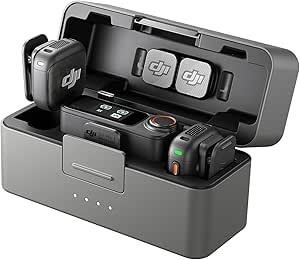
DJI Mic 3 Wireless Microphone (2 Transmitters, 1 Receiver, Charging Case)
As an affiliate, we earn on qualifying purchases.
How the Guide Compares Tools
The source says its selection approach balanced ease of use for beginners with tools for professional transcribers. It gives particular weight to correction workflows because automated transcripts can contain errors, especially with overlapping speakers, accents or specialized terminology. It also distinguishes one-time purchases from subscriptions, describing subscriptions as a way to receive continuing updates and services, while noting they require recurring payments.
Hardware integration is another dividing line. The guide says devices such as the OM SYSTEM AS-2700 and Vobot combine recording with processing and storage, which may suit field work, but can tie users to a particular ecosystem. It does not supply comparative microphone measurements or costs, so claims about value and sound quality need to be checked against current product specifications.
“No AI transcription software is 100% accurate, especially with overlapping speakers, accents, or technical jargon.”
— ThorstenMeyerAI.com guide
Evidence Behind the Rankings
The supplied source does not name all 11 products in the comparison, provide a dated testing record or explain how accuracy was measured. It also gives no transcript samples, error rates, current prices or like-for-like privacy assessment. Its descriptions of Express Scribe Pro and SpeechExec should therefore be read as the author’s recommendations, not independently verified performance findings.
The guide says some recorders advertise support for more than 140 languages, while asserting that quality may be strongest in a smaller set of leading languages. It does not identify which models, languages or tests support that observation. Product features, subscriptions and data policies can change, and the source does not establish their status for every offering in 2027.
What Buyers Should Verify
Readers comparing products should check current pricing, supported languages, export formats, editing controls and whether processing is local or cloud-based. Organizations handling confidential recordings should review retention, access and compliance terms with the vendor rather than relying on a general product description. A trial using representative audio can reveal whether a tool handles the user’s accents, terminology and recording environment.
The guide does not announce a follow-up test or a forthcoming product milestone. The next useful evidence would be a complete list of the 11 options, dated specifications and repeatable accuracy comparisons that disclose audio conditions and evaluation methods.
Key Questions
Which transcription tool does the guide favor for manual correction?
The guide favors Express Scribe Pro for workflows built around listening, pausing and correcting text. It does not provide a controlled comparison proving it is more accurate than alternatives.
What does the guide say about Philips SpeechExec?
It describes Philips SpeechExec as having security and integration features suited to medical and legal work. Buyers should verify the specific deployment, privacy terms and compliance requirements that apply to them.
Are dedicated AI recorders better than software?
Not across every use case. The guide says recorders such as Vobot and OLZO can combine capture and transcription, while desktop software may offer more editing flexibility. It supplies no benchmark establishing an overall winner.
Does the source prove which option is most accurate?
No. It discusses accuracy as a selection factor but provides no standardized error rates, test audio or independent validation in the supplied material.
What should users check before uploading sensitive audio?
Check whether audio is processed on-device or sent to a cloud service, along with retention, access and data-use terms. The guide identifies privacy as a concern but does not document the policies of every product.
Source: ThorstenMeyerAI.com